
For most e-commerce brands, product photography is a constant, expensive bottleneck. You book a studio, hire a photographer, pay a stylist, and get a fixed set of images for each SKU. Six months later, when you need a seasonal shot or want to A/B test a different background, you have to do it all over again. The cost isn't just in money; it's in speed and opportunity. You can't react to trends or refresh your catalog visuals without a massive production effort.
This entire model is now obsolete. The problem was never the photos; it was the process. By treating your product catalog as a data pipeline instead of a series of one-off creative projects, you can automate the entire visual asset creation process. This guide provides the 3-step workflow to build that pipeline in MyUP, turning a few reference shots of your product into an entire, infinitely variable, on-brand catalog.
The old way: why traditional product photoshoots can't keep up
The traditional product photoshoot is a rigid, linear process. For every new product launch or marketing campaign, you invest thousands of dollars and weeks of coordination to produce a handful of static images. These images are high-quality, but they are also inflexible assets. They exist in one context, with one lighting setup, and one background.
This becomes a major drag on growth. Want to create social media ads featuring your product in a festive holiday scene? That's a new shoot. Need to update your Amazon listings with lifestyle images that show the product in use? Another shoot. Want to test if your product converts better on a dark background versus a light one? You can't, unless you budgeted for it months ago. This friction slows down marketing, limits testing, and makes your brand's visual identity expensive to maintain and scale.
Step 1: Create a 'digital twin' of every product in your catalog
The biggest challenge with using AI for product photography has always been consistency. Generic AI models can generate 'a sneaker' or 'a skincare bottle,' but they can't generate your specific product with its unique logo, texture, and shape. This made AI useless for serious catalog work—until now.
Thanks to rapid fine-tuning techniques that became widely accessible in mid-2026, it's now possible to train a model on your specific item in minutes. This creates a 'digital twin' of your product that the AI understands perfectly. In MyUP, this process is integrated into a feature called a 'Product Profile.' You simply upload 3-5 clean, well-lit photos of your product from different angles. MyUP analyzes these images and creates a reusable profile that ensures your exact product—not a generic lookalike—appears in every image you generate. This is the foundational step that makes automation possible; you solve the consistency problem once for each SKU, and then it's done forever.
Step 2: Build your library of on-brand scenes
Once you have a digital twin of your product, you need a world for it to live in. This is where you define the visual identity of your brand. Instead of thinking about one-off backgrounds, you'll build a library of reusable, on-brand scenes. This isn't just about writing prompts; it's about defining your brand's aesthetic systematically.
Inside MyUP, you connect your Brandkit, which stores your brand's colors, fonts, and overall style. You can then create a 'Scene Library' by defining different environments that align with your brand. For example:
- Minimalist Studio: A clean, single-color background with soft shadows.
- Marble Countertop: A luxury scene with natural light, perfect for cosmetics or jewelry.
- Forest Floor: An organic, outdoor setting with dappled sunlight and mossy textures.
Each of these scenes is a template you can call on anytime. The user validates the style, and MyUP handles the production. For instance, you can use a workflow to instantly create a high-end, elegant shot for your product pages.
Workflow code: #myup-fy77-jljs
Minimalist Elegant Product Advertising Poster

Turn any product shot into a high-end editorial ad. It places your item against a soft cream background with airy spacing and adds elegant, small serif typography at the top. Great for wellness or luxury brands wanting a calm, minimal aesthetic.
Regenerate using your own assets.
Step 3: Automate generation with a MyUP workflow
This is where the system comes together and true automation begins. A MyUP Workflow is a repeatable sequence of steps that combines your Product Profile (Step 1) with your Scene Library (Step 2) to generate images at scale. You are no longer prompting for individual images; you are running a production process.
The workflow looks like this:
- Input: Select a 'Product Profile' (e.g., 'Hydrating Serum Bottle').
- Process: Select a scene from your 'Scene Library' (e.g., 'Minimalist Studio').
- Execute: The workflow automatically composites the product into the scene, ensuring the lighting, shadows, and perspective are correct.
- Output: A high-resolution, on-brand product image, ready for use.
Because this is a workflow, you can run it with one click. Change the scene, and you have a new image. Change the product, and you have your next SKU ready to go. It transforms image creation from a manual task into a manageable, automated system. A classic studio shot, for example, becomes a simple, one-click operation.
Workflow code: #myup-u4lt-o0ho
Studio Product Ad

Drop in a single product photo to instantly build a cohesive visual identity. It automatically samples your item's dominant colors to generate a beautifully matched mosaic moodboard, giving your brand an instant, polished aesthetic.
Regenerate using your own assets.
Scaling up: from a single product to your entire catalog
The real power of this system is revealed when you apply it across your entire product line. Once you've created Product Profiles for your top 10, 50, or 500 SKUs, you can generate a full set of marketing visuals for all of them in a single afternoon. Need to create a new set of images for your entire Amazon storefront? Simply run your catalog through the 'in-context' scene workflow.
This workflow-based approach is versatile enough to handle any product category. The core steps remain the same whether you're selling beverages or high-end accessories. For a beverage brand, you can instantly place your can or bottle in a scene with splashing liquids and fresh ingredients to create a compelling ad.
Workflow code: #myup-cqnu-i50m
Drink Product Ad
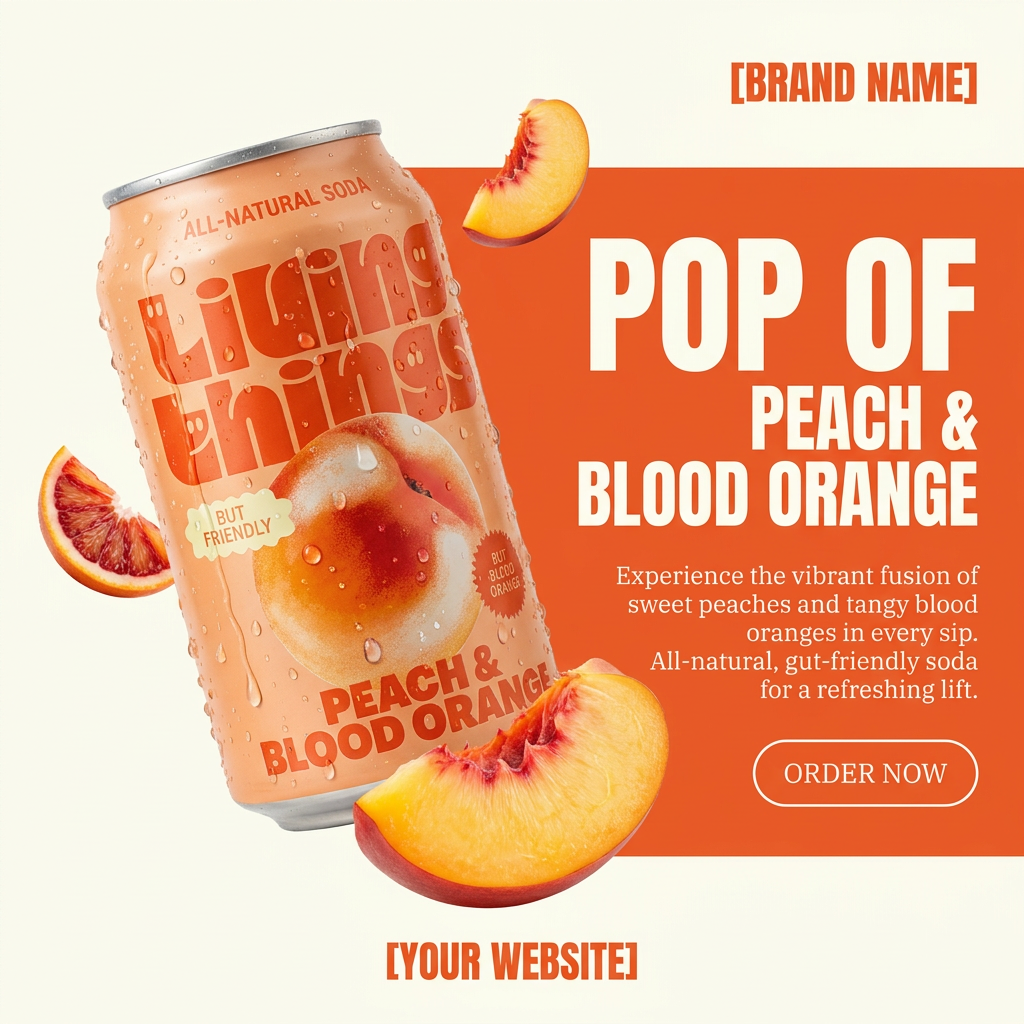
Turn any product photo into a bold, modern ad poster. It automatically frames your item against a split-color background, pairing a clean cream tone with a solid block of your product's dominant color. Super clean, minimal, and ready for social feeds.
Regenerate using your own assets.
For a luxury brand, the same system can generate images of jewelry against elegant, textured backdrops, a task that once required highly specialized photographers and equipment. The key is ensuring the product is placed in a way that looks real, with accurate lighting and believable shadows.
Workflow code: #myup-qtty-nngw
Jewerly Product Ad

Turn any product into a high-end editorial shot. It drops your item into a clean, flat-lay setup with soft directional light and elegant long shadows against a cool matte gray background.
Regenerate using your own assets.
With MyUP, you can batch-process these generations, creating dozens of variations for each product to use across your website, social media, and paid ad campaigns. The human creator's role shifts from manual production to creative direction—you define the system, and MyUP executes it.
The new mindset: your product catalog is now a data pipeline
Adopting an AI workflow for your e-commerce catalog requires a shift in thinking. You are no longer just 'taking photos.' You are building an asset generation pipeline. Your inputs are clean product images and a defined brand style. Your output is a virtually unlimited supply of on-brand visual content, ready for any channel or campaign.
This approach fundamentally changes the economics of e-commerce marketing. It removes the friction and cost of visual content production, allowing you to test more, refresh your creative more often, and respond to market trends instantly. With a platform like MyUP, you're not just using an AI image generator; you're managing a scalable production system that gives your brand a permanent, unfair advantage.
