Generating intricate, multi-element scenes with AI can often feel like a losing battle against inconsistency. You start with a clear vision: a bustling marketplace, a serene forest with specific creatures, or a dynamic product shot with layered props. Yet, the output frequently falls short—details morph, composition shifts, and the overall style drifts. This isn't a limitation of AI itself, but often a gap in the workflow. Recent advancements, like Midjourney V7.1's `--scene` parameter for coherence or Adobe Firefly's 'Style Reference' for aesthetic consistency, highlight this persistent challenge. The good news? MyUP.ai offers a structured framework to conquer this. We don't just generate images; we provide the control and iterative process to build complex scenes with unwavering consistency, every time.
The challenge of complex AI scene generation: why consistency breaks down
The promise of AI image generation is boundless, but the reality of crafting complex scenes often hits a wall. When you try to describe an intricate visual with multiple subjects, specific backgrounds, and nuanced lighting in a single prompt, AI models can struggle. They might nail one element but completely miss another, or worse, introduce visual inconsistencies across details. Characters change poses, objects disappear or reappear, and the overall aesthetic can drift, leaving you with a collection of disparate elements rather than a cohesive scene. This isn't just a minor annoyance; it's a significant time sink, forcing endless re-prompts or extensive post-production.The industry is actively working on this. We see tools like Kling AI introducing 'Depth Control' for precise 3D composition, and the Stable Diffusion community releasing 'ControlNet++' for enhanced multi-condition control. These innovations underscore the demand for more granular control over complex scene elements. However, for content creators and marketers, the challenge isn't just about advanced prompting; it's about integrating these controls into a repeatable, brand-consistent workflow.MyUP's framework for mastering complex scenes: Brandkits and iterative workflows
At MyUP, we approach complex scene generation as an art of controlled chaos. While AI handles the raw creative power, you provide the structure and validation. Our platform empowers you with two core mechanisms for mastering intricate visuals: Brandkits and iterative workflows. A Brandkit isn't just a collection of assets; it's a living visual identity that automatically applies your brand's colors, fonts, logo, and overall style to every AI generation. This means your complex scenes will always align with your brand, regardless of how many elements you introduce or how many iterations you go through.Iterative workflows, on the other hand, break down the daunting task of generating a complex scene into manageable steps. Instead of expecting a perfect, multi-layered image from a single prompt, MyUP allows you to build your scene piece by piece, refining each component and its relationship to others. This human-in-the-loop approach ensures that MyUP executes the creative heavy lifting, but you, the creator, retain ultimate control, validating and adjusting the output at every critical juncture to achieve your precise vision. It's how you move from abstract ideas to concrete, consistent visual stories.Step 1: Deconstructing your vision into manageable AI prompts
Before you even touch a prompt box, the first step to mastering complex scenes is deconstruction. Break your grand vision into its fundamental components: main subjects, secondary characters, background environment, key props, lighting conditions, and overall artistic style. Think of it like a director's shot list. Instead of prompting for 'a cyberpunk city street with a detective, a robot, a flying car, neon signs, and rain,' separate these elements mentally.For instance, you might first focus on the 'cyberpunk city street' as a background, then introduce the 'detective' and 'robot' as foreground elements, specifying their actions and interactions. This planning minimizes the AI's interpretive guesswork and allows you to build your scene layer by layer. MyUP's workflow-driven approach supports this modular thinking, letting you generate and refine each component before bringing them together. To get started with a multi-element composition, consider a template designed for layered visuals.Workflow code: #myup-sacz-tjdn (Y2K Scrapbook Collage Creator)Step 2: Establishing core visual consistency with your Brandkit
Once you've deconstructed your scene, the next critical step is to establish a consistent visual foundation. This is where your MyUP Brandkit becomes indispensable. While external tools might offer 'style reference' features, MyUP's Brandkit applies your entire visual identity—colors, fonts, logo, and a defined aesthetic—automatically to every generation. This means that whether you're generating a background element, a character, or a prop, they will all share the same underlying visual language.Imagine generating a series of images for a brand campaign where a consistent aesthetic is paramount, such as a high-end fashion editorial. Without a Brandkit, each AI generation might interpret 'high-end' differently, leading to varied color palettes, lighting, and textural qualities. With MyUP, your Brandkit 'locks in' these core elements, preventing visual drift and ensuring that every component of your complex scene contributes to a unified, on-brand look. This is especially powerful when you need stylistic coherence across multiple assets. For more on maintaining visual identity, read our article on A repeatable workflow for creating a consistent AI brand mascot.Workflow code: #myup-yk1h-uqy8 (High-End Editorial Fashion Magazine Cover)Step 3: Iterative generation for detail and compositional control
The secret to highly detailed and compositionally sound complex scenes lies in iteration. Instead of a single, monolithic prompt, MyUP's workflows encourage a phased approach. You might start by generating the general environment, then add your main subject, followed by secondary elements and props. Each step is an opportunity for refinement and control.For example, you could generate a 'retro street scene' first. Once you're happy with the base, you then prompt MyUP to 'add a vintage car with a specific color' into that scene, and then 'a person walking a dog.' This mirrors popular 'prompt chaining' techniques seen with models like DALL-E 3, but within MyUP's structured environment, your Brandkit ensures stylistic consistency throughout. MyUP executes the generation based on your refined prompts, and you validate the output, making small adjustments to the prompt or parameters until the detail is perfect. This human control loop is essential; MyUP handles the production, but you maintain the creative direction, ensuring the AI output aligns precisely with your vision.Workflow code: #myup-1hgd-9oz5 (Retro Style Food Advertising Poster)Workflow code: #myup-wo7y-ebmc
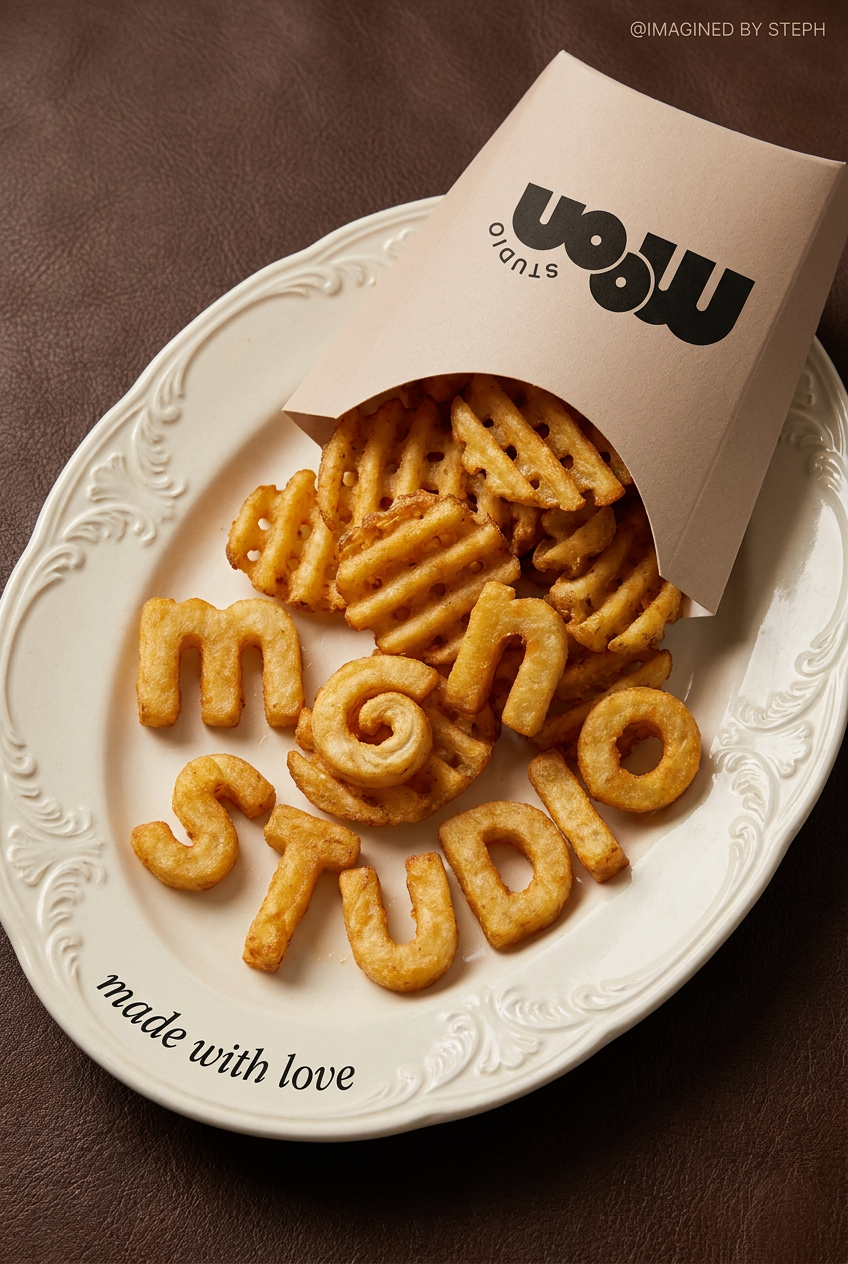
Food Ad
Transform simple food items into high-fashion editorial campaigns. This style uses a dynamic diagonal layout and a slightly tilted overhead angle to give your products incredible depth and texture, making them look like luxury design pieces.
Use for Free
Regenerate using your own assets.
Step 4: Refining spatial relationships and integrating elements for coherence
With individual elements generated and refined, the final stage involves integrating them seamlessly into a cohesive scene. This is where you focus on spatial relationships: ensuring correct perspective, scale, lighting, and shadow consistency across all elements. It’s about making sure your foreground elements don’t look pasted onto the background, and that all light sources behave logically.MyUP's iterative workflows allow you to make these precise adjustments. You can guide the AI to alter the 'depth' of an element, adjust its scale relative to others, or modify lighting to match the overall scene's mood. While tools like Kling AI offer specific 'Depth Control' features, MyUP's workflow provides a practical, step-by-step method to achieve similar compositional mastery through targeted prompts and continuous refinement. This ensures that every element feels like it belongs, creating a believable and impactful final image. For a deeper dive into scene building, explore our article on Your product photo is perfect. Here's the AI workflow to build its world.Workflow code: #myup-fy77-jljs (Minimalist Elegant Product Advertising Poster)Beyond static images: applying scene consistency to AI video
The principles of complex scene generation and consistency aren't limited to static images. As AI video generation rapidly advances, the challenge of maintaining visual coherence across frames becomes even more critical. Features like 'object persistence' in models such as Runway Gen-3 Alpha are addressing the problem of elements flickering or changing appearance in video sequences. The same methodical, iterative approach you apply to complex images—deconstructing, establishing brand consistency, and refining elements—forms a robust foundation for AI video.MyUP's workflow capabilities are designed to be format-agnostic, meaning the structured thinking and iterative refinement you master for images will directly translate to producing consistent, on-brand AI videos. By building a solid visual identity with your Brandkit and leveraging iterative steps, you're future-proofing your content creation against the inherent inconsistencies of nascent AI video models, ensuring continuity whether you're crafting a single image or an entire animated sequence.Achieving your complex scene vision with MyUP's controlled workflows
Generating truly complex, consistent AI scenes is no longer a hit-or-miss endeavor. By embracing MyUP's Brandkit and iterative workflow approach, you gain the precise control needed to move beyond basic prompts to sophisticated visual storytelling. You define the vision, break it down, establish your brand's immutable style, and then guide the AI through a series of refinements. MyUP handles the execution, integrating your brand's identity and processing your detailed instructions, while you, the creative director, validate and adjust every step of the way. This collaborative workflow empowers you to produce intricate, high-quality visuals efficiently, ensuring every detail and compositional choice serves your overarching creative purpose. Stop battling AI's inconsistencies and start building your most ambitious scenes with confidence on MyUP.ai.Tags:
