
On July 20, 2026, Stability AI released Fabric Weaver, a new model built on the Stable Diffusion 3 architecture to solve the single biggest problem with AI clothing mockups: they look fake. The plastic sheen, the unnatural wrinkles, the fabric that looks like a texture map stretched over a digital doll—Fabric Weaver addresses this at the foundational level.
But for an e-commerce brand, a new model is just raw horsepower. To turn that realism into revenue, you need a professional workflow that controls for brand consistency, lighting, and scalability. Here’s how to build it on MyUP.
Why most AI mockups fail to convert
You’ve likely seen the viral posts on Reddit and X: complex, 15-step guides involving multiple tools, custom models, and arcane prompts just to get a t-shirt to look like it has natural wrinkles. This isn't a niche technical challenge; it's the primary barrier between a cool AI experiment and a sales asset you can trust with your brand's reputation.
Most one-click AI mockup generators fail because they can't control the three variables that matter for customer trust and conversion rates:
- Unnatural Lighting and Drape: The clothing often looks pasted on, with shadows that don't match the environment. The fabric hangs stiffly, lacking the natural drape and folds of real material. This immediately signals 'fake' to a potential buyer.
- Inconsistent Models and Scenes: Generating a single good image is one thing. Creating a full product line with the same model, in the same environment, under the same lighting is nearly impossible with basic tools. This inconsistency shatters the illusion of a professional, cohesive brand.
- Poor Fabric Texture: Until now, AI has struggled to render the tangible qualities of fabric. Denim lacked texture, silk had no subtle sheen, and cotton looked like plastic. Without believable texture, the product itself feels cheap and untrustworthy.
These failures aren't just aesthetic problems; they are business problems that directly impact sales and erode customer trust.
The professional workflow for mockups that sell
A mockup that converts isn't a lucky shot; it's the result of a deliberate, repeatable process. On MyUP, this process isn't a complex hack cobbled together from different apps. It's a single, streamlined workflow designed for professional content production. It separates creative direction from production, allowing you to define your brand's reality once and then apply it at scale.
The workflow consists of three core stages, all managed within the MyUP platform.
Step 1: Define your photoshoot with a Brandkit
Before you write a single prompt, you establish control. A MyUP Brandkit acts as your virtual photoshoot director, locking in your brand's core visual identity. This goes far beyond just logos and colors. You define the specific characteristics of your campaign:
- Your Model: Specify the consistent face, hair, and style of the model you want to feature across all mockups.
- Your Environment: Define the setting. Is it a “sun-drenched industrial loft with concrete floors” or a “minimalist studio with a soft grey backdrop”?
- Your Lighting: Dictate the exact lighting setup, such as “soft, diffused light from a large window on the left, with gentle fill light from the right.”
This isn't a prompt you type each time; it's a permanent instruction set saved in your Brandkit. Every asset you generate will start from this on-brand foundation, solving the consistency problem before you even begin.
Step 2: Generate your on-brand scene and pose
With your Brandkit active, the first generative step is to create the canvas: your consistent model in the perfect pose and setting. At this stage, you're not focused on the specific clothing design. Your goal is to nail the composition, the human element, and the mood. The Brandkit ensures the person and place are perfectly aligned with your lookbook's aesthetic.
The user simply approves the pose and composition; MyUP handles the production of the on-brand base image. For a dynamic, high-energy shot typical of an athletic brand, you can start with a pre-built workflow to get the perfect result instantly.
Workflow code: #myup-ywpr-rqz6
Professional Sportswear Ad

Suspends your apparel right in the center of a high-energy promo shot, held up by hands around the frame. It gives your shirts or jerseys a gritty, collaborative streetwear editorial look that feels alive and physical.
Regenerate using your own assets.
Step 3: Apply your design with realistic texture
Once you have your approved base image, you apply your actual clothing design. Using MyUP's multi-step workflow tools, you can use techniques like inpainting or image-to-image to overlay your flat product design onto the model. This is where the power of Stability AI’s Fabric Weaver comes into play.
Because MyUP integrates the latest foundation models, including the SD3 architecture that powers Fabric Weaver, the platform can render your design with a new level of physical realism. Your design is no longer just a flat image; it's a virtual material. Denim gets its characteristic twill texture. Silk gets a subtle, realistic sheen. The fabric drapes and folds according to the model's pose, casting shadows that are physically accurate to the lighting you defined in your Brandkit. You control the creative design; MyUP ensures it looks real enough to sell.
For a more high-end, editorial feel, a different workflow can be used to control the lighting and focus for luxury goods.
Workflow code: #myup-tc2h-gy9g
Luxury Editorial Product Photography
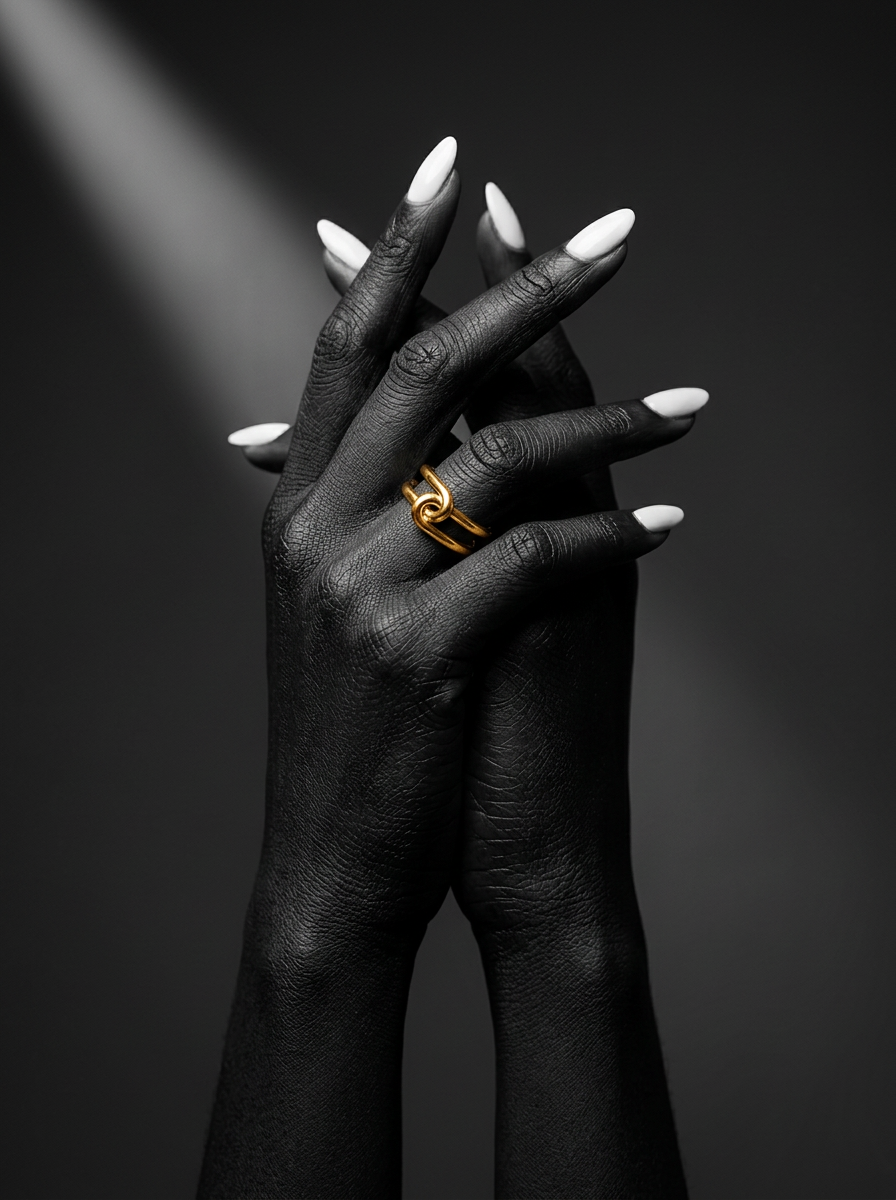
Get striking, high-end editorial shots focusing entirely on hands against minimalist backdrops. It strips away the distraction of faces to deliver a moody, fine-art look that's perfect for showcasing rings, nail art, or dramatic poses.
Regenerate using your own assets.
From a single mockup to a full collection
The real cost of a physical photoshoot isn't the first shot; it's the 50th. The same is true for AI content creation. Creating one good image is a fun challenge. Creating an entire, consistent product collection is a business process.
With your Brandkit and workflow established in MyUP, generating mockups for ten or twenty new designs becomes a simple, repeatable task. You just swap the input design and re-run the workflow. The model, lighting, and style remain perfectly locked in. This is how you go from a single image to a complete, AI-generated fashion lookbook without sacrificing brand cohesion. It's the key to scaling up your e-commerce visuals without scaling up your costs and production time.
This same workflow can be adapted for high-fashion concepts, like creating a magazine cover to promote a new collection.
Workflow code: #myup-yk1h-uqy8
High-End Editorial Fashion Magazine Cover

Drop in any portrait and turn it into a high-end editorial magazine cover. It frames your subject beautifully with relaxed, high-fashion posing and soft styling for a polished print aesthetic.
Regenerate using your own assets.
The difference between a novelty and a sales tool
A new AI model generates buzz. A professional workflow generates sales. The release of Stability AI's Fabric Weaver is a critical technological leap for realism, but it doesn't solve the business problems of brand consistency and scalable production on its own. That is a workflow problem.
By combining the latest AI capabilities with a Brandkit-driven process on MyUP, you move beyond generating novelties and start producing sales-critical assets. You gain control over your brand's image, ensuring every mockup is not just realistic, but also a perfect reflection of your brand's identity—and a powerful tool for driving conversions.
