You saw the viral AI stop-motion. Now skip the 20-step tutorial.
The demand for unique visual content is higher than ever, and AI stop-motion, particularly the 'AI Claymation' style, is the latest trend capturing attention. Creators are sharing intricate workflows across social media, detailing how they stitch together various AI image generators, custom LoRAs, and video interpolation tools to produce these quirky, engaging sequences. While the results are impressive, the process is anything but efficient for a brand or content team needing to scale. This is where MyUP.ai steps in, offering a direct path to create hundreds of slightly varied, stylistically consistent frames in minutes, not days.
Forget the manual labor and the steep learning curve of multiple disparate tools. MyUP.ai is designed to streamline this complex creative task, making it accessible for marketers, social media managers, and creators who need to produce high-quality, on-brand animated content. We're talking about a workflow that transforms a viral aesthetic into a repeatable, efficient process for your brand.
Why most AI animations flicker and fail
The core challenge with AI-generated animation, especially stop-motion, is consistency. When you generate individual frames one by one, even with similar prompts, AI models tend to introduce subtle (or not-so-subtle) variations in character, object, lighting, and style. This leads to the dreaded 'flicker' or 'boil' effect—an unsettling visual jitter that breaks the illusion of continuous motion and makes the animation look amateurish. Major players like Adobe with 'Style Sync' and Luma Labs with 'Character Lock' are actively trying to solve this, underscoring just how critical consistency is for professional AI content creation.
For brands, this inconsistency is a non-starter. Off-brand colors, shifting logos, or a character that changes its appearance from one frame to the next can erode trust and dilute your visual identity. Traditional stop-motion requires meticulous attention to detail for every single frame. MyUP.ai tackles this head-on by integrating a 'brand memory' directly into the generation process. Instead of hoping for consistency, you ensure it.
The MyUP workflow: How to generate hundreds of consistent frames automatically
The MyUP.ai solution for creating AI stop-motion videos is built on two fundamental pillars: the Brandkit and automated Workflows. The Brandkit acts as your visual identity guardian, locking in your desired aesthetic—colors, fonts, logos, and even specific stylistic nuances like 'claymation texture' or 'vintage film grain.' This means every image generated, regardless of the prompt variations, adheres to your established style. This is a significant leap beyond single-reference image style transfers; it's a comprehensive brand memory.
Once your Brandkit is defined, MyUP's workflow engine takes over. It allows you to set up iterative prompts that generate hundreds of slightly varied frames automatically. Think of it as creating a series of micro-adjustments to your scene, just as a traditional animator would move a clay figure incrementally. The efficiency of modern AI models, like the new generation of hyper-efficient models such as Un-0, makes generating these large volumes of frames practical and fast. You define the start and end, and MyUP fills in the blanks, maintaining the visual integrity of your brand throughout.
Step 1: Define your 'AI claymation' style in a Brandkit
Before generating a single frame, establish your visual foundation within MyUP.ai. Your Brandkit is where you bake in the unique elements of your 'AI Claymation' style. This isn't just about uploading a logo; it's about defining the specific textures (e.g., 'soft clay texture,' 'fingerprint smudges'), the color palette (e.g., 'muted pastels,' 'vibrant primary colors'), and the overall stylistic mood (e.g., 'whimsical,' 'gritty,' 'childlike').
To start, simply create a new Brandkit in MyUP.ai, or select an existing one. If you're building a new one, you can input a URL, and MyUP will automatically extract key visual elements. Then, refine it with specific keywords and reference images that embody the claymation aesthetic you're aiming for. This Brandkit will then be automatically applied to every generation within your workflow, ensuring unparalleled consistency. For a deeper dive into setting this up, read our guide on how to bake your brand guidelines into every AI visual you create.
Step 2: Create your keyframes with a single prompt
With your Brandkit locked in, begin by generating your keyframes—the starting and ending points of your animation, or any significant poses in between. These initial images set the stage for the entire sequence. On MyUP.ai, you can use a template to ensure these first frames are high-quality and perfectly on-brand from the outset. For instance, if you're animating a food product, you might start with a compelling still image.
Utilize a workflow like the "Bold Portrait Food Advertising Photo" to generate a crisp, stylistically accurate base image. This template guides you to articulate the subject and desired composition while automatically applying your Brandkit's visual style. This ensures that your initial frames already have that consistent 'claymation' look, making the subsequent iterative generations far more cohesive.
Workflow code: #myup-xjsb-hirr
Bold Portrait Food Advertising Photo

Get those high-impact, tight action shots of people actually enjoying your food brand. It drops your product right into a messy, realistic close-up bite shot that feels like a premium lifestyle campaign instead of a boring studio packshot.
Regenerate using your own assets.
Step 3: Automate the in-between frames (without the headache)
This is where MyUP.ai truly shines, eliminating the tedious, time-consuming effort of traditional stop-motion. Instead of manually moving a physical object and taking hundreds of photos, or painstakingly tweaking prompts for each frame in other AI tools, MyUP's workflow engine automates the process. You define the incremental changes, and the platform generates the frames, always referencing your Brandkit for style consistency.
Imagine animating a product slowly rotating or transforming. You'd set up a prompt that describes the product and its initial state, then define a series of small, sequential changes (e.g., 'rotate 5 degrees clockwise,' 'expand slightly'). MyUP's workflow then iterates on this, generating each frame with that tiny adjustment, while maintaining the overall claymation style. For a product-focused animation, you could use a workflow like "Minimal Vibrant Product Advertising Poster" and adapt it for iterative changes. You simply input your core prompt, define the variable elements, and let MyUP generate the sequence.
Workflow code: #myup-zpby-tzie
Minimal Vibrant Product Advertising Poster

Drop in any product shot and watch it turn into a bold, high-energy square ad. It automatically reads your packaging to pull out the dominant colors and text, then builds a vibrant poster styled perfectly around your brand.
Regenerate using your own assets.
Step 4: Assemble your sequence and take creative control
Once MyUP has generated your sequence of frames—potentially hundreds of them—the next step is to compile them into a video. While MyUP handles the heavy lifting of consistent image production, you retain full creative control over the final animation. You can review the generated frames, select the best ones, adjust the pacing, and even re-render specific segments if you want to fine-tune a particular movement.
This human-in-the-loop approach ensures that the final output aligns perfectly with your creative vision. MyUP executes the repetitive, labor-intensive tasks, freeing you to focus on the artistic direction and storytelling. You're not just accepting whatever the AI produces; you're directing a high-volume, on-brand creative factory. Many creators find success importing these sequences into basic video editing software like DaVinci Resolve or even simple online tools to set the frame rate and add sound.
Putting it all together: An on-brand product animation
Let's consider a practical example: creating an 'AI Claymation' ad for a new snack product. You've defined your Brandkit with the brand's vibrant color palette and a 'soft, pliable clay' texture. You've generated your keyframes showing the product initially, then perhaps a bite taken out of it, and finally, a satisfied character.
Using MyUP's workflow, you'd then create a sequence of frames that smoothly transition between these key moments. The AI generates the subtle movements, ensuring the product's appearance, the clay texture, and the brand's colors remain consistent across every frame. The result is a unique, engaging, and perfectly on-brand stop-motion animation that would have taken days or weeks to produce traditionally. This is the power of MyUP: turning complex creative aspirations into achievable, scalable content.
To see how this looks in a dedicated ad format, explore the "Food Product Ad" workflow, which can be adapted for animated sequences.
Workflow code: #myup-w0vh-abft
Food Product Ad
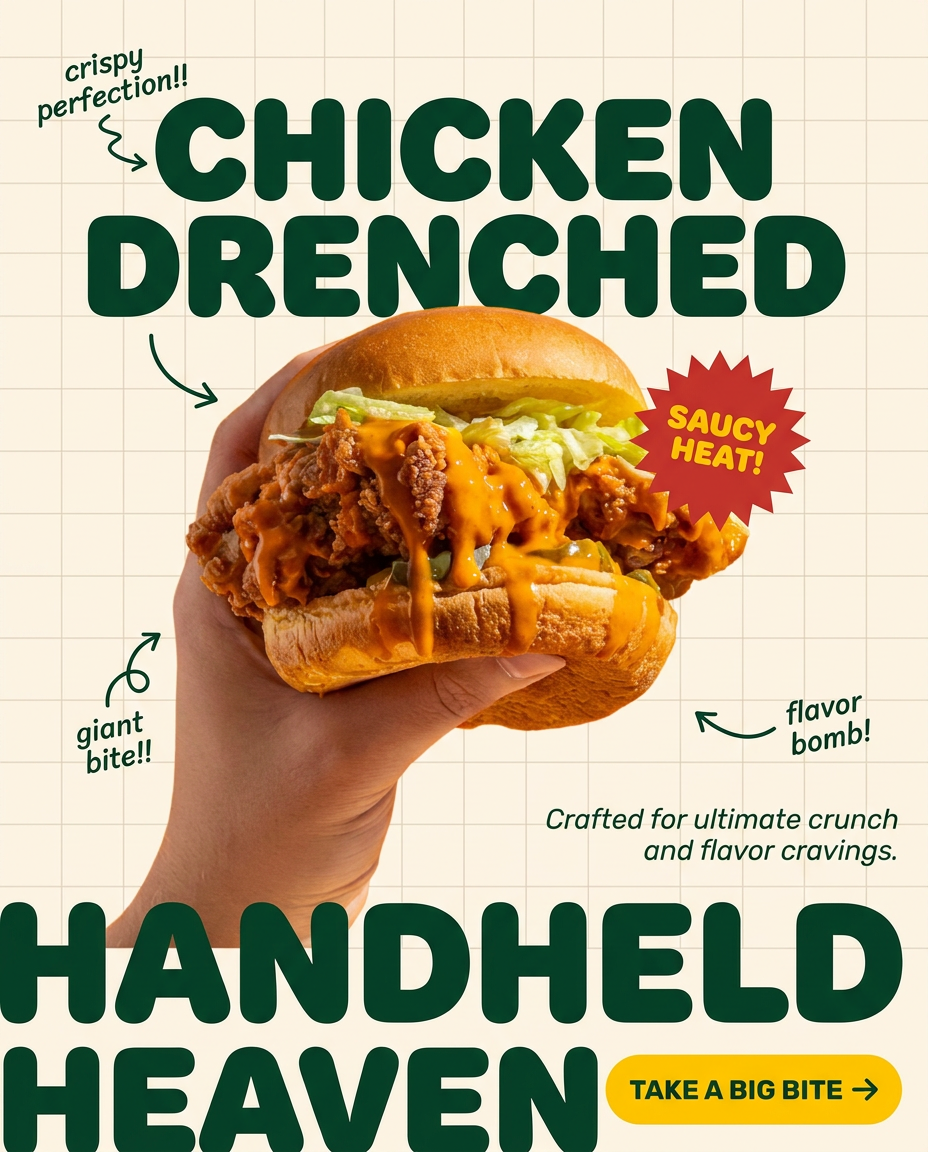
Turn any dish or snack into a bold, playful social ad. It places your food against a soft warm beige background with a subtle grid pattern, topped with chunky rounded headlines. It's clean, friendly, and instantly grabs attention in the feed.
Regenerate using your own assets.
Stop animating frame by frame. Start with MyUP.
The viral 'AI Claymation' trend proves that unique, engaging visual content is a powerful way to capture attention. But you don't need a multi-tool, manual, and inconsistent workflow to achieve it. MyUP.ai provides the integrated platform to define your brand's unique stop-motion style with a Brandkit and then automate the generation of hundreds of consistent frames with powerful workflows. This means less time wrestling with complex software and more time focusing on creative direction and impactful storytelling. Ready to create your next viral animation? Create an account on MyUP.ai and experience the difference.
