
You did it. After wrestling with prompts, you used an AI image generator to create the perfect cover for your first book. The art is stunning, it captures the mood, and it looks better than anything you could have afforded from a designer. Then comes book two. You fire up the generator, use a similar prompt, and get... something completely different. The character looks wrong, the style is off, and the AI-generated text is a garbled mess. Suddenly, your dream of a professional-looking series vanishes. You don't have a brand; you have a single, lucky image.
This is the ceiling for authors using image-only AI tools. The gap between a one-off graphic and a scalable author brand is a production problem, and it’s one that AI image generators are fundamentally not built to solve.
Why AI image generators are a dead end for author branding
The promise of AI is speed and variety, but for an author building a catalog, the most important asset is consistency. This is where even the most advanced models fail. As recently as June 2026, users testing powerful new models like Stable Diffusion 3 are still reporting the same core frustrations: the text is unusable. Letters are misshapen, words are misspelled, and getting a specific font is impossible.
But the problem runs deeper than just bad typography. Image generators lack the memory and control needed for a series:
- No Style Lock: You can use the same seed and prompt, but minute variations in the model will produce different artistic styles over time. The 'moody oil painting' style from your first cover might be interpreted differently by the AI months later.
- Character Drift: Creating a consistent character across multiple images is notoriously difficult. Your hero might have different facial features or even hair color from one cover to the next, breaking reader immersion.
- Typographic Chaos: The title and author name are the most crucial branding elements on a cover. AI generators treat text as just another pattern of pixels, leading to unreadable, unprofessional results that instantly signal 'amateur'.
Relying on these tools for your brand is like building a house on a foundation of sand. It works until you try to add the second floor.
The solution: Separate the art from the typography
A professional book cover isn't just an image; it's a design system. It has rules for layout, color, and typography that ensure every book in a series feels connected. To achieve this with AI, you have to stop trying to do everything in one step. Instead, break the job into two parts, using the right tool for each.
Part 1: Art Direction with AI. Use AI image generators for their core strength: exploring and creating stunning, unique artwork. Your goal here isn't a finished cover, but a library of on-brand background images.
Part 2: Typographic System with MyUP. Use a brand-aware platform to apply your title, author name, and series branding with perfect precision and consistency. This is where layout, fonts, and colors are handled—the elements that actually sell the book.
In this workflow, the AI generates the creative options, but you, the author, remain in control. You approve the artwork, and MyUP handles the repetitive, brand-critical production work automatically.
Step 1: Create your series' art direction with a master prompt
Before you generate anything, define the visual DNA of your series. Instead of prompting for a specific scene ('a detective looking at a clue'), create a master prompt that defines the consistent elements. This prompt should focus on mood, style, and color, not just a single character or action.
A good master prompt for a sci-fi series might look like this:
'Epic cosmic landscape, nebulae in shades of deep purple and cyan, hyper-detailed, cinematic lighting, style of a 1970s science fiction paperback cover, fine grain texture, no text.'
From this master prompt, you can create variations for each book by adding a specific element: '...with a lone astronaut floating', '...with a derelict starship', '...with a glowing alien artifact'. This ensures every piece of art shares the same core style, color palette, and mood, creating a cohesive visual family for your series.
Step 2: Build your author Brandkit in MyUP
This is where you build the permanent, repeatable foundation of your author brand. A Brandkit in MyUP is a central hub that stores your visual identity. Instead of manually picking fonts and colors for every cover, you define them once, and MyUP applies them for you. For an author, this is a game-changer.
In MyUP, you can set up an 'Author Brandkit' with specific design rules:
- Author Name Font: Upload the exact font file (e.g., a specific serif font like Garamond Pro) that you use for your name on every cover. Set its size and color.
- Title Font: Choose a distinct font for your book titles (e.g., a bold, modern sans-serif like Montserrat Bold).
- Series Tagline Font: If you have a series name or tagline, assign a third font style to it.
- Brand Colors: Define the exact hex codes for colors used in your text to ensure they are always consistent.
Building your Brandkit is a one-time task that solves the consistency problem forever. It turns your branding from a guess into an automated rule. You can learn more about how to set up an AI Brandkit that works for you in our detailed guide.
Step 3: Run the book cover workflow for your entire series
With your library of AI-generated art and your Author Brandkit locked in, producing the covers is now a simple, repeatable process. In MyUP, you can use a workflow that combines these two elements automatically.
The workflow functions in two steps:
- Image Input: You provide one of the background images you generated in Step 1.
- Brand Application: The workflow automatically overlays your text, pulling the correct fonts, colors, and sizes directly from your saved Brandkit. You just type in the title and author name, and the design is applied perfectly.
For a stylish, modern thriller or non-fiction book, a layout like a high-end magazine cover works incredibly well to grab attention. You can use the workflow below to generate the art and then let your Brandkit automatically apply your professional typography.
Workflow code: #myup-yk1h-uqy8
High-End Editorial Fashion Magazine Cover

Drop in any portrait and turn it into a high-end editorial magazine cover. It frames your subject beautifully with relaxed, high-fashion posing and soft styling for a polished print aesthetic.
Regenerate using your own assets.
To create the cover for Book 2, you simply run the same workflow again, provide the new background art and title, and MyUP ensures the author name and overall layout are identical to Book 1. You get a perfectly consistent series in minutes, not hours of frustrating trial and error.
Adapting the workflow for different genres
This two-part system is not limited to a single genre. Its strength is its flexibility. The Brandkit provides the rigid consistency, while the AI art provides the creative variation. Need to design a cover for a cookbook series? The process is the same, but the inputs change.
Your master art prompt would shift to something like: 'Vibrant, rustic flat lay of fresh ingredients on a wooden table, warm natural light, food photography, macro details, appetizing.'
Your Author Brandkit might use friendlier, more approachable fonts. The workflow itself remains the same: generate the art, then apply the typography. This template for a food magazine cover is a perfect starting point. It creates a compelling visual grid which you can then brand with your specific title and author fonts from your MyUP Brandkit.
Workflow code: #myup-aktp-7jq0
Food Magazine Mosaic Cover
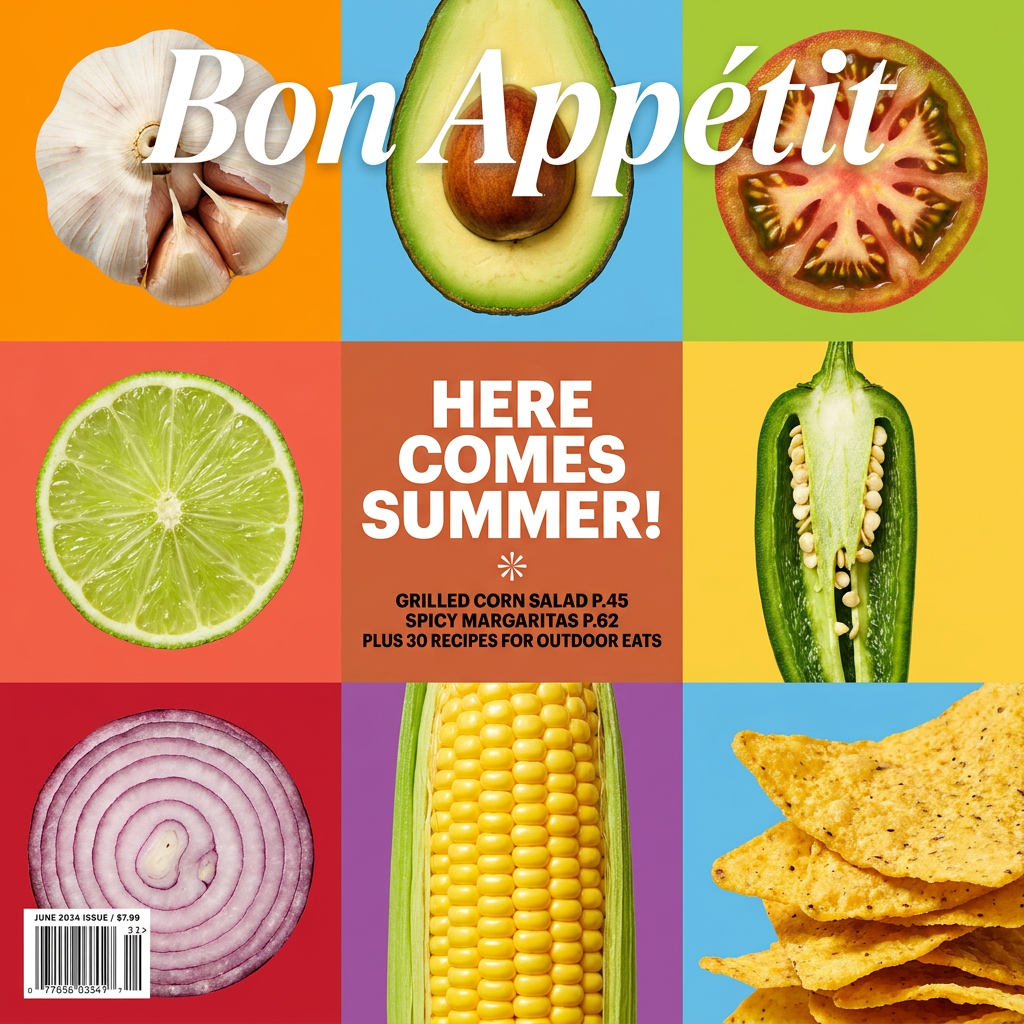
Turn your food shots into a bold, high-end editorial cover. It takes extreme close-ups of your dishes or ingredients and arranges them into a vibrant 3x3 grid that looks straight out of a premium food magazine.
Regenerate using your own assets.
Whether you're writing sci-fi, romance, cookbooks, or business books, the system holds. Define the art style, lock in the typography, and execute with a workflow. This separates you from authors who are stuck generating random, inconsistent images and establishes a professional, recognizable brand that helps sell books.
From generator to system: Your scalable author brand
An AI book cover generator is a tool for making a single image. A professional author needs a system for building a brand. By separating art creation from typographic design, you take control of your brand identity and turn a frustrating, unpredictable process into an efficient production line.
Stop fighting with AI-generated text and wrestling with inconsistent styles. Use AI for what it excels at—generating a world of visual ideas. Then, use a platform like MyUP.ai to build a rock-solid, repeatable Brandkit and workflow. This is how you move from making one-off covers to building a scalable author brand that can grow with your career.
