You have the perfect scene in your head. You describe it in detail: “A man and a woman arguing in a dramatic, dimly lit Italian restaurant, with a waiter looking on nervously.” The AI returns a portrait of a woman. You try again, adding more detail. You get a picture of an empty restaurant. After the fifth try, you get two people smiling over a plate of spaghetti. The creative vision is lost, and an hour of your time is gone with it.
This is the universal frustration of creating complex AI scenes. Until recently, AI models would crumble under the weight of detail, blending concepts and ignoring specific instructions. But the game changed in June 2026 with the arrival of hyper-efficient models like Un-0. The technical barrier to generating and, more importantly, iterating on complex scenes has been removed. Raw power isn't enough, though. You need a method. This guide provides the practical, repeatable framework to take back creative control and build the exact scenes you imagine.
Why complex scenes used to fail (and what just changed)
Older AI models suffered from a curse of complexity. Each new detail you added to a prompt—a second person, a specific background object, a particular action—increased the chance of the model getting confused. This is often called 'concept bleeding,' where the AI merges attributes, putting the man's red coat on the woman or placing the cat on the table instead of under it. The result was a lottery, not a creative process.
The breakthrough of models like Un-0 isn't just about speed; it's about efficiency. This efficiency makes rapid iteration—the core of any creative workflow—finally practical for complex generations. Instead of waiting minutes for a failed attempt, you can get results in seconds. This speed allows you to test, refine, and layer your instructions using a structured approach, knowing you won't waste your entire afternoon. In MyUP, we integrate these powerful models to give you not just the raw generation capability, but a workflow to direct it. The technology provides the power; the framework gives you the control.
The 4-part framework for prompting complex scenes
Forget writing a long, conversational paragraph. To control complex scenes, you need to structure your prompt like a film director's shot list. This 4-part framework isolates each critical element, telling the AI exactly what to focus on and where. On MyUP, you can build this prompt directly in the workflow builder to make it repeatable.
The Framework:
- Scene & Style: This is your foundation. Start with the overall composition, style, and mood. Be specific. Instead of 'a photo,' use 'High-fashion editorial photograph, moody cinematic lighting, wide-angle shot, 35mm film grain.' This sets the stage before you add any characters.
- Subject A: Define your first character or primary object in a self-contained block. Describe their appearance, clothing, position in the frame, and their action. For example: 'A woman with short, dark hair wearing a vintage leather jacket, sitting on the left side of a red velvet sofa, looking directly at the camera with a confident expression.'
- Subject B: Now, define your second character or object with the same level of isolated detail. It's crucial to separate their description from Subject A to prevent concept bleeding. Example: 'A man with a beard wearing a grey turtleneck sweater, standing behind the sofa on the right, looking away from the camera towards a window.'
- Environment & Lighting: With your subjects placed, fill in the environment around them. Describe the background, foreground, and specific light sources to complete the scene. Example: 'The scene is a dimly lit, wood-paneled library. Bookshelves filled with old books line the back wall. A large, ornate fireplace is on the far right, casting a warm glow on the subjects.'
By separating these components, you give the AI a clear hierarchy of instructions, dramatically improving its ability to render each element accurately.
Workflow in action: building an editorial scene in MyUP
Let's put the framework to the test. Imagine you're creating a cover shot for a fashion magazine. Using our 4-part structure, your prompt in MyUP might look like this:
Editorial fashion photography, dramatic chiaroscuro lighting, full-body shot // A tall model with fiery red hair in a flowing emerald green couture gown, standing center-left, hand on her hip // A sleek black greyhound dog, sitting obediently at her feet on the right // The scene is a minimalist concrete studio with a single spotlight from above, creating long shadows.
MyUP executes this instruction, leveraging an efficient model to render the complex interaction between the two subjects and the specific lighting. But generating the image is just the first step. A raw image isn't a magazine cover. On MyUP, the workflow continues. The generated visual is instantly placed into a layout, complete with your masthead, headlines, and brand fonts. You validate the result, and the asset is finished.
You can execute this entire process, from complex prompt to finished cover, with a single workflow. Start here:
Workflow code: #myup-yk1h-uqy8
High-End Editorial Fashion Magazine Cover

Drop in any portrait and turn it into a high-end editorial magazine cover. It frames your subject beautifully with relaxed, high-fashion posing and soft styling for a polished print aesthetic.
Regenerate using your own assets.
Refining the details: from composition to brand consistency
A successful complex scene is more than just getting all the elements in the right place. It needs to feel like it belongs to your brand. This is where a simple AI image generator falls short. On MyUP, your Brandkit is automatically part of the workflow. It infuses your brand's unique style keywords, color palette, and logo into the creation process. The AI doesn't just generate a scene; it generates your scene.
This allows you to move from creation to curation. Perhaps you generate three or four variations of a complex scene, each with a slightly different composition or mood. Instead of just picking one, you can combine them into a single, powerful piece of creative, like a grid poster for a new collection or a campaign announcement. This moves beyond a single hero image and creates a visual narrative. The MyUP platform is built for this kind of asset production, letting you arrange multiple AI-generated visuals into a professional design without leaving the platform.
This template is perfect for combining multiple shots into one cohesive, high-impact poster.
Workflow code: #myup-n0bi-2wzk
Bold Editorial Grid Poster

Create striking 2x3 editorial posters with six seamless, flat-color square cards in a perfect 4:5 grid. There are absolutely no gaps between the blocks, giving your content a bold, high-contrast magazine layout. It looks incredibly clean on any social feed.
Regenerate using your own assets.
From a single scene to a full campaign
Mastering the complex scene isn't the end goal; it's the beginning. This framework is the building block for creating an entire campaign's worth of visual assets. Once you've defined a core scene—your characters, your environment, your style—you can use it as a template to generate dozens of variations for different channels, all while maintaining a consistent narrative.
Imagine a food brand. Your core scene might be a rustic kitchen table laden with fresh ingredients. Using the framework, you can generate a wide shot for your website's hero image. Then, you can prompt for close-ups of specific dishes, shots of a 'chef' preparing the food, and lifestyle images of people enjoying a meal—all within the same visual world. On MyUP, you can build a workflow that generates this entire suite of assets from a single brief. The user approves and adjusts; MyUP handles the production. This is how you scale high-quality, on-brand creative without scaling the manual effort.
For example, you can take multiple complex food shots and instantly arrange them into a stunning magazine cover that tells a richer story than any single image could.
Workflow code: #myup-aktp-7jq0
Food Magazine Mosaic Cover
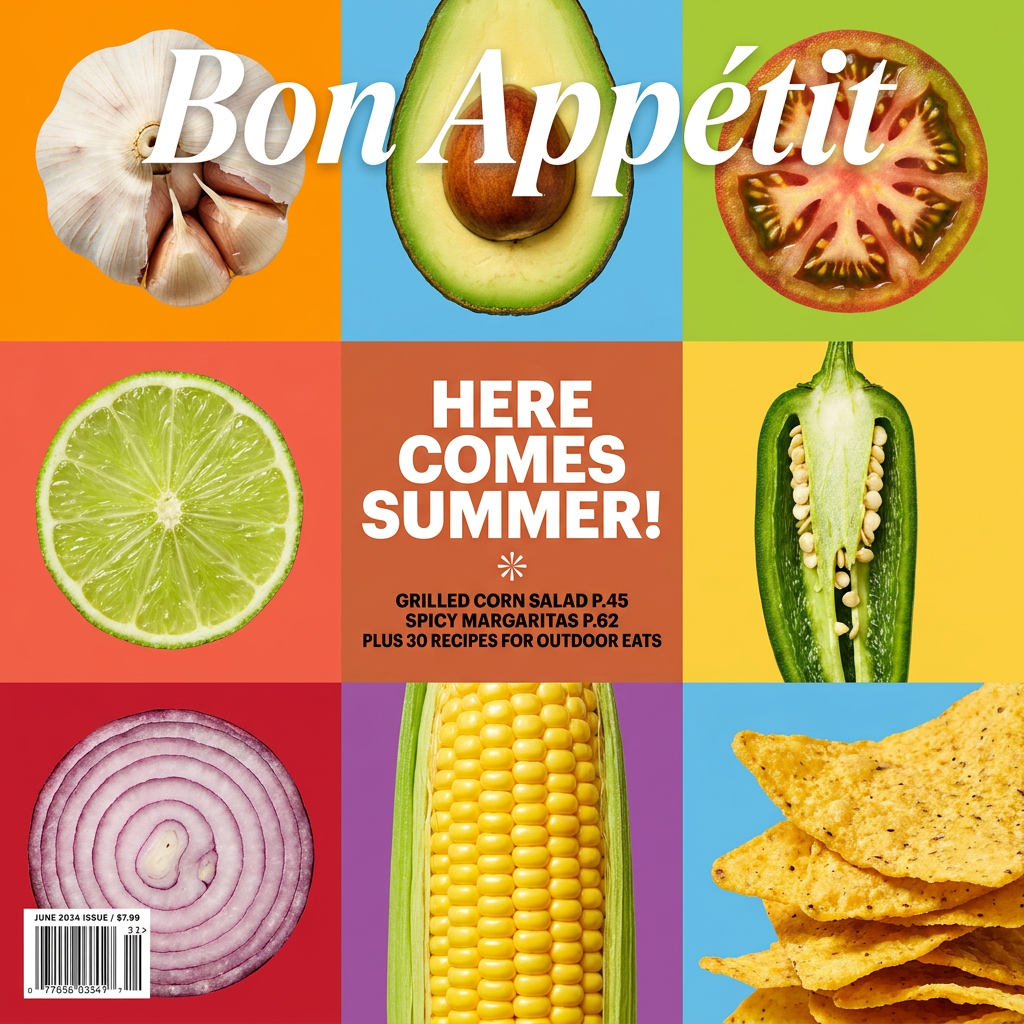
Turn your food shots into a bold, high-end editorial cover. It takes extreme close-ups of your dishes or ingredients and arranges them into a vibrant 3x3 grid that looks straight out of a premium food magazine.
Regenerate using your own assets.
