
You have a folder of great product shots, campaign photos, and lifestyle images. But on social media, static images are fighting an uphill battle for attention. Video is king. Until recently, turning those images into video meant wrestling with complex editing software or settling for a cheesy Ken Burns effect.
As of July 2026, that's changed. With Adobe Express launching 'Animate from Image' and Canva upgrading 'Magic Animate', one-click animation is now mainstream. The problem is solved, right? Not quite. A new, bigger problem has emerged: the template trap. When everyone uses the same handful of preset animations, every brand's content starts to look the same. Your unique visual identity gets lost in a sea of generic pans, zooms, and fades.
Adding motion isn't enough. You need to turn a static image into a brand story. That means the motion, the typography, and the colors must all align with your identity. This is the professional workflow for doing exactly that, using a system that works with your brand, not against it.
The 4-step workflow for turning any image into a brand story
This isn't about applying a random effect. It's a production workflow designed for brand consistency and speed. In MyUP.ai, this entire process is built around your Brandkit — a central hub for your logos, colors, fonts, and visual style. The Brandkit ensures every asset you create, including these videos, is automatically on-brand. Let's break down the four steps.
Step 1: Start with a strong image and a complete Brandkit
The quality of your output depends entirely on the quality of your input. Start with a high-resolution image that has a clear subject and some depth. An image with distinct foreground and background elements will produce a more compelling animation than a flat graphic.
Before you even upload the image, the real first step is having your Brandkit set up in MyUP. By simply providing a URL, MyUP automatically extracts your brand's core visual assets. This is the foundation. Without it, you're just decorating, not branding. Once your Brandkit is ready, you can start with a simple workflow to bring a clean product shot to life.
For a straightforward product feature on a clean background, this template is the perfect starting point.
Workflow code: #myup-gxue-opd0
Product Post

Turn a single product shot into a cohesive six-part Instagram story campaign. It mixes tactile crumpled paper textures with bold, stacked typography and custom mascot spots in your brand's signature colors.
Regenerate using your own assets.
Step 2: Choose your motion style, from subtle to cinematic
Generic tools offer a few animation presets. A professional workflow gives you directorial control. In MyUP, you can define the camera motion to match the image's mood and the story you want to tell.
- Subtle Pan/Tilt: A slow, gentle movement across the image. Perfect for creating a sense of calm or revealing a detail in a landscape or flat lay.
- Slow Zoom In/Out: Pushing into a key detail or pulling back to reveal the full scene. This is great for focusing the viewer's attention on a product or a person's expression.
- Dynamic Dolly: Creates a parallax effect where the foreground appears to move faster than the background, adding a three-dimensional feel. This is ideal for images with clear layers, like a person standing in front of a cityscape.
The key is to match the motion to the content. A fast-paced dolly zoom works for an energetic fashion post, while a slow, subtle pan is better for a luxury product. You're not just animating a photo; you're guiding the viewer's eye. This workflow for a fashion post, for example, is built for more dynamic movement.
Workflow code: #myup-3sro-edbt
Brand Clothes Post

Turn any outfit photo into a high-end fashion promo poster. It centers your subject in a full-body shot against a dark, dramatic studio backdrop, perfectly cropped for social feeds. It gives your apparel a moody, editorial look instantly.
Regenerate using your own assets.
Step 3: Add text overlays that are actually on-brand
This is where most template-based tools fail. You add a text box, and then you have to manually hunt for your brand font, pull up a hex code for your brand color, and resize it until it looks right. It's slow, tedious, and prone to error.
Because MyUP is connected to your Brandkit, this entire step is automated. When you add a text overlay, it automatically uses your designated brand fonts and color palette. You type the message, and MyUP handles the brand compliance. This isn't just a time-saver; it's the core of what separates a generic social post from a true brand asset. The ability to instantly apply complex and consistent typography, like in this gourmet food ad, is what a production system enables. For more on this, see our guide to creating on-brand kinetic typography.
Workflow code: #myup-fts6-4ihp
Vertical Gourmet French Fry Ad

Transform your products into high-fashion editorial ads. This setup uses a dynamic diagonal layout and a slightly tilted overhead angle to give food and packaging incredible depth and texture. It's perfect for giving any brand a chic, premium look.
Regenerate using your own assets.
Workflow code: #myup-wo7y-ebmc
Food Ad
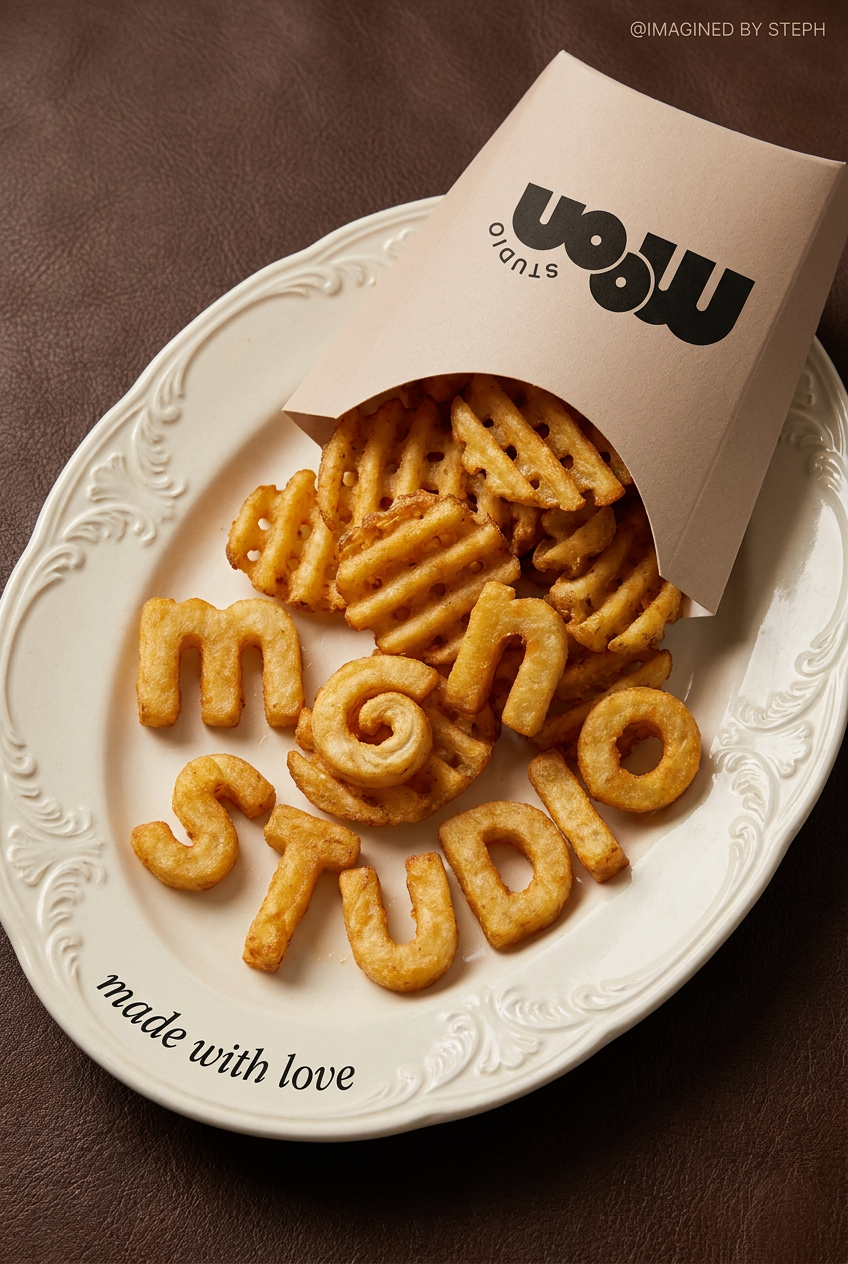
Transform simple food items into high-fashion editorial campaigns. This style uses a dynamic diagonal layout and a slightly tilted overhead angle to give your products incredible depth and texture, making them look like luxury design pieces.
Regenerate using your own assets.
Step 4: Finalize with sound and export for social
The final touches complete the transformation. You can upload your own audio track or select from a library of royalty-free music to match the video's energy. MyUP's video generator is built for social media, so exporting in the correct aspect ratio (like 9:16 for Instagram Reels, TikTok, and YouTube Shorts) is a one-click step. The output is a ready-to-post, high-resolution video file that looks like it took hours to create, not minutes.
From a single video to a repeatable content system
The real power of this workflow isn't in making one video. It's in creating a system to produce dozens of them. Once you've perfected a sequence—a specific camera motion, text placement, and style—you can save it in MyUP as a reusable workflow.
Now, instead of starting from scratch, you can run that workflow on any new image. Upload a new product photo, and your custom-branded video is generated in seconds. This is how you scale content production without sacrificing brand integrity. You can generate an entire campaign's worth of video assets from a single photoshoot, all perfectly consistent.
This campaign workflow, for example, is designed to generate multiple variations for a product line, ensuring every video feels part of the same family.
Workflow code: #myup-j6sp-glnw
Fruit Advertisement Campaign
Drop your product straight into a lush, hyperrealistic pile of fresh sliced fruit. It takes your clean product shot, blends it into rich organic textures, and generates a premium, slow-motion falling animation ready for a luxury cosmetic or food ad.
Regenerate using your own assets.
The final step: Human validation
Even with the best automation, the final creative decision rests with you. MyUP's philosophy is simple: the AI executes, and the human validates. After the video is generated, you have the final say. You can review the output, tweak the text, or adjust the motion style. This combination of AI-powered production and human-led creative control ensures that the final asset doesn't just meet a technical requirement; it meets your standard of quality.
