You've generated five perfect AI video clips for your ad. But when you stitch them together, it's a disaster. The lighting shifts, the colors clash, and the entire sequence looks amateur. This isn't just a minor annoyance; it's a critical barrier to producing professional, high-converting visuals with generative AI.
As of September 5, 2026, the demand for consistent, high-quality AI-generated content is at an all-time high. Yet, many creators find themselves stuck in a cycle of generating clips and then spending hours trying to manually color-match them. This guide offers a practical method to bypass that complexity, showing you how to achieve a consistent cinematic look for all your AI videos and photos, directly within an integrated production platform.
The hidden problem with multi-shot AI video
You've just generated five perfect AI video clips for your latest ad campaign. The visuals are stunning, the movement is fluid, and each shot looks incredible in isolation. But when you stitch them together, it's a disaster. The lighting shifts dramatically, the colors clash, and the entire sequence feels disjointed and amateur. This frustrating experience is becoming increasingly common as creators push the boundaries of AI video generation.
This isn't a problem with your creative vision; it's a fundamental challenge with how most generative AI tools operate. Producing truly finished, cohesive video content requires more than just generating individual clips. It demands a unified visual strategy from the outset, something traditional post-production tools struggle to provide efficiently for AI-generated assets.
Diagnosis: Why your AI-generated scenes don't match
The core reason for color inconsistency across AI-generated video and photos lies in the nature of generative models. Each time you prompt an AI to create a visual, it's often treated as an independent request. There's no inherent 'memory' or continuity of color, lighting, or atmosphere from one generation to the next. This means:
- **Varying Color Temperatures:** A scene generated with a 'warm morning light' prompt might follow one generated with 'cool evening glow,' resulting in jarring shifts.
- **Inconsistent Contrast & Saturation:** Different generations can interpret 'cinematic' differently, leading to clips with wildly varying levels of punchiness or subtlety.
- **Lack of Brand Cohesion:** Without a guiding visual identity, your AI creations will lack a signature look, making it hard to build a recognizable brand aesthetic.
Tools like Runway or Pika are excellent for generating individual compelling clips, but they don't inherently solve the problem of visual continuity across an entire sequence. The real challenge emerges when you need to assemble these disparate pieces into a professional, cohesive narrative.
The old fix: Is complex color grading software the only answer?
For years, the solution to inconsistent footage, whether shot on different cameras or in varied lighting conditions, has been manual color grading in professional software. Applications like DaVinci Resolve or Adobe Premiere Pro offer incredibly powerful tools to adjust color, contrast, and tone, frame by frame if necessary. Colorists spend years mastering these tools to achieve a consistent look.
The landscape is evolving, however. Just yesterday, September 4, 2026, Blackmagic Design announced DaVinci Resolve 20, featuring a new 'AI Text-to-Grade' capability. This is a significant step, allowing professionals to use text prompts to guide their color corrections. While impressive, it still operates within the paradigm of *fixing* visual inconsistencies in post-production. It's a powerful tool for expert editors, but for marketers and brand managers who need finished content ready to publish, it means adding another layer of complexity and specialized skill to their production process.
The question isn't whether these tools can fix the problem, but whether you should have to spend valuable time and resources fixing it in the first place.
The new method: From fixing clips to integrated production
Instead of generating clips and then trying to force consistency in a separate, complex post-production step, imagine an approach where consistency is baked in from the very beginning. This is the core philosophy of MyUP: an intention-based production platform.
With MyUP, you don't think about individual tools or technical pipelines. You define your creative intention for the *finished result*. This includes the desired aesthetic, mood, and, crucially, your brand's visual identity. MyUP then handles the technical production from A to Z, ensuring every asset, every scene, and every frame aligns with that initial intention.
The key to this integrated approach is the MyUP Brandkit. It's your brand's visual DNA, applied automatically to all your creations, guaranteeing a cohesive and professional look without the need for manual adjustments or complex software.
How to create a consistent brand mood with a Brandkit
A Brandkit on MyUP is more than just a style guide; it's an active ingredient in your creative production. It captures your brand's unique visual identity and ensures it's applied consistently across all your images, videos, and designs. Here's how to set it up and use it:
Create Your Brandkit: Start by providing MyUP with your brand's website URL. Our platform intelligently analyzes your site to extract your primary colors, typography, logo, and overall visual style. This forms the foundation of your Brandkit.
Define Your Visual Mood: Beyond the basic elements, you can refine your Brandkit to include specific aesthetic preferences. Do you prefer a warm, earthy palette or a cool, minimalist tone? Do you want high-contrast drama or soft, diffused lighting? This is where you infuse your desired 'cinematic' quality.
Save and Reuse: Once established, your Brandkit is saved and can be automatically applied to any new creation. This means every product photo, every social media graphic, and every video sequence will adhere to your brand's consistent visual identity.
This means you define your brand's look once, and MyUP ensures every visual you produce adheres to it. No more guessing, no more manual color matching.
Example: Producing a cinematic ad with a unified 'golden hour' look
Let's say you want to produce a luxury perfume commercial that evokes the warmth and elegance of a 'golden hour' sunset. Traditionally, this would involve shooting multiple scenes, each carefully lit, and then hours of color grading to ensure continuity.
With MyUP, you specify the intention: a multi-scene commercial with a 'golden hour' cinematic look, and then leverage a template designed for this exact purpose. The Brandkit ensures the color palette and overall mood remain consistent across all generated clips, from the close-up of the perfume bottle to the sweeping landscape shot.
For instance, using the Luxury Perfume Brand Commercial Video template, you simply describe the scenes you need. MyUP takes your input and your Brandkit's visual cues to produce a series of clips that not only match your descriptions but also share that unified, golden-hour aesthetic. Template: #myup-mvtk-dmtt
Luxury Perfume Brand Commercial Video
Capture a cinematic glow that makes any subject look like a brand icon. This process blends a sharp, low-angle still with a fluid motion sequence to turn your product into the star of a golden hour commercial.
Regenerate using your own assets.
Example: Building an epic short film with a consistent aesthetic
The power of consistent color grading extends far beyond short ads. Imagine creating a short film or a narrative piece that requires a distinct, complex visual style – perhaps a historical epic with a gritty, desaturated palette, or a sci-fi thriller with stark blues and greens.
Instead of painstakingly matching each shot from different generative AI outputs, MyUP allows you to define this overall aesthetic upfront. The platform then produces the various scenes and shots, all imbued with your chosen visual language. This integration saves immense time and ensures your narrative maintains its visual integrity from start to finish.
For an epic historical feel, you might use the Cinematic Trojan Horse Siege Short Film template. This template is built to generate high-tension sequences with a consistent, dramatic color grade, ensuring that every detail, from massive exterior shots to claustrophobic interiors, shares the same visual weight. Template: #myup-e4ti-dcrw
Cinematic Trojan Horse Siege Short Film
Build high-tension cinematic sequences that shift from massive exterior monuments to claustrophobic interior details. It tracks subtle movements like shifting shadows and creeping fog to weave a suspenseful narrative, perfect for turning any static subject into a gripping, atmospheric story that unfolds through tight, gritty visual perspectives.
Regenerate using your own assets.
Beyond video: Keep your entire campaign on-brand
Visual consistency isn't just for video. Your entire marketing campaign, from social media posts to website banners, needs to resonate with the same brand identity. The Brandkit you establish for your videos can be seamlessly applied to your still images too.
This means that the 'golden hour' feel of your perfume commercial can be mirrored in your Instagram carousels, or the gritty aesthetic of your historical film can extend to promotional posters. You describe the intention, and MyUP delivers the finished visual, adhering to your Brandkit's guidelines.
Consider creating a fashion editorial for your luxury brand. Using a template like Hyperrealistic High Angle Fashion Editorial, paired with your Brandkit, ensures that the resulting images carry the same color fidelity and stylistic nuances as your video content. Template: #myup-lkxt-mwbw This holistic approach guarantees that every touchpoint with your audience reinforces your brand's unique visual story.
Hyperrealistic High Angle Fashion Editorial
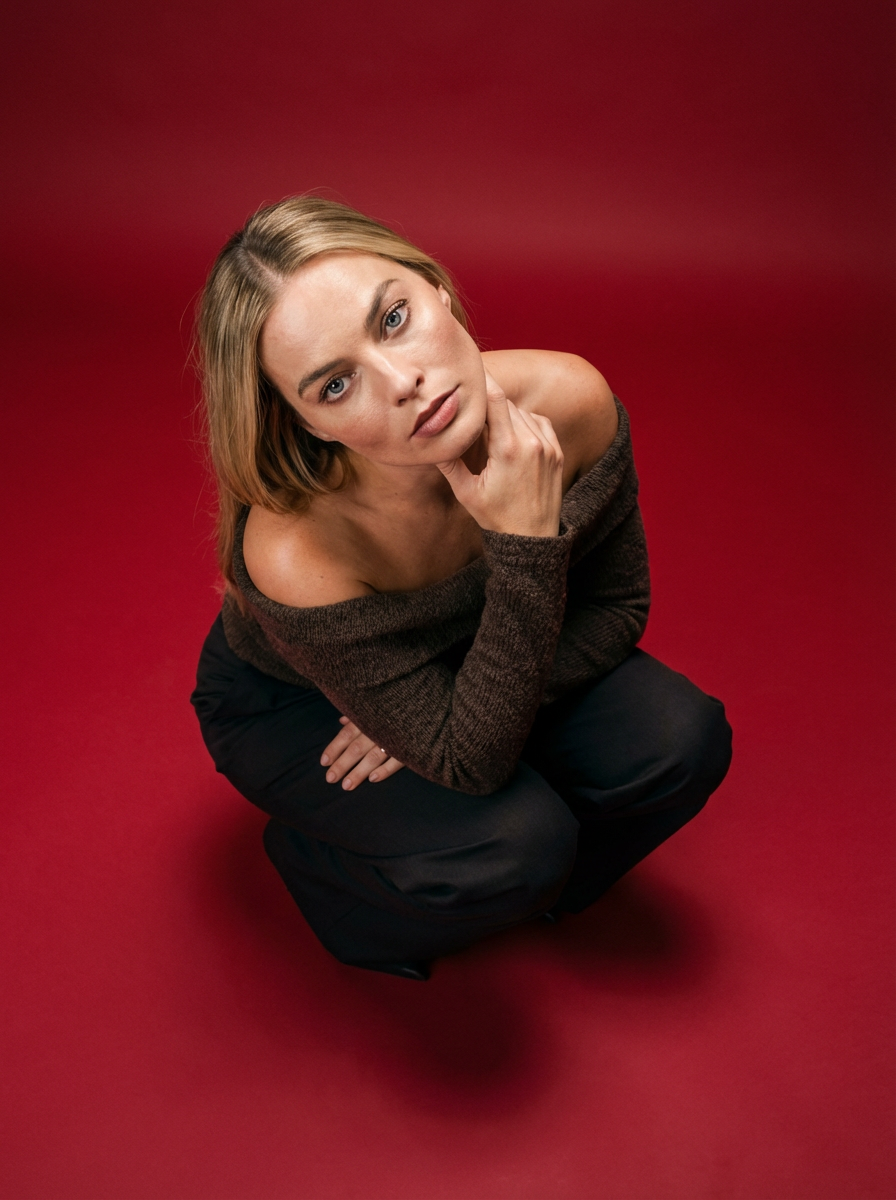
Frame your subject in a grounded, high-angle editorial style. This setup forces a compact, kneeling pose that brings out a raw and hyperrealistic fashion aesthetic, perfect for making any garment or accessory look sharp and intentional.
Regenerate using your own assets.
For more insights on maintaining brand visuals, you can read our guide on Your AI brand kit is failing. Here's the production method for consistent marketing visuals.
Get finished, consistent videos, not just clips
The era of treating AI generation and post-production as separate, disconnected steps is over. As generative AI becomes more sophisticated, the bottleneck has shifted from generating raw assets to achieving studio-quality, finished results that are consistent and ready to publish.
MyUP is designed to bridge this gap. By focusing on your creative intention and leveraging the power of Brandkits and ready-to-use creative templates, you can bypass the complexities of traditional color grading software. You get to maintain your vision and validate the results, while MyUP handles the technical production, ensuring every video, every image, and every piece of content is born on-brand and visually cohesive. Stop trying to fix inconsistent clips in post-production; define your creative intention once, and let MyUP deliver the finished, perfectly graded creation.
Achieve seamless visual consistency with MyUP
The challenge of inconsistent color grading in AI-generated visuals is a common frustration for marketers and creators. However, the solution doesn't lie in mastering ever more complex post-production tools. Instead, it's about shifting to an intention-first production process, where visual consistency is an inherent part of creation, not an afterthought.
MyUP empowers you to define the exact cinematic look and brand aesthetic you desire, then produces all your visuals – from multi-scene videos to individual product photos – with that vision baked in. With Brandkits ensuring your visual identity is always present and ready-to-use creative templates simplifying complex productions, you can finally deliver finished, professional-grade content that truly stands out. Ready to transform your creative production? Create an Account and start producing with consistency.
