
Your ‘About Us’ page is a mess. It’s a grid of poorly-lit selfies, cropped LinkedIn photos from five years ago, and a few professional shots from that one conference. Everyone looks like they work for a different company. You’re not alone in this—the recent breakout search trend for 'consistent AI headshots' and the viral workflows spreading on X prove this is a massive, urgent problem for businesses.
Those viral hacks, however, often involve a frustrating chain of different apps for face-swapping, style referencing, and upscaling. It’s a complex, brittle process. There is a better way. This guide provides a professional, one-platform workflow to define your brand's unique photographic style and apply it consistently across your entire team for a cohesive, high-end look.
Step 1: Define your brand's photographic DNA
Before you generate a single image, you need to move beyond prompting and start thinking like a brand director. A team headshot isn't just a collection of faces; it's a statement of identity. Your AI tool should understand your brand’s photographic style, not just how to render a face. In MyUP, you do this with a Brandkit.
Forget just uploading a logo and color hex codes. Your MyUP Brandkit is where you codify your visual identity, including what we call your 'photographic DNA'. This means translating abstract brand attributes into concrete photographic instructions. For example:
- If your brand is 'premium and trustworthy': Your DNA might be 'Soft, diffused studio lighting, shallow depth of field, neutral grey background, subjects looking directly at the camera.'
- If your brand is 'innovative and bold': It could be 'High-contrast, dramatic Rembrandt lighting, dark and moody background, shot from a slightly low angle.'
- If your brand is 'friendly and approachable': You might specify 'Warm, natural light, blurred office or outdoor background, genuine smiles, relaxed posture.'
By defining this once in your Brandkit, you create a permanent, reusable asset. This isn't just a prompt; it's a set of rules the AI will follow every time, ensuring every image feels like it belongs to your brand. It's how you bake your brand's DNA into every AI image, not just sprinkle it on top.
Step 2: Build your reusable master headshot workflow
With your photographic DNA defined, you can now build the master workflow that will produce every headshot. This is the repeatable process that combines a team member's source photo with your brand's defined style.
The goal is to create one perfect, on-brand headshot that will serve as the template for everyone else. Start with a high-quality, well-lit photo of one team member. Then, in MyUP, you'll use a workflow that applies your stylistic rules to that person's face and structure.
For a clean, professional, and high-end corporate look, a great starting point is an editorial-style template. These templates are built to produce high-fidelity, professional-grade portraits. You can start directly with a workflow designed for this quality of output, like the one below, and then customize it with the specific background and lighting details from your Brandkit.
Workflow code: #myup-wqxr-3214
Luxury Jewelry Editorial Portrait
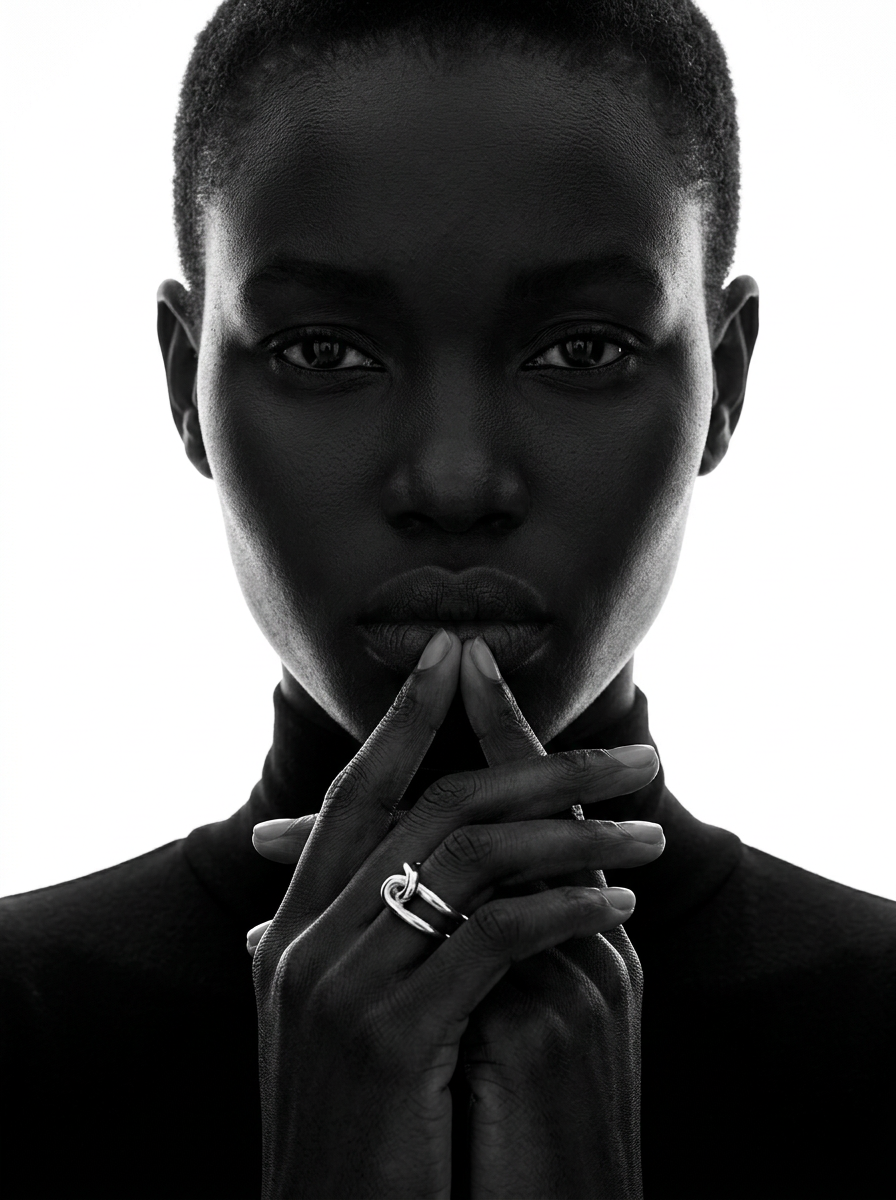
Strip away all color and turn your portrait shots into high-fashion editorial art. It applies a dramatic, high-contrast black and white treatment with deep tonal shadows, giving any subject a striking, luxury magazine aesthetic.
Regenerate using your own assets.
This workflow, 'Luxury Jewelry Editorial Portrait,' provides the core instructions for creating a high-end photographic portrait. You simply provide your team member's photo and let the workflow handle the lighting, skin texture, and professional finish, which you can then align with your Brandkit's rules.
Choosing the right style: from corporate to creative
Not every company is a 'neutral grey background' brand. Your team's visual identity should match your culture. The power of a workflow-based approach is its adaptability. By swapping out the core style instructions, you can produce radically different, yet internally consistent, sets of headshots.
Here are a couple of alternative starting points for different brand vibes, all achievable within MyUP:
- For the energetic, modern tech brand: You might want something more dynamic. A style built for sportswear advertising can provide that high-energy, crisp look, even in a corporate context. It emphasizes clean lines and a sense of action. Workflow code: #myup-ywpr-rqz6
- For the bold, creative agency: Your team needs to look the part. A fashion-forward, high-concept editorial style can communicate creativity and confidence. This approach allows for more dramatic lighting and artistic expression.Workflow code: #myup-yk1h-uqy8
The key isn't the title of the template, but the photographic properties it enforces. You select a base style that matches your brand's energy, lock it into a master workflow, and you're ready to scale.
Step 3: Scale it across the entire team
This is where the magic happens. Your master workflow is now a saved asset in your MyUP account. You don't need to rethink the prompt, lighting, or background for each new person. The production system is already built.
The process becomes simple and scalable:
- A new team member joins.
- They provide a clear, well-lit photo of their face.
- You run their photo through your saved master headshot workflow.
MyUP handles the heavy lifting of production—applying the exact same stylistic parameters to the new photo. Your role shifts from creator to validator. You review the generated options and select the one with the best likeness and expression. This 'human in the loop' approach ensures you get the consistency of automation without sacrificing creative control and quality assurance. Within minutes, the new team member has a headshot that perfectly matches everyone else's, ready for the website or their LinkedIn profile.
From a workflow to a brand asset
By following this process, you haven't just created a few nice pictures. You've built a scalable system for visual brand identity. You've turned a recurring, time-consuming problem into a simple, repeatable task. This master workflow is now a durable brand asset that ensures every person who represents your company does so with a consistent, professional, and intentional image.
This is the fundamental difference between using AI as a toy and using it as a professional production tool. Stop chasing prompts and start building systems. Create your headshot workflow in MyUP and solve this problem for good.
