You've spent hours prompting the perfect AI visuals, but the final result feels flat. The color is bland, the mood is inconsistent, and it lacks the polished, cinematic quality of professional work. This is the frustrating gap between raw AI generation and a finished creation. You don't need to become a professional colorist or spend weeks learning complex software to fix it. There is a better method.
This practical guide shows you how to skip the technical hurdles of manual color grading and use MyUP's intention-based production platform to get studio-quality, cinematic visuals for your videos and photos—finished, consistent, and ready to publish.
The missing cinematic touch in AI visuals: why raw generations fall short
You’ve generated a stunning series of AI video clips or photos, but when you stitch them together, something feels off. The lighting is inconsistent, the mood shifts jarringly from one shot to the next, and the overall look lacks that professional, cinematic polish. As of September 2026, this is the new post-production wall creators are hitting. As a recent Reddit discussion highlighted, one of the biggest frustrations is getting a consistent film look when AI tools apply color grades unevenly across different clips.
Another common failure point, especially for commercial work, is how AI grading handles people. Many tools that create a moody cinematic background end up producing unnatural, blotchy, or inconsistent skin tones, making portraits unusable. The raw generation is just the first step; the magic is in the finishing. But finishing shouldn't require mastering complex tools like DaVinci Resolve or juggling a dozen plugins.
Beyond basic filters: the new era of scene-aware AI color grading
For years, achieving a cinematic look meant applying a Look-Up Table (LUT), which is essentially a static color filter. While useful, LUTs are a blunt instrument. They apply the same color transformation to every pixel, regardless of whether it's sky, skin, or a shadow. This is why they often fail on complex scenes or break skin tones.
The industry is now moving toward scene-aware AI color grading. These advanced models don't just map colors; they understand the content of the image or video. They can identify a face and protect its natural tones while pushing the background towards a stylized teal and orange. They understand that a 'golden hour' look requires warming the highlights, not just applying a yellow overlay. This is the difference between a simple filter and true creative production. Instead of relying on old techniques, MyUP's production process is built on this principle of context and intention from the start.
Achieving a consistent cinematic look with MyUP's intention-based production
The core problem with traditional creative tools is that they force you to think like a technician, not a creator. You have to translate your vision—'I want this to feel like Blade Runner'—into a series of technical steps: adjusting curves, saturation, and contrast across multiple software packages. MyUP, the Creative Production Platform, flips this on its head.
You don’t need to learn a new tool; you just state your intention. Instead of generating raw clips and then struggling to grade them, you describe the final, finished creation you want. For example, you can tell MyUP: "Create a cinematic promo video with a moody, vintage sci-fi aesthetic." MyUP handles the entire production, from generation to final color grade, delivering a finished video where every shot is consistent and polished. This integrated approach solves the inconsistency problem at its root.
Producing cinematic video with precise color and mood
One of the hardest parts of video production is ensuring visual consistency across multiple shots, especially when they are generated separately or filmed under different conditions. A jarring shift in color or tone can instantly break the viewer's immersion. This is where an integrated production process becomes essential.
On MyUP, you don't grade clip by clip. You define the mood for the entire project. MyUP's production engine analyzes all the clips in your sequence to deliver a unified and cohesive cinematic grade. This method ensures smooth transitions and a consistent atmosphere, turning a collection of shots into a single, compelling narrative. For a deeper look at achieving this across multiple shots, see our guide on producing consistent cinematic AI video.
To see this in action, you can use a creative template designed for narrative tension. It builds high-stakes cinematic sequences by maintaining a consistent mood across different scales, from massive exteriors to tight interior shots.
Template: #myup-e4ti-dcrw
Cinematic Trojan Horse Siege Short Film
Build high-tension cinematic sequences that shift from massive exterior monuments to claustrophobic interior details. It tracks subtle movements like shifting shadows and creeping fog to weave a suspenseful narrative, perfect for turning any static subject into a gripping, atmospheric story that unfolds through tight, gritty visual perspectives.
Regenerate using your own assets.
Crafting cinematic photos that protect natural skin tones
A cinematic grade should enhance, not erase, the subject. As many photographers have discovered, generic AI grading tools often create a 'cinematic' look at the expense of natural skin tones, leaving portraits looking plasticky or discolored. This is unacceptable for fashion, editorial, or commercial work where the subject must look their best.
MyUP's creative templates are designed by top creators who understand this balance. They are built to protect and enhance natural skin tones while applying a sophisticated grade to the surrounding environment. The AI understands the difference between a person and a backdrop, giving you a finished photo that feels both artfully stylized and authentically human. A template built for a high-angle editorial style, for instance, focuses on a hyperrealistic aesthetic that keeps skin texture and tone authentic while creating a sharp fashion look.
Template: #myup-lkxt-mwbw
Hyperrealistic High Angle Fashion Editorial
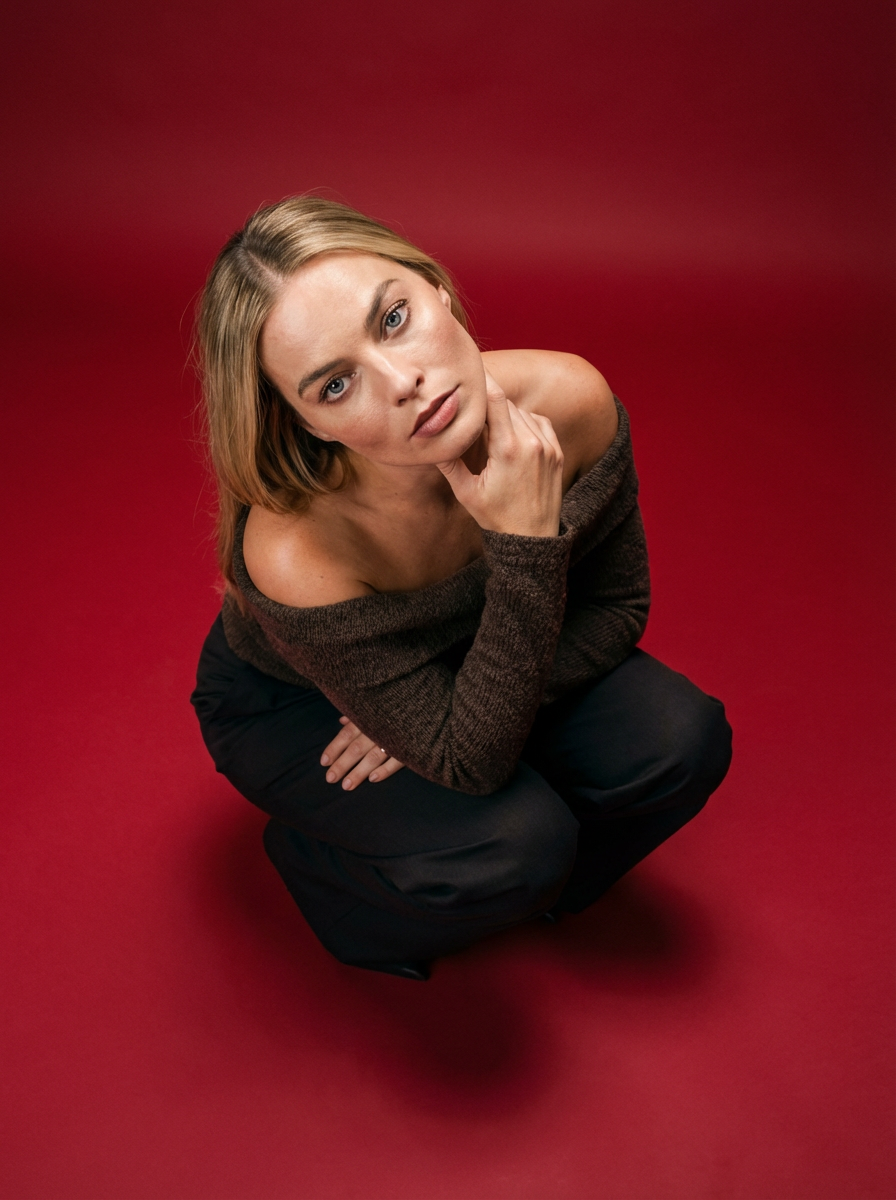
Frame your subject in a grounded, high-angle editorial style. This setup forces a compact, kneeling pose that brings out a raw and hyperrealistic fashion aesthetic, perfect for making any garment or accessory look sharp and intentional.
Regenerate using your own assets.
The power of Brandkits for on-brand cinematic visuals
For marketers, color consistency isn't just about aesthetics; it's about brand identity. You need your specific brand of red, your signature warm palette, or your cool, minimalist vibe to be present across every image, video, and social media post. Juggling this across dozens of assets is a major challenge.
This is precisely what MyUP's Brandkit feature is for. You set up your brand's visual identity once—with your logo, fonts, and specific color palette. From then on, you can apply this identity to any creation with a single intention. Want a cinematic video ad that feels on-brand? MyUP uses your Brandkit to ensure the final grade aligns with your established visual style. This is how you move from one-off creative pieces to a cohesive, instantly recognizable campaign. To learn more about this method, read our guide on building a production method for consistent marketing visuals.
For example, a template for a luxury commercial can capture a cinematic golden hour glow while ensuring the product's brand colors remain true and prominent.
Template: #myup-mvtk-dmtt
Luxury Perfume Brand Commercial Video
Capture a cinematic glow that makes any subject look like a brand icon. This process blends a sharp, low-angle still with a fluid motion sequence to turn your product into the star of a golden hour commercial.
Regenerate using your own assets.
MyUP vs. fragmented tools: simplicity for finished results
The launch of new plugins like Chroma AI 2.0 for traditional video editors validates a clear market need: creators want powerful, AI-driven color grading. But the 'plugin method' still keeps you trapped in a fragmented and complex technical process. You have to find the plugin, install it, learn its interface, and hope it works seamlessly with your editing software, your footage, and your operating system. It's another tool to manage, another potential point of failure.
MyUP offers a fundamentally simpler path. There are no plugins to install and no compatibility issues to worry about. The advanced grading capability is fully integrated into the production platform. You simply state your creative intention, and MyUP delivers the finished result. This removes the technical friction, letting you focus entirely on your creative vision, not on managing a stack of tools.
Your vision, MyUP's production
Achieving a professional cinematic look is no longer about mastering a dozen complex tools. It's about having the right production partner. With MyUP, you provide the creative vision, and the platform handles the technical execution to deliver a finished, polished, and ready-to-publish creation. Stop wrestling with inconsistent colors and unnatural skin tones. It's time to turn your creative intentions into reality.
Ready to see the difference? Create your first project on MyUP and make your unimaginable possible.
