If you're creating video content for social media with AI, you've likely encountered the frustrating problem of 'character drift' or 'style shifts' across clips. It's a common pain point, as recent viral discussions on X (as of June 2026) have highlighted, where users struggle to maintain a consistent brand aesthetic or character identity in AI-generated video series. While new models like Runway Gen-4 and Kling AI are making strides in temporal consistency and multi-scene generation, the challenge remains: how do you ensure every clip in your TikTok or Instagram story series looks unequivocally *yours*?
The answer lies in a structured workflow that prioritizes brand consistency from the outset. MyUP.ai offers an integrated solution, leveraging its Brandkit and AI video generation capabilities to produce a cohesive, on-brand video story series. This guide will walk you through the process, transforming inconsistent AI output into a powerful, unified brand presence.
The challenge of consistent AI video: why your social stories look random
The ephemeral nature of TikTok and Instagram Stories demands a constant stream of fresh content. AI promises to deliver this at scale, but often falls short on consistency. Generating a single, stunning AI video is one thing; producing a series where every character, product, color palette, and visual style remains perfectly aligned is another entirely. This inconsistency dilutes your brand message, confuses your audience, and ultimately impacts engagement. Imagine a product changing color between scenes, or a brand mascot subtly altering its appearance – it undermines trust and recognition.
While tools like Runway Gen-4 are improving temporal consistency within single clips, and Kling AI is pushing multi-scene generation with enhanced continuity (as of June 2026), these still require careful manual oversight to ensure they adhere to specific brand guidelines. The real cost isn't just in the time spent generating, but in the hours of post-production editing to force consistency, or worse, the missed opportunity of a disjointed brand narrative.
MyUP's Brandkit: your foundation for a cohesive AI video story series
At the heart of MyUP.ai's solution for branded video consistency is the Brandkit. This isn't just a style guide; it's an active, intelligent system that embeds your visual identity into every AI-generated asset. Once you've built your Brandkit on MyUP.ai – by simply inputting your website URL, which automatically extracts your logo, brand colors, fonts, and overall aesthetic – every subsequent creation will automatically inherit these elements. This ensures that whether you're generating an image or a video, it will always look and feel like your brand.
For a video story series, this means your characters, products, backgrounds, and even the subtle mood of each clip will consistently reflect your established brand identity. You build your visual identity once, and MyUP.ai reuses it automatically every time, eliminating the need to manually enforce brand guidelines across multiple AI generations.
Step 1: planning your story arc and visual brief for social media
Before you generate a single frame, a clear plan is essential. For TikTok and Instagram Stories, think in short, punchy segments – typically 5-15 seconds per clip. Outline your story arc: what's the hook, the rising action, the climax, and the call to action? Break this down into individual scenes or 'beats.' For each beat, create a concise visual brief:
- **Key visual element:** What's the main focus (product, character, action)?
- **Desired mood/tone:** Energetic, calm, suspenseful?
- **Specific actions:** What happens in this clip?
- **Text overlay idea:** Any key message or CTA for this segment?
This pre-planning ensures that MyUP.ai has a clear direction for generating each consistent asset, preventing scattered results and saving you iteration time. Consider how each clip will transition into the next, maintaining a narrative flow that keeps viewers engaged through the entire series.
Step 2: generating consistent visual assets with MyUP's AI
With your story beats defined, it's time to generate the core visual assets. On MyUP.ai, you'll use your Brandkit to guide the AI. Start by generating the key images for each scene. For example, if your story features a new product, you'll want consistent visuals of that product across different scenarios. MyUP.ai's AI image generator, when paired with your Brandkit, ensures that your product appears with the correct colors, branding, and in your desired style, whether it's photorealistic or illustrative.
You can generate a series of images that depict your product or character in various poses or environments, all while maintaining visual fidelity. This foundational step is critical for avoiding the 'character drift' that plagues many AI video productions. By creating a strong, consistent visual base, you set the stage for a cohesive video series.
Workflow code: #myup-gxue-opd0
Product Post

Turn a single product shot into a cohesive six-part Instagram story campaign. It mixes tactile crumpled paper textures with bold, stacked typography and custom mascot spots in your brand's signature colors.
Regenerate using your own assets.
Step 3: animating your clips for dynamic TikToks and Instagram stories
Once you have your consistent visual assets, the next step is to bring them to life. MyUP.ai's AI video generator, powered by Stable Diffusion image-to-video, takes your static images and animates them into dynamic short clips. The key here is to guide the animation with prompts that maintain the intended motion and narrative flow, building on the visual consistency established in the previous step.
Focus on short, impactful movements that are optimized for vertical formats like TikTok and Instagram Reels. You can specify camera movements (zoom, pan), object motion, or character actions. MyUP.ai handles the underlying animation, ensuring that the temporal consistency of your branded elements remains intact across the short duration of each clip. The user validates the AI's execution, making minor adjustments to motion intensity or duration to achieve the desired effect.
Workflow code: #myup-fts6-4ihp
Vertical Gourmet French Fry Ad

Transform your products into high-fashion editorial ads. This setup uses a dynamic diagonal layout and a slightly tilted overhead angle to give food and packaging incredible depth and texture. It's perfect for giving any brand a chic, premium look.
Regenerate using your own assets.
Step 4: integrating on-brand text and graphic overlays seamlessly
A branded video story isn't complete without on-brand text and graphic overlays. This is where many AI video tools falter, producing 'wobbly text' or inconsistent typography. MyUP.ai addresses this by integrating your Brandkit's font styles and color palette directly into the text and graphic generation process. You can add titles, captions, calls-to-action, or even animated graphic elements that perfectly match your brand's visual identity.
While other tools like Midjourney v7.1 are improving text rendering within images, MyUP.ai ensures that your brand's specific typography is applied consistently across all video segments. This means your key messages are not only legible but also reinforce your brand's professional image, preventing the jarring visual inconsistencies that can undermine your content's credibility.
Workflow code: #myup-6hp6-zwh2
Minimalist Hand-Lettered Food Brand Poster
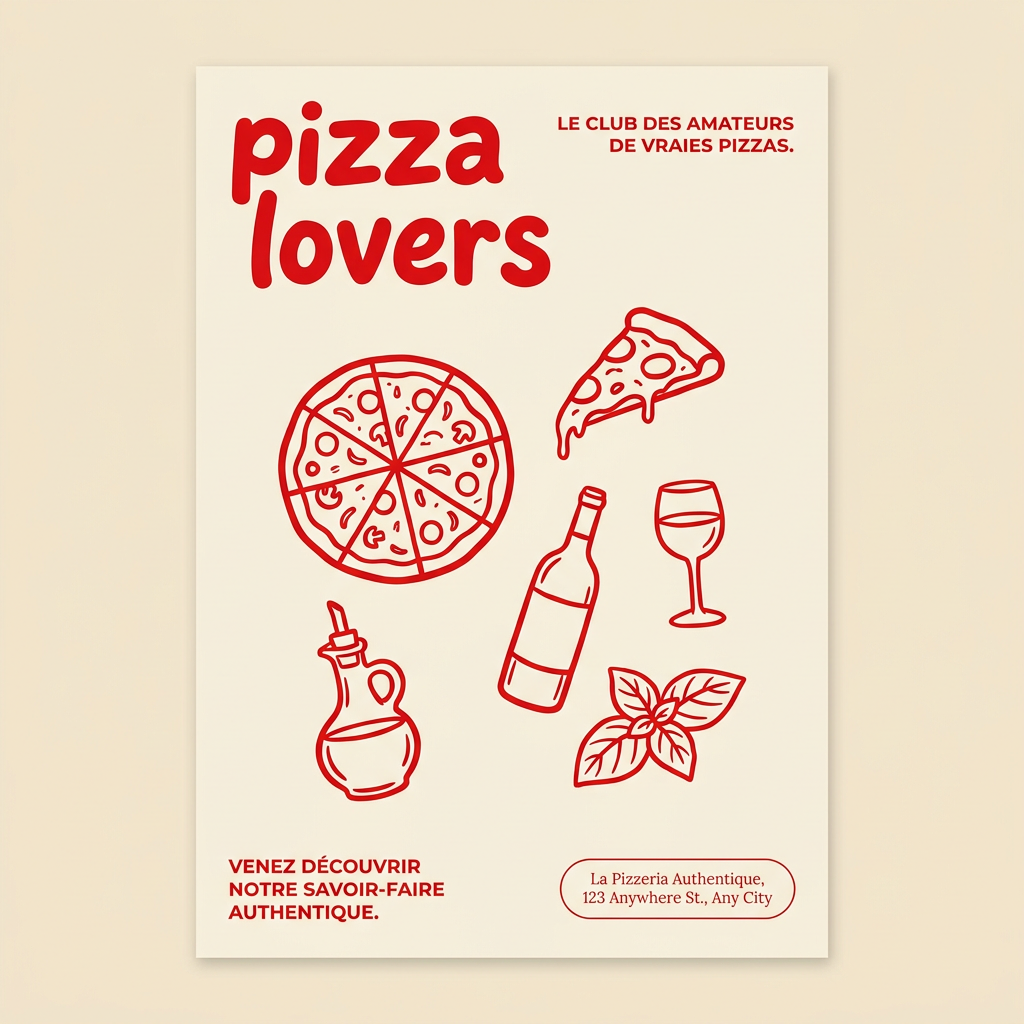
Generate clean, minimal posters for your food brand or cafe. It sets up a soft cream background with tons of breathing room, contrasted by a bold, chunky handwritten title in vivid red. It's a gorgeous editorial layout that makes your brand look instantly high-end.
Regenerate using your own assets.
Step 5: assembling and optimizing your branded series for platform delivery
After generating and animating your individual clips with consistent branding and text, the final step is to assemble them into a cohesive story series. On MyUP.ai, you can sequence your clips, adjust their pacing, and ensure smooth transitions between each segment. Pay close attention to the aspect ratio – vertical (9:16) is crucial for native TikTok and Instagram Story experiences. MyUP.ai helps you optimize the output for these specific platforms, ensuring your branded content looks professional and fits perfectly.
Review the entire series for overall flow, narrative coherence, and visual impact. This is where your human creative eye ensures the AI-generated content truly shines as a unified brand story, ready to captivate your audience.
The human control: validating and refining your AI video output
MyUP.ai operates on a simple principle: the AI executes, but the user validates. While the platform automates the heavy lifting of consistency and generation, your creative input remains paramount. After each generation step – from initial images to animated clips and text overlays – you have the opportunity to review, adjust, and fine-tune. This iterative process allows you to maintain precise creative control, ensuring the final video series perfectly aligns with your vision and brand standards.
Think of MyUP.ai as your highly efficient production assistant. It handles the repetitive, technically complex tasks of maintaining brand consistency across dynamic media, freeing you to focus on the storytelling and strategic messaging. You approve the output, make tweaks as needed, and guide the AI toward perfection, ensuring your brand's voice and visual identity are always upheld.
Scaling your brand's presence: beyond a single AI video series
The true power of MyUP.ai's Brandkit and workflow approach extends beyond creating a single video story series. Once your Brandkit is established and you've mastered the workflow, you can rapidly produce an ongoing stream of consistent, high-quality social media video content. This capability transforms what used to be a time-consuming, inconsistency-prone task into a repeatable, scalable strategy.
Whether you need daily product showcases, weekly brand narratives, or seasonal campaign content, MyUP.ai enables you to maintain a strong, recognizable brand presence across TikTok and Instagram without compromising on visual integrity or spending countless hours on manual adjustments. This means building brand recognition and engagement more efficiently than ever before. For more on creating consistent social content, see our guide on how to create a week of on-brand TikToks.
Workflow code: #myup-3sro-edbt
Brand Clothes Post

Turn any outfit photo into a high-end fashion promo poster. It centers your subject in a full-body shot against a dark, dramatic studio backdrop, perfectly cropped for social feeds. It gives your apparel a moody, editorial look instantly.
Regenerate using your own assets.
Start creating your consistent AI video stories today
The era of inconsistent, off-brand AI video content for social media is over. With MyUP.ai, you have a powerful, integrated platform to plan, generate, animate, and refine an entire series of branded video stories for TikTok and Instagram. By leveraging your Brandkit and following a structured workflow, you can deliver visually cohesive, engaging content that truly represents your brand. Stop fighting AI's inconsistencies and start directing its power to build a stronger, more unified brand presence across your social channels. Create an account and experience the difference a truly branded AI workflow makes.
