Scroll through your For You Page. You’ll see it: the same AI filter, the same trending CapCut template, the same animated style used by a dozen different creators in a row. It’s not your fault. The tools that make AI accessible to everyone also create a sea of sameness. When your content looks just like the video before and the video after, your brand becomes invisible.
Getting noticed on a platform as saturated as TikTok isn't about finding the next viral effect. It's about building a recognizable visual identity. This is the workflow for creating a system that generates unique, on-brand visuals for your videos, so you can stand out by design, not by accident.
Your TikToks look like everyone else's, and it's not your fault
The core problem is 'template fatigue'. Tools like CapCut offer incredible one-click convenience, but that convenience comes at the cost of originality. When millions of creators use the same limited set of AI styles, those styles lose their impact. What was once novel becomes background noise. This hurts creators in two ways: it makes it harder to capture attention in the first few seconds, and it actively prevents you from building a memorable brand identity. If your visuals are interchangeable with anyone else's, so is your brand.
The solution isn't to abandon AI, but to take control of it. Instead of using a public template that defines your look, you need a private system that scales your unique style. That’s the difference between renting an aesthetic and owning one.
The industry is shifting from generic filters to brand control
This shift isn't just a theory; it's happening at the highest levels of the creative industry. In August 2026, Adobe announced 'Style Kits' for its Firefly AI, a feature designed to help users generate images consistent with a specific brand aesthetic. This is a massive signal that the market is moving past generic generation and toward brand-controlled AI. The expectation for creative control is now the standard.
While features like Style Kits are a step in the right direction, they often exist within a single tool. A true visual system needs to be more integrated. This is where MyUP's approach is different. With MyUP, your visual identity isn't just a feature; it’s the foundation. Your Brandkit—a reusable profile of your colors, fonts, logos, and even abstract style descriptions—is automatically applied to every workflow. This means you’re not just creating one-off assets; you’re running a production system that ensures everything you make is recognizably yours.
The 3-step workflow for a batch of unique TikTok visuals
Forget the multi-app hacks and complex prompting. Creating a full library of unique, on-brand visuals for a TikTok video is a repeatable process inside MyUP. It’s about setting your style once, then automating the production of the assets you need.
Step 1: Define your style with a Brandkit
Your first step is to establish the visual DNA for your AI. In MyUP, you do this by creating a Brandkit. This goes far beyond just uploading a logo and color palette. The most powerful part of a Brandkit is the ability to define your style with descriptive language. You can teach it your aesthetic with prompts like:
- 'Clean and airy editorial photography with soft, natural light.'
- 'Gritty, textured risograph print with high contrast and limited colors.'
- 'Y2K nostalgia with grainy film textures, lens flares, and vibrant, saturated tones.'
- 'Dark academia aesthetic, moody lighting, rich wood textures, and classic typography.'
Once saved, this Brandkit becomes the default creative director for all your projects. MyUP will automatically apply these stylistic rules to every image or video clip it generates for you, ensuring perfect consistency without you having to repeat complex prompts every single time.
Step 2: Generate a full asset library from one idea
With your Brandkit active, you can now move to production. The goal here isn't to create one perfect image, but to generate a batch of 10-12 related visuals that can be used as backgrounds, B-roll, or animated sequences in your TikTok. This batch-generation approach is at the heart of an efficient workflow.
Instead of thinking image-by-image, you run a workflow with a single concept. For example, if you're a beauty brand launching a new product, you could use a workflow designed for high-end editorial shots. You provide the product name and a brief description, and MyUP generates a dozen different compositions, all in the consistent style defined by your Brandkit. The user validates the outputs, asks for adjustments, and quickly builds a complete asset library. MyUP handles the repetitive production work.
For a product-focused brand, a workflow like this is the perfect starting point to create a library of elegant, on-brand visuals. Workflow code: #myup-5q78-bln0
Luxury Floral Product Editorial
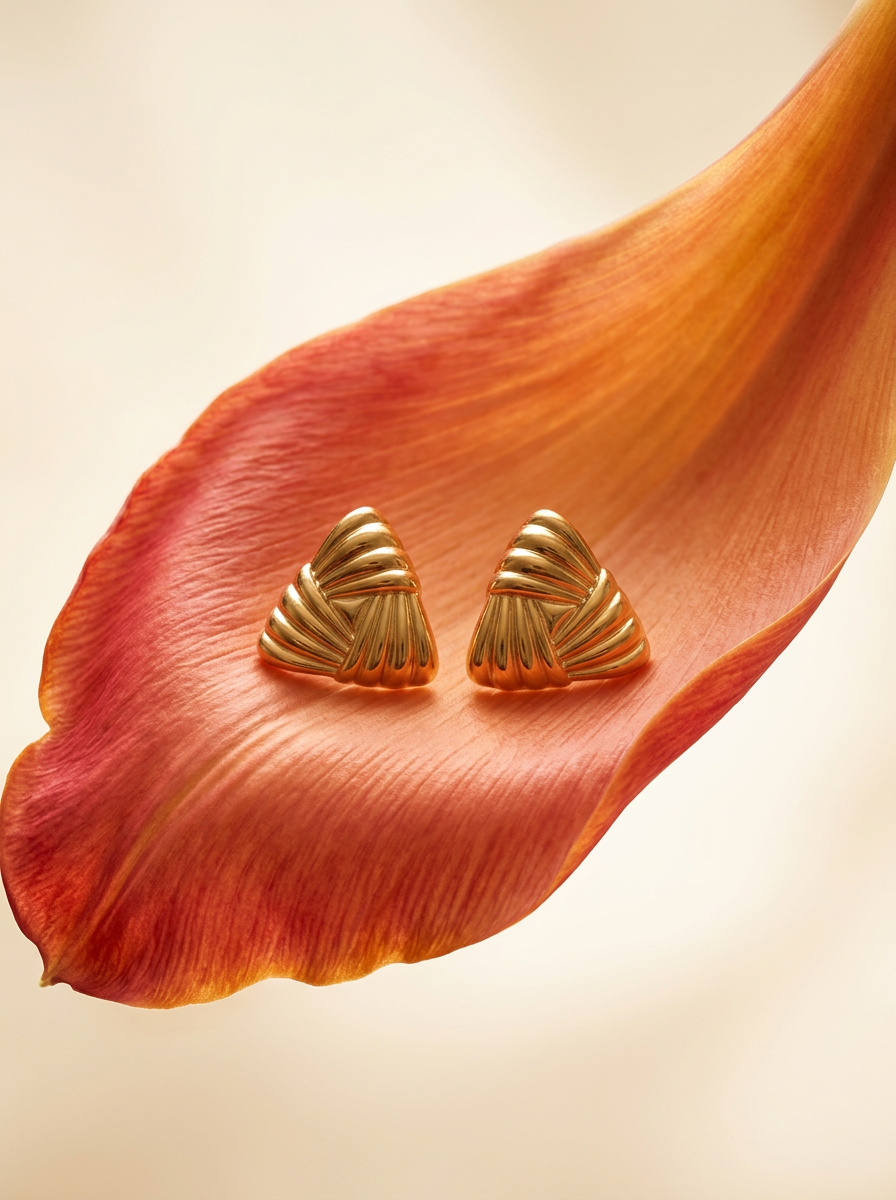
Place any product in an ultra-minimalist, warm studio space. It wraps your item in a seamless cream and beige backdrop with a super soft bokeh that melts away, making the details pop. It’s perfect for giving goods a clean, high-end look.
Regenerate using your own assets.
Step 3: Assemble your unique video
Once you have a folder of 10+ custom, on-brand visual assets from MyUP, the final step is simple. You can import this library into any video editor—even CapCut or TikTok's native editor—and assemble your video. The difference is that you are no longer limited by their templates. The creative foundation is entirely your own. You can add your text, voiceover, and music with the confidence that the underlying visuals are unique to your brand. The heavy lifting of creating an original aesthetic is already done.
How to use trends without looking like a copycat
Participating in trends is crucial for discoverability on TikTok. But how do you join in on something like the 'AI Diorama' or 'Pixel Art' trend without producing a carbon copy of everyone else's video? The answer is to filter the trend through your brand's unique style.
A MyUP workflow allows you to do exactly this. You can use a workflow designed to create a specific tactile look, like a retro zine or a vintage print, and then apply your Brandkit's colors, textures, and overall mood to it. The result is a piece of content that participates in the trend but is executed in your signature style. You're not just copying the trend; you're interpreting it.
For example, you could use these workflows to give any video concept a distinct, analog feel that stands out from clean digital styles.
- Retro Zine Style Event Poster: To get a gritty, photocopied aesthetic. Workflow code: #myup-msop-hlxf
- Vintage Risograph Event Poster: For a tactile, textured print look with uneven ink. Workflow code: #myup-3xus-3l9x
This approach allows you to stay relevant while reinforcing your brand, turning a potential commodity into a unique asset. It's a strategy that applies equally well to creating AI-powered Instagram Reels that feel distinct and memorable.
Stop chasing templates, start building a system
The key to winning on visually-driven platforms like TikTok isn't about having the fastest reaction to the latest filter. It's about building a recognizable and repeatable visual system. Chasing trends is exhausting and makes your brand dependent on other platforms' features. Building a system in MyUP gives you control, consistency, and speed.
By defining your aesthetic with a Brandkit and using workflows to automate the production of unique assets, you move from being a consumer of generic templates to a director of your own brand's visual identity. That is how you build a brand that people remember, recognize, and follow.
