That video you just posted for your new listing? It’s probably a slideshow. A collection of photos with a cross-fade transition and a generic royalty-free music track. It’s what everyone does. And in a crowded market, it’s not enough to stop a potential buyer from scrolling.
Buyers now expect dynamic, engaging video content. But hiring a videographer for every property is expensive, and spending hours in complex editing software is a non-starter. The result is that only high-end listings get the video treatment they deserve, while the rest get the same old slideshow.
There is a better way. This isn't about just stitching photos together. This is a repeatable AI workflow that transforms your standard listing photos into a polished, on-brand video tour for every single property, in minutes. Let's build the system.
Step 1: Set up your agency's Brandkit for one-click consistency
Before you create a single video, the first step is to solve the consistency problem once and for all. Every video, social post, and flyer needs to look like it came from your agency, with the correct logo, colors, and fonts. Doing this manually for every asset is a huge time sink.
In MyUP.ai, you solve this with a Brandkit. This is a one-time setup where you provide your agency's website URL or upload your brand assets. MyUP automatically extracts your logo, color palette, and typography. From that point on, any content you generate—from videos to social posts—will automatically use your brand's visual identity.
This is the foundation of an efficient workflow. Instead of hunting for hex codes or the right font file every time, your brand is built into the creation process. The user validates the output; MyUP handles the production, ensuring every asset is perfectly on-brand.
Step 2: Turn your listing photos into an animated video
With your Brandkit in place, you can now address the core problem: the static slideshow. The difference between a professional video and an amateur one often comes down to subtle motion. Professional videos use slow pans, zooms, and cinematic movements to make a space feel alive. This is known as the Ken Burns effect.
In MyUP, you don’t need a video editor to achieve this. You can start a workflow by simply uploading the high-resolution photos from your property shoot. Instead of just placing them on a timeline, you instruct the AI to animate the static images. The AI intelligently applies subtle pans across wide living room shots, slow zooms into kitchen details, and gentle tilts to reveal architectural features. It creates a sense of movement and guided discovery, as if a camera is actually moving through the space.
The workflow then allows you to add text overlays for feature callouts—like 'Gourmet Kitchen' or 'Private Balcony'—which automatically use the fonts and colors from your Brandkit. In a few clicks, you’ve gone from a folder of still images to a dynamic video tour that feels premium and professional.
Step 3: Create a 'Just Listed' social post from your video assets
A great video is only effective if people see it. Once your video tour is generated, your workflow shouldn't stop there. The next logical step is to create promotional assets for social media to drive traffic to the listing.
You can instruct MyUP to pull the most compelling frame from your new video—perhaps a hero shot of the home's exterior at golden hour. With that image as the centerpiece, you can instantly generate a 'Just Listed' announcement post for Instagram or Facebook. Because your Brandkit is already active, the template will automatically incorporate your logo and brand colors, ensuring it aligns with all your other marketing materials.
This template is the perfect next step to announce your new listing with a high-quality visual pulled directly from your video.
Workflow code: #myup-kbgo-tlle
Product Brand Post

Drop in your product to generate a cohesive nine-post Instagram grid. It blends warm lifestyle photography and flat-lay packaging with bold hand-drawn doodles, collages, and urban billboard mockups. Everything automatically styles itself to your brand's colors.
Regenerate using your own assets.
Step 4: Design an open house flyer in 60 seconds
The same principle of repurposing applies to print and digital marketing materials. Your open house needs a flyer or a poster. Instead of starting from scratch in another design tool, you can extend your MyUP workflow.
Using the same property photos and your established Brandkit, you can generate a clean, professional poster design in seconds. Provide the key details—date, time, address—and the AI populates a template that is already on-brand. The result is a cohesive marketing package where the video tour, social posts, and flyers all share the same professional aesthetic.
This is the power of a workflow system: you're not just making a single asset; you're creating an entire campaign's worth of material from a single set of inputs.
Workflow code: #myup-k4td-9k6z
Minimalist Poster

Give your social feed a clean, gallery-like aesthetic. This layout frames your images with structured mono typography and soft, neutral backgrounds for a high-end editorial look. It's perfect for minimal product launches or brand announcements.
Regenerate using your own assets.
The next level: Creating virtual staging videos for empty homes
The biggest challenge for marketing an empty property is helping buyers envision themselves living there. This is why virtual staging has become so popular, but it's often limited to static photos. Recently, complex AI workflows have emerged for creating 'virtual staging videos,' but they require technical expertise.
MyUP simplifies this into a manageable workflow. First, you upload a photo of an empty room. You use an AI image generation step to furnish the space based on a descriptive prompt (e.g., 'furnish this living room in a modern Scandinavian style'). The AI adds furniture, art, and decor, transforming the empty space into a beautifully staged home.
Once you approve the staged image, it becomes the input for the video workflow described in Step 2. You can now create an animated tour of a fully furnished home, even if the property is completely empty. To complete the package, use the staged images to create a high-end feature sheet or poster that highlights the property's potential.
Workflow code: #myup-ysc9-ekcs
Professional Product Poster
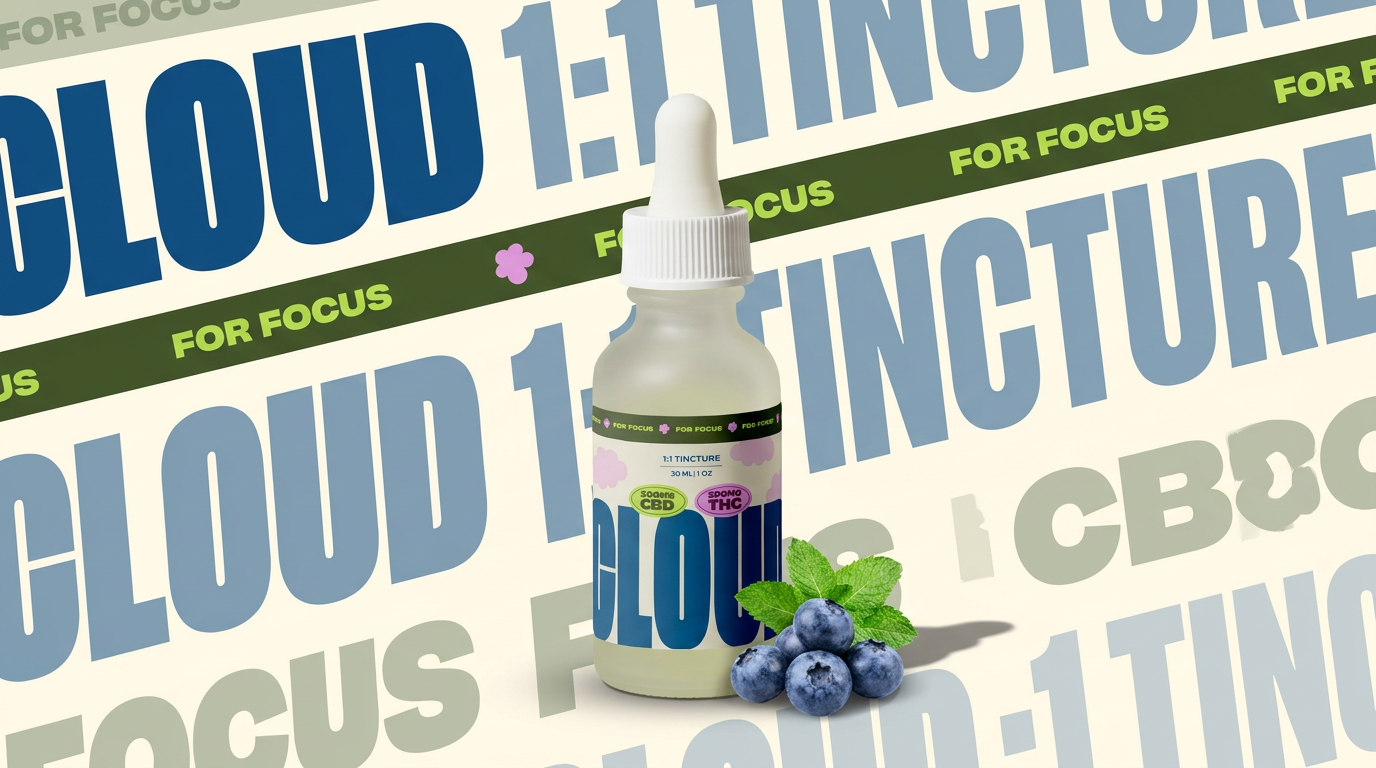
Turn any product shot into a clean, graphic landscape poster. It automatically pulls the text from your packaging to create a massive, semi-transparent repeated background pattern behind your item. Great for modern, typography-heavy brand showcases.
Regenerate using your own assets.
One workflow, every listing
High-quality video marketing shouldn't be a luxury reserved for multi-million dollar listings. The difference between selling a property quickly and having it sit on the market is often the quality of its presentation. An automated AI workflow in MyUP makes it possible to create a stunning, on-brand video tour and a full set of marketing assets for every single property you represent.
This isn't about replacing your expertise; it's about amplifying it. By building a repeatable system, you spend less time on tedious production tasks and more time closing deals. Every listing gets the premium marketing it deserves, and your agency's brand looks professional and consistent everywhere it appears.
