You’ve been there. You ask an AI image generator for a simple shot: your product on a clean background. What you get back is… almost right. The logo is slightly warped, the label text is nonsense, and the product's signature color is just a little off. It’s unusable for any real marketing.
These one-click tools fail because they're forced to guess what your product looks like. They try to generate the product and the scene simultaneously, leading to distortions and inconsistencies. For brand work, that's not a workflow; it's a lottery. There is a much better way.
Why one-click AI tools keep messing up your product shots
The core problem with asking an AI to generate a complete product scene from a single prompt is a lack of control. The AI model has no true understanding of your specific product—its precise shape, texture, color, and branding. It's simply referencing millions of images to create a plausible-looking object that fits your description.
This results in common, frustrating failures:
- Logo and Text Distortion: AI models struggle with typography, often rendering logos and labels as warped or illegible text-like shapes.
- Inaccurate Product Representation: The model might change the material, alter the color, or miss key details that define your product's look and feel.
- Brand Inconsistency: The generated scene's style, lighting, and color palette are based on the AI's interpretation, not your established brand guidelines.
For any serious e-commerce or marketing team, these issues make one-shot generation a dead end. You can't build a campaign on assets that misrepresent your product.
The secret: Separate your product from the scene
The professional workflow for creating AI product photography isn't about finding a magic prompt. It's about taking back control by breaking the task into two distinct parts: the product and the environment.
The logic is simple: use a real, high-quality photo of your actual product, and then use AI for what it does best—creating a beautiful, imaginative, and perfectly on-brand world around it. This is the foundational principle behind creating product visuals in MyUP.ai.
Instead of letting the AI guess, you provide the ground truth: your product. MyUP then handles the creative heavy lifting of scene generation, guided by your specific instructions and your pre-loaded Brandkit. The user validates the final composition, ensuring the result is not just impressive, but accurate.
Step 1: Generate a clean, on-brand background in MyUP
The first step is to create the stage for your product. Forget prompting for the product itself. Instead, describe only the background you want to create. Think like a set designer, not a photographer.
For example, you might prompt for:
- "A minimalist studio background in a solid beige color, with a single, sharp shadow from a palm leaf cast from the upper left."
- "A warm, sunlit kitchen counter made of white marble, with a few out-of-focus lemons in a bowl behind."
- "A podium made of rough, grey concrete standing on a beach with soft evening light."
The key to making this work consistently is MyUP’s Brandkit. Once you’ve set up your brand by simply entering your website URL, MyUP knows your colors, fonts, and overall aesthetic. When you generate a scene, it automatically steers the output toward your visual identity. The colors are right, the mood is right, and the result feels like it belongs to your brand. For a classic e-commerce shot, a simple studio setup is the perfect place to start.
Workflow code: #myup-u4lt-o0ho
Studio Product Ad

Drop in a single product photo to instantly build a cohesive visual identity. It automatically samples your item's dominant colors to generate a beautifully matched mosaic moodboard, giving your brand an instant, polished aesthetic.
Regenerate using your own assets.
Step 2: Place your product and refine the composition
With your on-brand background generated, the next step is to bring in your hero: the product. You'll need a clean product photo, ideally a PNG file with a transparent background. Most e-commerce brands already have these on hand from previous photoshoots.
In the MyUP editor, you can upload your product image and place it as a layer on top of the AI-generated scene. This is where human control becomes critical. You can drag, resize, and rotate your product to get the perfect placement. Does it need to be larger to show detail? Should it be off-center for a more dynamic feel? You decide. MyUP provides the canvas; you control the final composition. For a more stylized social media post, you can use a template that provides a pre-defined layout for your product and text.
Workflow code: #myup-zpby-tzie
Minimal Vibrant Product Advertising Poster

Drop in any product shot and watch it turn into a bold, high-energy square ad. It automatically reads your packaging to pull out the dominant colors and text, then builds a vibrant poster styled perfectly around your brand.
Regenerate using your own assets.
Beyond the studio: Creating lifestyle and contextual scenes
This workflow isn't limited to simple studio backdrops. Its real power lies in creating an endless variety of lifestyle and contextual scenes that would otherwise require expensive and time-consuming photoshoots. The process remains the same: generate the scene, then place your product.
Need to show your new hiking boot on a mountain trail? Generate the trail, then place your boot. Launching a new skincare line? Generate a dozen different bathroom shelves, marble vanities, and sun-drenched window sills, and place your product in each one. This approach gives you a massive library of marketing assets from a single product photo. You can see how this works in practice by exploring the repeatable AI workflow for professional product photos.
For example, if you're launching a new beverage, you can create a scene that evokes a specific feeling or occasion, placing your product right in the middle of the story.
Workflow code: #myup-cqnu-i50m
Drink Product Ad
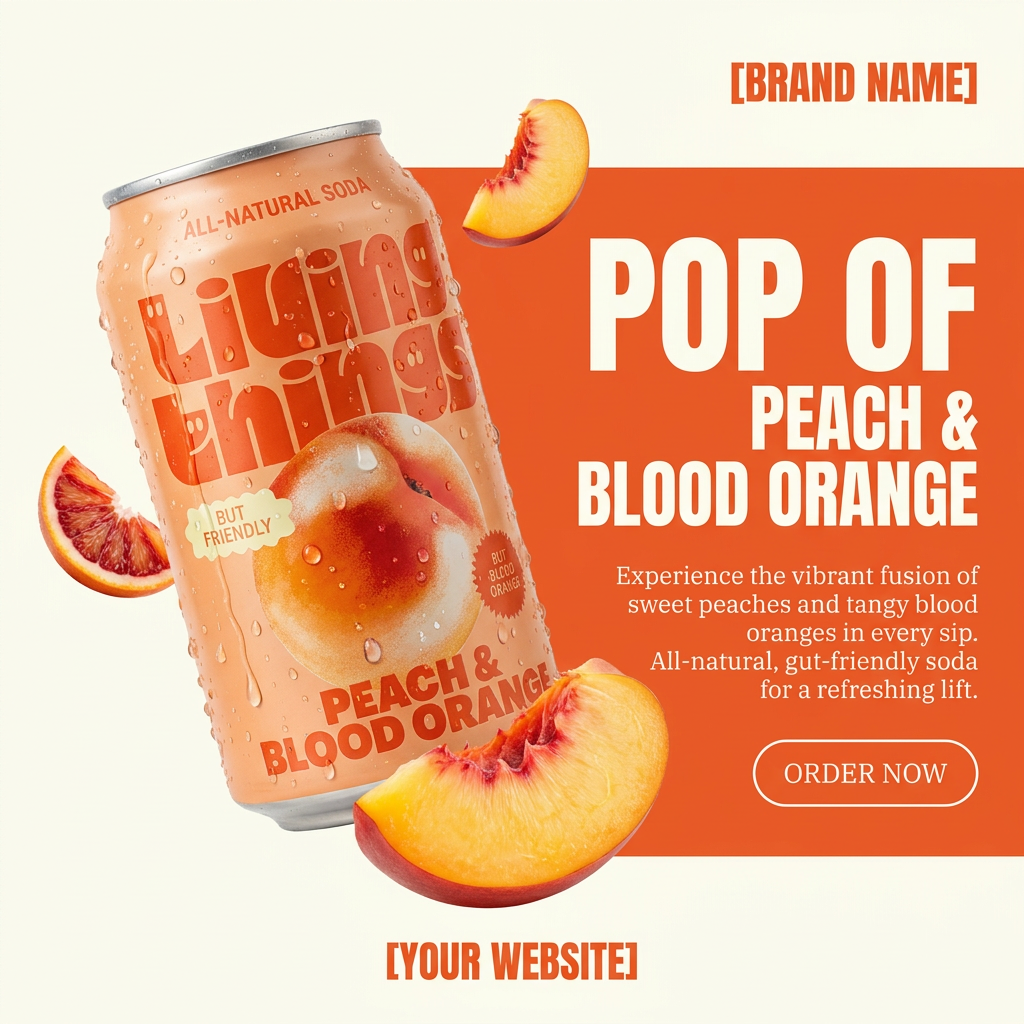
Turn any product photo into a bold, modern ad poster. It automatically frames your item against a split-color background, pairing a clean cream tone with a solid block of your product's dominant color. Super clean, minimal, and ready for social feeds.
Regenerate using your own assets.
A repeatable system for endless on-brand product visuals
By separating your product from the AI-generated scene, you move from gambling to a reliable production system. The one-click background generators that try to do everything at once will continue to produce flawed, off-brand results. A workflow-based platform like MyUP gives you the control needed for professional content.
The benefits are clear:
- Total Product Accuracy: Your product is always displayed perfectly because you are using its actual photograph. No distortions, no errors.
- Guaranteed Brand Consistency: With MyUP's Brandkit guiding every background generation, your visuals will always align with your brand's unique aesthetic.
- Infinite Scalability: From one product photo, you can generate hundreds of unique, on-brand scenes for different campaigns, social platforms, and seasonal promotions, saving thousands on traditional photography.
Stop wrestling with AI tools that don't respect your brand. Adopt a workflow that gives you control, and start creating the exact product shots you need, every single time.
