
If you've been generating user-generated content (UGC) style ads with AI and feel like they're falling flat, you're not imagining it. On July 20, 2026, Adobe confirmed this widespread industry pain point by launching an 'Authenticity Engine' for its Firefly model, designed specifically to combat the sterile, overly-polished look of AI creative. The biggest players in the game now officially admit it: your AI ads look fake.
While a feature like this validates the problem, a black-box 'authenticity' button isn't the solution for a brand. True authenticity isn't a generic filter; it's a specific, controllable aesthetic that reflects your unique audience and product. The real fix isn't a magic button—it's a better workflow. This guide provides that exact workflow, showing you how to define your brand's version of 'real' and make it a repeatable, one-click process in MyUP.
Why 'perfect' is the enemy of authentic
The core issue is that AI models are trained to produce 'perfect' images. They default to studio lighting, flawless skin, symmetrical compositions, and impossibly clean environments. This is the opposite of what makes traditional UGC effective. Real UGC connects with viewers because it's relatable. It has the subtle imperfections of real life: the slightly off-center framing of a phone picture, the natural light from a window, the minor blemishes on a person's skin. These are cues of authenticity.
When an AI-generated ad lacks these cues, it lands squarely in the 'uncanny valley' of ad creative. Viewers can't always articulate why it feels off, but they know it wasn't made by a human for humans. This friction creates distrust and lowers ad performance. Your click-through rates suffer not because the product is bad, but because the creative screams 'low-effort AI' instead of 'trusted recommendation'. To get results, you need to deliberately prompt for the right kind of imperfection.
The prompt formula for believable imperfection
Getting realistic AI UGC isn't about finding one magic word. It’s about building a prompt formula that combines positive instructions with specific negative constraints. The goal is to strip away the AI's tendency toward digital perfection.
Here’s the core structure you can adapt in MyUP:
- Specify the Camera: Don't just ask for a photo; ask for a photo from a specific device. This is one of the most powerful levers for realism. Instead of 'photo of a woman using our product,' try 'shot on iPhone 15, a woman using our product'. This simple addition cues the model to replicate the specific lens qualities, depth of field, and color science of a smartphone camera.
- Control the Lighting: AI defaults to bright, even, multi-point studio lighting. You have to override this. Use terms like 'natural window lighting', 'golden hour sun', 'slightly overcast day', or 'candid flash photography at night'. This grounds the image in a real-world environment.
- Introduce Human Elements: Ask for 'candid moment', 'unposed', 'in-the-moment selfie', or 'over the shoulder shot'. These phrases break the AI's habit of creating perfectly centered, posed portraits.
- Use Negative Prompts to Remove Polish: This is where you fight the uncanny valley directly. Append your prompt with negative keywords to forbid the AI from adding its typical digital gloss. A good starting list is: --no studio lighting, perfect skin, flawless, airbrushed, professional photography, soft lighting, pristine, clean background. In MyUP, you can build these directly into your saved workflow.
By combining these elements, a generic prompt transforms into a powerful recipe for authenticity. You're no longer just describing a scene; you're directing the entire photoshoot, from the gear to the environment.
Workflow: How to make authenticity repeatable in MyUP
A great prompt is only useful if you can reuse it. The real cost in content production is the time spent re-creating successful results. This is where a workflow-based platform like MyUP becomes essential. Instead of saving your prompt formula in a text document, you build it into a repeatable asset generator.
In MyUP, you can create a workflow that combines your 'imperfect' prompt formula with your brand's specific assets. First, you save the detailed prompt—including the camera type, lighting, and all your negative keywords—as a template. Now, anyone on your team can generate a perfectly imperfect, UGC-style base image with a single click, without needing to become a prompt engineer.
The next step is applying your brand identity. This is where the MyUP Brandkit comes in. After the authentic image is generated, the workflow automatically applies your brand's logo, fonts, and color palette. The result is an asset that feels like authentic UGC but is still perfectly on-brand. The user validates the output, and MyUP handles the production. This two-step process—generate for authenticity, then overlay for brand consistency—is the key to scaling high-performing ad creative.
You can start with a pre-built workflow designed for this exact purpose. The Photo Product Ad template is configured with the right settings to get you started on authentic product shots immediately.
Workflow code: #myup-seli-mtp0
Photo Product Ad
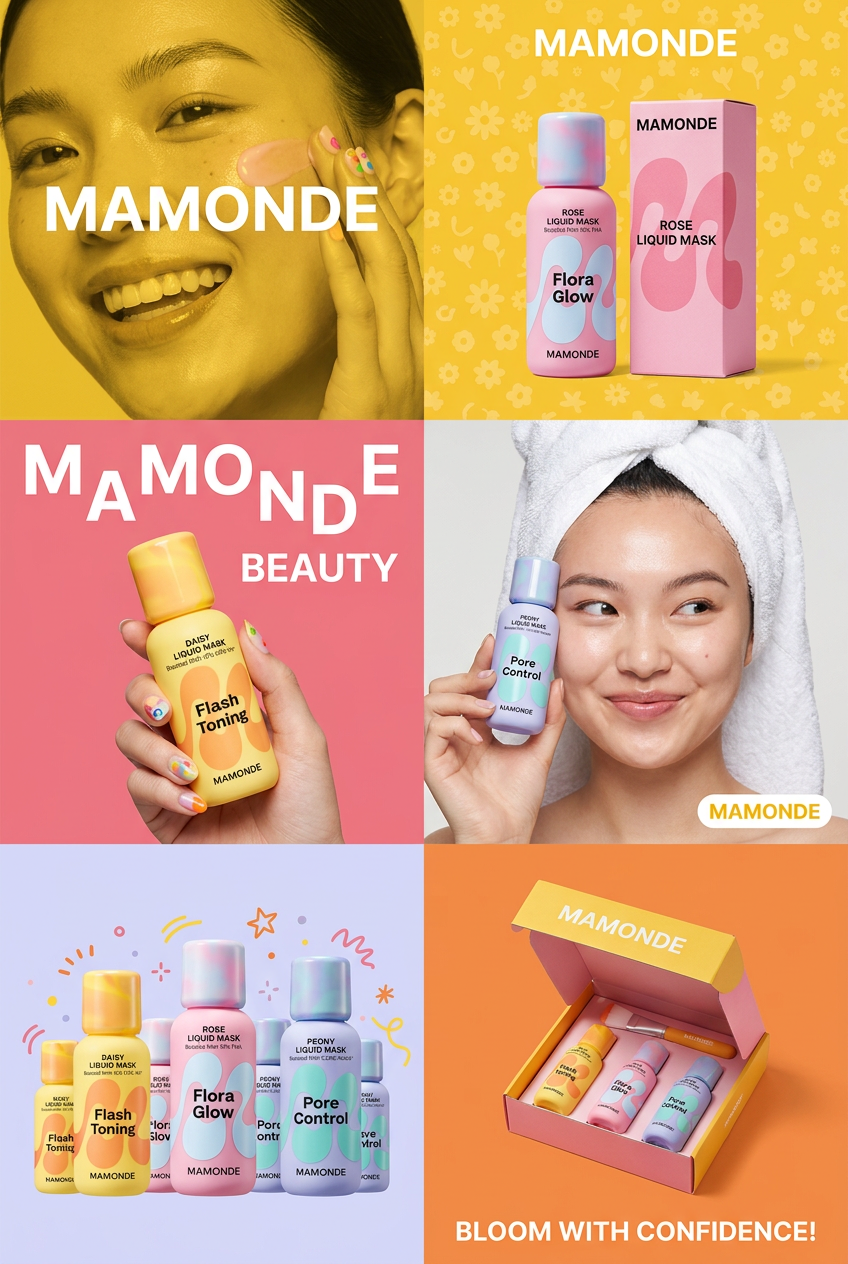
Get that high-end editorial look with a stacked, multi-panel campaign layout. It slices your brand visuals into a bold three-tier grid, pairing tight product close-ups right next to lifestyle shots for a cohesive, modern beauty poster.
Regenerate using your own assets.
In practice: Generating authentic ads for different products
Different product categories require different flavors of authenticity. What works for a skincare brand won't work for a food delivery service. A MyUP workflow allows you to create and save these different 'recipes' for authenticity across your product lines.
For Beauty and Skincare Brands
Authenticity means showing realistic skin texture and relatable situations. Instead of a flawless model in a studio, you want a shot that looks like a real customer's selfie. You might use a prompt like: 'Selfie shot on iPhone 15, a woman with glowing skin trying a new lip gloss in her bathroom, natural morning window light, slightly messy background --no perfect skin, airbrushed, studio lighting'.
This kind of detailed prompt is already built into templates like the Gourmand Candy Lip Gloss Ad, which is designed to produce vibrant, authentic-looking visuals for beauty products.
Workflow code: #myup-iffs-sdef
Gourmand Candy Lip Gloss Ad
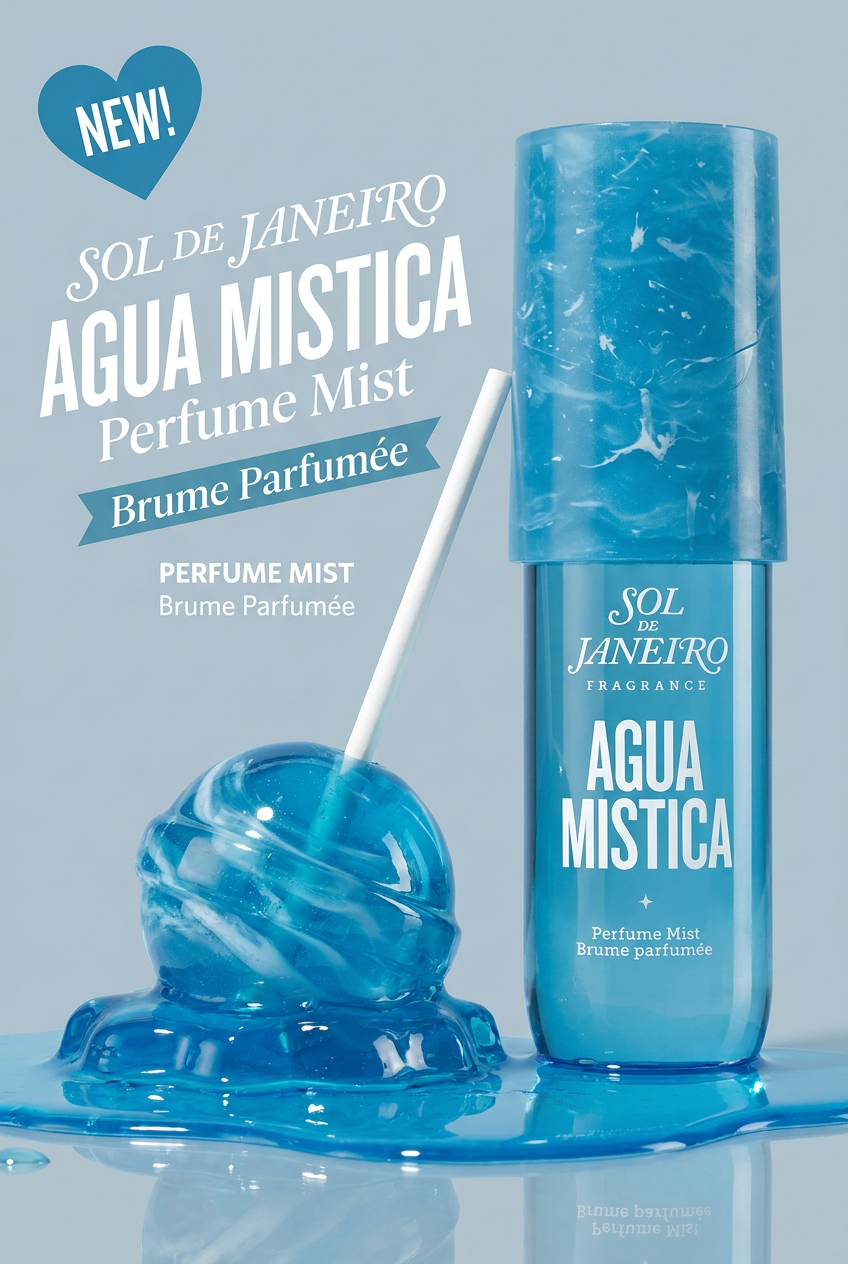
Drop your product photo in and watch it transform into a sleek, modern cosmetic ad. It automatically extracts your item's signature colors to build a vibrant, gourmand-style backdrop that matches perfectly.
Regenerate using your own assets.
For Food and Beverage Brands
For food, 'perfect' often looks like plastic. Authenticity comes from texture, steam, crumbs, and the context of a real meal. A better prompt would be: 'Overhead shot on a Google Pixel 8, a half-eaten, delicious-looking pizza on a wooden table, natural light from a window, a glass of cola next to it, slightly messy, realistic cheese pull --no pristine, perfect, studio shot, plastic-looking'. For a deeper dive into this, see our complete guide on AI food photography that actually looks real.
The Food Brand Poster workflow is a great starting point for creating this kind of appetizing, true-to-life image for CPG brands and restaurants.
Workflow code: #myup-tbky-nciq
Food Brand Poster

Instantly turn any food or drink product packaging into a bold, vibrant retro poster. The system automatically reads your bottle or box to grab its exact colors and ingredients, then crafts a perfectly coordinated vintage background around it.
Regenerate using your own assets.
You control the authenticity, MyUP handles the production
The arrival of 'authenticity' features from major players like Adobe proves that the demand for realistic AI creative is massive. But relying on a generic filter means your ads will look like everyone else's. True performance comes from defining your own brand's unique version of realism—a look that your specific customers find relatable and trustworthy.
MyUP gives you the control to craft that look with detailed prompt formulas and the platform to make it a scalable, repeatable system. You define the right kind of imperfection once in a workflow. MyUP ensures you can produce it consistently every single time. Stop chasing perfection and start building a workflow for authenticity.
