You’ve tried it. You prompted for a “delicious cheeseburger” and got a glossy, plastic-looking puck of meat that had zero appetite appeal. For restaurant owners, CPG brands, and food marketers, this has been the dealbreaker for AI image generation. As a recent trend on Reddit communities highlights, the web is littered with examples of this waxy, unappetizing AI food. It’s a fun novelty, but you can’t build a marketing campaign on it.
Until now. Thanks to recent breakthroughs in photorealistic AI models, the “plastic food” problem is finally solved. It’s now possible to generate images that look like they were shot by a professional food photographer with a high-end DSLR camera. But a great photo is just the first ingredient. The real goal is to turn that photo into a finished marketing asset—an ad, a poster, a menu update—that is consistently on-brand.
This article details the complete, end-to-end workflow on MyUP.ai. We'll go beyond just prompting and show you how to generate a hyper-realistic hero shot and then instantly deploy it across a full suite of branded marketing materials.
Step 1: Generate the hero shot that actually looks edible
The foundation of any great food campaign is a hero shot that makes people hungry. With AI, this comes down to the prompt. Generic prompts get generic results. To achieve photorealism, you need to think like a photographer and a food stylist, describing not just the dish, but the light, texture, and composition.
In MyUP's image generator, move beyond simple descriptions. Instead of “cheeseburger,” you need to specify the details that trigger a sensory response:
- Lighting: Don't just say “well-lit.” Describe the light source. Is it “soft natural light from a side window” or “dramatic, warm studio lighting”?
- Texture: This is critical for appetite appeal. Use words like “glistening glaze,” “crispy char marks on the patty,” “melty, dripping cheese,” and “fresh, dewy lettuce.”
- Camera and Composition: Specify the shot. “Macro shot,” “close-up,” and “shallow depth of field” will create that professional, focused look with a beautifully blurred background (bokeh).
Here is a professional-grade prompt you can adapt inside MyUP to generate a truly appetizing burger:
Photorealistic commercial food photography of a gourmet smash burger on a brioche bun. The beef patty has crispy, lacy edges and visible char. A slice of cheddar cheese is perfectly melted, dripping down the side. Topped with crisp green lettuce, a slice of ripe red tomato, and thinly sliced red onion. The bun is shiny and lightly toasted. Shot with a macro lens, shallow depth of field, soft natural light from the left creating gentle highlights on the glossy sauce. The background is a rustic wooden table, softly blurred. Hyper-detailed, incredible texture.
This level of detail is what separates a sterile AI image from a photo that stops the scroll.
Step 2: Turn a single photo into a full campaign with a Brandkit
Generating a stunning hero shot is a huge win, but it's only half the job. That image is an asset, not a campaign. The next, and most crucial, step is to place it into marketing contexts—a process that used to require a designer and hours of manual work. This is where a systems-based approach becomes a massive advantage.
On MyUP, you set up your Brandkit once. By providing a link to your website or manually uploading your assets, MyUP saves your brand's core visual identity:
- Your logo: To be placed consistently on every asset.
- Your brand colors: For backgrounds, text, and graphic elements.
- Your brand fonts: Ensuring all typography matches your menu, website, and other collateral.
This isn't just about saving time; it's about enforcing brand consistency at scale. Every asset you create from this point on will automatically inherit your visual identity. This transforms your AI-generated photo from a one-off image into the foundation for a cohesive and professional marketing campaign.
Step 3: Deploy your image into ready-made marketing assets
With your realistic hero shot generated and your Brandkit loaded, you’re ready for the final step: production. In MyUP, you don’t have to start with a blank canvas. The platform uses workflows—pre-built templates for specific marketing jobs—that combine your image and your Brandkit to create finished assets in one click.
Instead of manually resizing, adding text, and placing logos for every channel, you simply choose a workflow that matches your goal. The system handles the production; you validate the result. Let's walk through a few common scenarios for a restaurant or food brand.
Example: A social media ad for your new dish
You're launching a new spicy chicken sandwich and need to get the word out on Instagram and Facebook immediately. A traditional photoshoot would take days or weeks to schedule and edit. With your AI-generated hero shot, you can create a high-performance ad in under a minute.
The MyUP 'Food Product Ad' workflow is built for this exact purpose. It takes your food photo, applies your logo and brand fonts for the headline, and formats it into a compelling social media graphic ready to publish. You direct the creative by providing the dish, and MyUP executes the design.
Workflow code: #myup-w0vh-abft
Food Product Ad
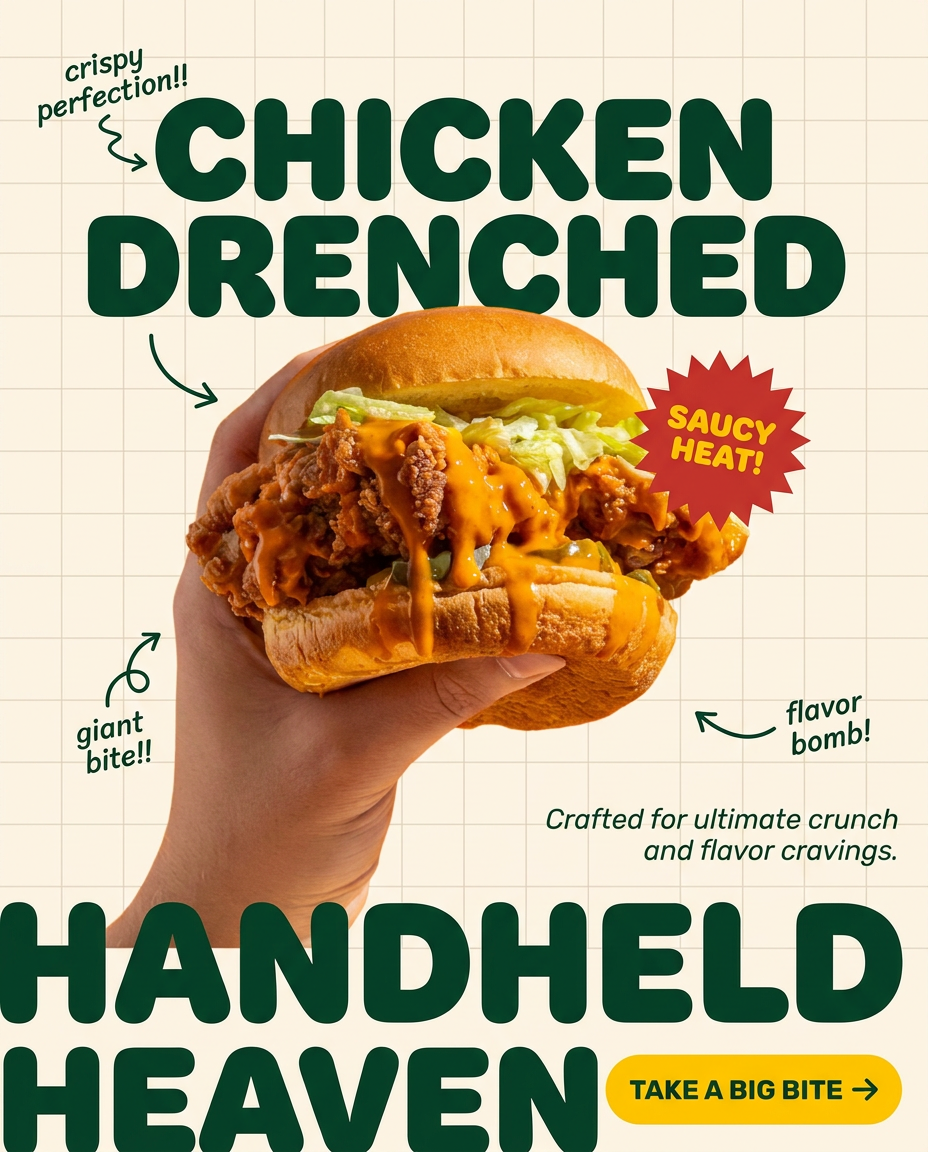
Turn any dish or snack into a bold, playful social ad. It places your food against a soft warm beige background with a subtle grid pattern, topped with chunky rounded headlines. It's clean, friendly, and instantly grabs attention in the feed.
Regenerate using your own assets.
Example: A bold promotional poster
Next, you need a high-impact visual for an in-store display or a printed flyer. This requires a different design approach than a social media ad—bolder, more focused, and designed to grab attention from a distance. The 'Bold Portrait Food Advertising Photo' workflow is designed for this. It uses dramatic cropping and composition to give your food photo an editorial, high-end feel suitable for print or digital signage.
Workflow code: #myup-xjsb-hirr
Bold Portrait Food Advertising Photo

Get those high-impact, tight action shots of people actually enjoying your food brand. It drops your product right into a messy, realistic close-up bite shot that feels like a premium lifestyle campaign instead of a boring studio packshot.
Regenerate using your own assets.
Workflow code: #myup-wo7y-ebmc
Food Ad
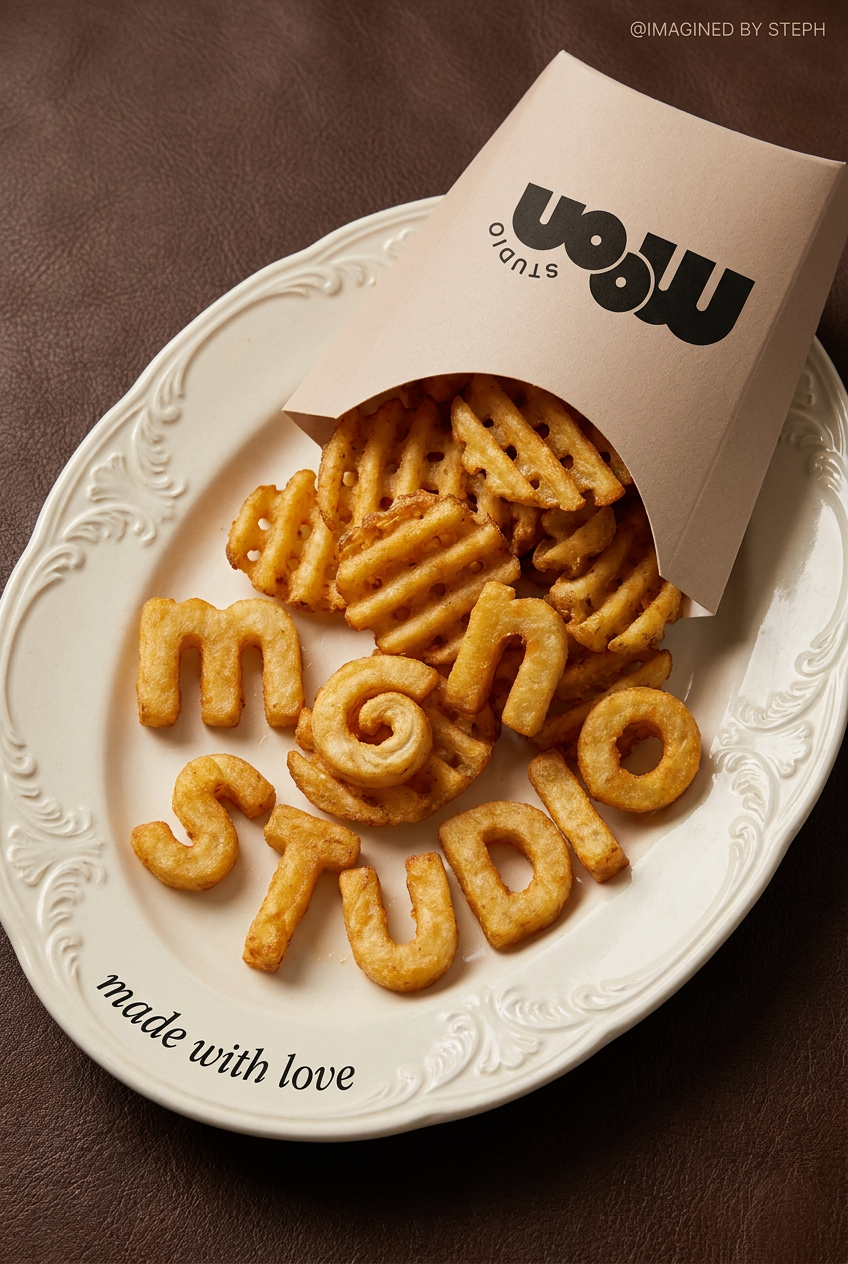
Transform simple food items into high-fashion editorial campaigns. This style uses a dynamic diagonal layout and a slightly tilted overhead angle to give your products incredible depth and texture, making them look like luxury design pieces.
Regenerate using your own assets.
Example: An updated menu or special feature
Finally, your new dish needs to be featured on your digital menu boards or as a printed table-topper. Consistency with your existing menu design is key. The 'Food Brand Poster' workflow creates a clean, stylish layout that presents your food photo alongside your branding, perfect for integrating into your menu system.
This is a fast and efficient way to handle menu engineering, allowing you to test new items with professional visuals without committing to expensive, permanent print runs. It's a core part of building a menu that can adapt and evolve quickly, a process we cover in more detail in our guide to The AI workflow for a restaurant menu that designs itself.
Workflow code: #myup-tbky-nciq
Food Brand Poster

Instantly turn any food or drink product packaging into a bold, vibrant retro poster. The system automatically reads your bottle or box to grab its exact colors and ingredients, then crafts a perfectly coordinated vintage background around it.
Regenerate using your own assets.
Your job is to direct, not to shoot
Great food photography is no longer limited by access to a studio, a stylist, and a photographer. It’s about having a system that can reliably translate a creative idea—'our new spicy chicken sandwich'—into a complete set of marketing visuals that look real, feel on-brand, and are ready to publish in minutes.
With a platform like MyUP, your role shifts from manual production to creative direction. You define the vision in the prompt, approve the hero shot, and validate the final assets. MyUP handles the repetitive, time-consuming work of applying branding and formatting layouts. This workflow doesn't just save thousands of dollars on photoshoots; it saves hundreds of hours in production, allowing you to market your food faster and more effectively than ever before.
