You prompted for a “delicious gourmet burger” and the AI gave you a picture of a plastic toy. The cheese has no melt, the bun has the sheen of a bowling ball, and the whole thing looks sterile and unappetizing. It’s a common frustration, so common that specialized models like Chroma-V2 were just released in July 2026 to try and solve this exact problem.
But the solution isn't chasing the latest niche model. The secret to creating crave-worthy food photography with AI isn't a magic prompt like “make it tasty.” It's about control. Professional food photos look delicious because a stylist and photographer have meticulously controlled the light, texture, and composition. Getting realistic results from AI requires the same level of art direction. This guide provides the professional workflow to do just that, turning you from a frustrated prompter into a food stylist who directs the AI to produce consistently delicious, on-brand results on MyUP.ai.
The 3 ingredients of delicious photography: light, texture, and styling
Before we can fix the problem, we have to diagnose it. Fake-looking AI food almost always fails in one of three areas that professional photographers obsess over.
1. Lifeless Lighting
In the real world, light interacts with food in complex ways. It creates glistening specular highlights on a sauce, casts soft shadows around a piece of bread, and reveals moisture on fresh vegetables. Most AI generators default to flat, diffuse, “commercial” lighting that eliminates these details, making the food look like it's in a sterile lab, not a warm kitchen. Appetizing food needs realistic light with direction and character.
2. Fake Texture
We eat with our eyes first, and our eyes are trained to look for texture. The crispy char on a grilled steak, the porous crumb of freshly baked sourdough, the creamy swirl in a soup—these details signal flavor and quality. AI often smooths over these imperfections, resulting in unnaturally perfect surfaces that read as plastic or rubbery. Without convincing texture, the food has no story and no appeal.
3. Poor Styling and Composition
A great food photo is a carefully constructed scene. The plate, the cutlery, the linen, the out-of-focus background (or 'bokeh') all work together to create a mood. AI generators, left to their own devices, often just center the food item on a generic surface with no thought to plating, propping, or depth of field. This results in an image that feels empty and unconvincing, like a 3D render, not a photograph.
The workflow: from bland prompt to branded asset on MyUP
Fixing these three issues requires a systematic approach, not random prompting. On MyUP, this professional workflow begins before you generate a single image. It starts with your brand.
The first step is to create a Brandkit on MyUP. By providing a link to your website, MyUP automatically extracts your brand’s core visual identity: your logos, color palette, and fonts. This becomes the foundation for every asset you create. When your AI food photography needs a text overlay for a social media post, your Brandkit ensures it uses the correct font and brand color. This simple step solves brand consistency from the outset, something that's impossible with generic image generators.
With your brand identity locked in, you can now move into the creative workflow, where you’ll act as the art director to systematically control the light, texture, and styling of your shots.
Step 1: Control the light and texture like a food stylist
To get realistic results, you must describe the physics of the scene, not just the food itself. Your prompt needs to include specific terms from photography and culinary arts.
- For Light: Don't just say 'good lighting'. Specify the source, direction, and quality. Try terms like: "soft morning window light from the side," "dramatic backlit scene creating a bright rim light," "warm, low-key restaurant ambiance," or "hard light creating sharp, defined shadows."
- For Texture: Get specific about the surfaces. Use phrases like: "fluffy, porous crumb structure," "glistening olive oil drizzle with specular highlights," "crispy, golden-brown fried texture," "creamy, thick consistency with a swirl on top," or "visible char marks from the grill."
Combining these gives you a prompt that directs the AI like a professional. Instead of "a photo of a steak," you'd write: "Macro food photography of a medium-rare grilled steak, sliced to show the pink interior. Visible char marks and glistening juices. Plated on a dark ceramic dish, shot with dramatic, low-key side lighting that highlights the texture."
For a powerful, high-contrast look perfect for a hero dish, you don’t need to engineer the perfect prompt from scratch. MyUP workflows have these best practices built-in. This one, for example, is designed to create dramatic, portrait-style food shots.
Workflow code: #myup-xjsb-hirr
Bold Portrait Food Advertising Photo

Get those high-impact, tight action shots of people actually enjoying your food brand. It drops your product right into a messy, realistic close-up bite shot that feels like a premium lifestyle campaign instead of a boring studio packshot.
Regenerate using your own assets.
Step 2: Compose the shot for your channel
Where will this image live? A hero image for your website needs a different composition than a vertical video for an Instagram story. Your prompt should define the entire scene, including the composition, props, and background.
- Composition: Use terms like "rule of thirds composition," "top-down flat lay," "dynamic diagonal angle," or "shallow depth of field with a beautifully blurred bokeh background."
- Props & Plating: Describe the environment. Add details like "on a rustic, dark wood table," "with vintage silverware," "garnished with fresh parsley," or "next to a sweating glass of iced tea."
Creating assets for social media often means thinking in a 9:16 aspect ratio. Instead of generating a square image and cropping it awkwardly, you can use a workflow designed specifically for that format. This ensures the composition is perfect for vertical viewing from the start.
Workflow code: #myup-fts6-4ihp
Vertical Gourmet French Fry Ad

Transform your products into high-fashion editorial ads. This setup uses a dynamic diagonal layout and a slightly tilted overhead angle to give food and packaging incredible depth and texture. It's perfect for giving any brand a chic, premium look.
Regenerate using your own assets.
Step 3: Create a whole menu of on-brand visuals
The real power of a workflow isn't just creating one great image; it's creating a whole campaign's worth of consistently great images. Once you've defined your lighting, texture, and styling preferences, you have a repeatable recipe for success. Your MyUP Brandkit keeps the core identity consistent, while the workflow ensures the photographic style remains the same across different dishes.
You can now generate an entire menu of visuals simply by swapping out the main subject. The prompt structure for your steak photo can be adapted for chicken, fish, or a vegetarian dish, ensuring your entire menu is presented in a cohesive, professional style. This is how you move from one-off image generation to building a scalable content production system.
For your everyday social media posts, this flexible workflow is the perfect starting point for clean, appetizing product ads.
Workflow code: #myup-w0vh-abft
Food Product Ad
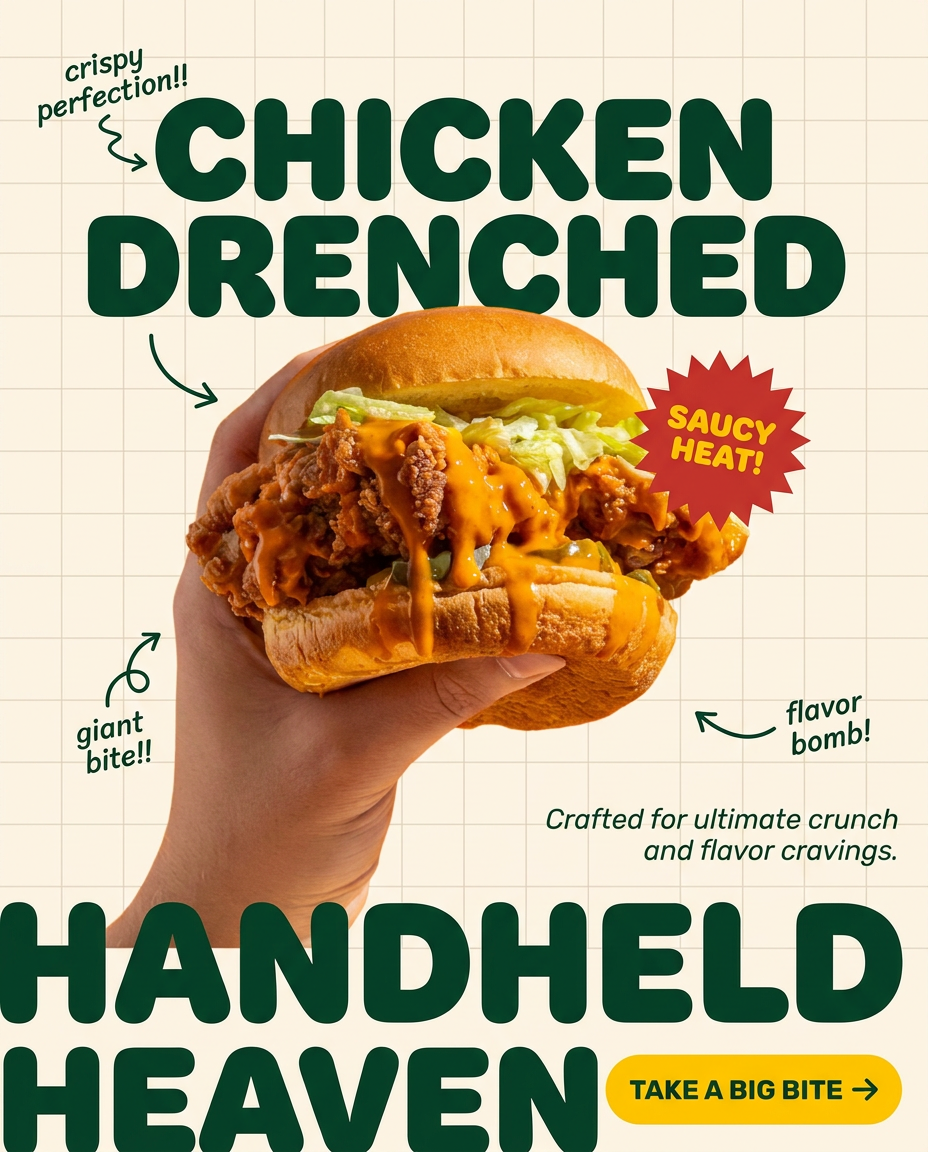
Turn any dish or snack into a bold, playful social ad. It places your food against a soft warm beige background with a subtle grid pattern, topped with chunky rounded headlines. It's clean, friendly, and instantly grabs attention in the feed.
Regenerate using your own assets.
And when you need to run a specific promotion or tap into a different aesthetic, you can use a more stylized workflow. For example, you can create a vintage-inspired poster for a weekly special that still feels connected to your brand through the colors and tone established in your Brandkit.
Workflow code: #myup-1hgd-9oz5
Retro Style Food Advertising Poster

Turn any food product shot into a bold, nostalgic retro advertisement. It drops your item onto a warm cream background and automatically frames it with a color-matched header badge for that classic mid-century print ad look.
Regenerate using your own assets.
You are the art director, MyUP is your studio
Making AI-generated food look delicious isn't about finding a secret prompt or a better model. It's about applying the principles of photography and art direction through a structured workflow. You provide the creative vision—the mood, the light, the story. You validate the results and make the final creative calls. MyUP provides the production engine, a powerful and repeatable studio that executes your vision consistently and at scale. Stop prompting and start directing.
