
The goal of AI fashion photography isn't to look like AI; it's to sell clothes. That requires a brand-first approach where the AI adapts to your aesthetic, not the other way around. Getting realistic results isn't about one magic prompt. It's a workflow that involves defining your brand's specific style, generating consistently, and creating scenes that highlight the product, not just the AI's capability.
Even AI giants admit it: the default 'AI look' doesn't sell clothes
In July 2026, Midjourney released a new parameter, '--style raw+', designed to reduce the model's heavy-handed artistic opinion. This isn't just a technical update; it's an admission from a market leader. The default, hyper-stylized 'AI look' that impresses artists is a commercial liability for brands. It screams 'AI-generated' and distracts from the product.
For an e-commerce brand or fashion line, photography has one job: to represent the product realistically and desirably. It requires control over lighting, mood, model expression, and fabric texture. A cool but inaccurate image is worse than no image at all. This is where single-prompt generation fails. The solution isn't a better prompt; it's a better, brand-first workflow.
Step 1: Define your brand's photoshoot DNA (before you write a single prompt)
Every great fashion photographer has a signature style. Your brand should too. Before you even think about generating an image, you must codify your visual identity. This goes far beyond a logo and color palette. For photography, your brand's DNA includes:
- Lighting Style: Is your look defined by soft, natural window light, or dramatic, hard-edged studio strobes? Is it golden hour warmth or cool, diffused daylight?
- Mood & Atmosphere: Are your campaigns energetic and vibrant, or moody and contemplative?
- Model Archetype: Who is your customer? Define the look, attitude, and general aesthetic of the people who represent your brand.
- Color Grade: Do your images have a consistent color treatment? Desaturated tones, high contrast, a warm filmic look?
This is the foundational step that most users skip, leading to generic results. In MyUP, you build this DNA directly into a Brandkit. By setting up your photographic style, model preferences, and color palette once, you ensure every image the AI generates starts from your unique brand foundation. The AI learns your rules, so you're not fighting its defaults every time.
Step 2: Master the prompt details that create realism
With your brand DNA established in a MyUP Brandkit, you can focus your prompts on the details that create commercial-grade realism. As of July 2026, the technology has crossed a critical threshold.
First, texture. With new capabilities in models like Flux 1.2, you can move beyond generic materials. Don't just ask for a 'leather jacket'. Demand a 'photograph of a pebbled leather biker jacket, showing the grain and subtle sheen'. Instead of 'silk dress', specify 'liquid silk charmeuse dress, capturing the way light reflects off the folds'. This level of detail is crucial for communicating quality to a potential buyer.
Second, expression. The current debate among AI artists about 'micro-expressions' highlights the new frontier of realism. A generic 'smile' looks fake. You need emotional specificity. Prompt for 'a confident, subtle smirk', 'a look of quiet contemplation', or 'a genuine laugh with eyes crinkling'. This is how you create a connection with the viewer, turning a static model into a relatable person.
To see how these elements combine for a high-fashion result, this MyUP workflow is pre-configured with the right photographic settings and prompt structure for an editorial shot.
Workflow code: #myup-yk1h-uqy8
High-End Editorial Fashion Magazine Cover

Drop in any portrait and turn it into a high-end editorial magazine cover. It frames your subject beautifully with relaxed, high-fashion posing and soft styling for a polished print aesthetic.
Regenerate using your own assets.
Step 3: The simple workflow for campaign-wide consistency
So you've created one perfect image. How do you create ten more for a lookbook with the exact same model, lighting, and mood? This is the single biggest challenge in AI brand photography. You'll see complex, multi-tool workflows trending on Reddit and Behance involving custom model training and layered ControlNets. They work, but they are incredibly time-consuming and require technical expertise.
MyUP solves this with an integrated workflow. By combining your Brandkit (which holds your style DNA) with a saved workflow, you create a repeatable production line. The Brandkit ensures the model's facial structure and brand aesthetic remain consistent, while the workflow locks in the camera angles, lighting, and composition. For a brand, this consistency is non-negotiable. You can't have a slightly different model on every product page. If you're building a library of professional product photos, consistency is key.
This means you can generate shot after shot for a campaign, and they will all look like they came from the same photoshoot, by the same photographer. Here’s a workflow designed for a consistent streetwear aesthetic. Notice how it maintains a specific vibe across outputs.
Workflow code: #myup-hyfn-escm
Streetwear Photography
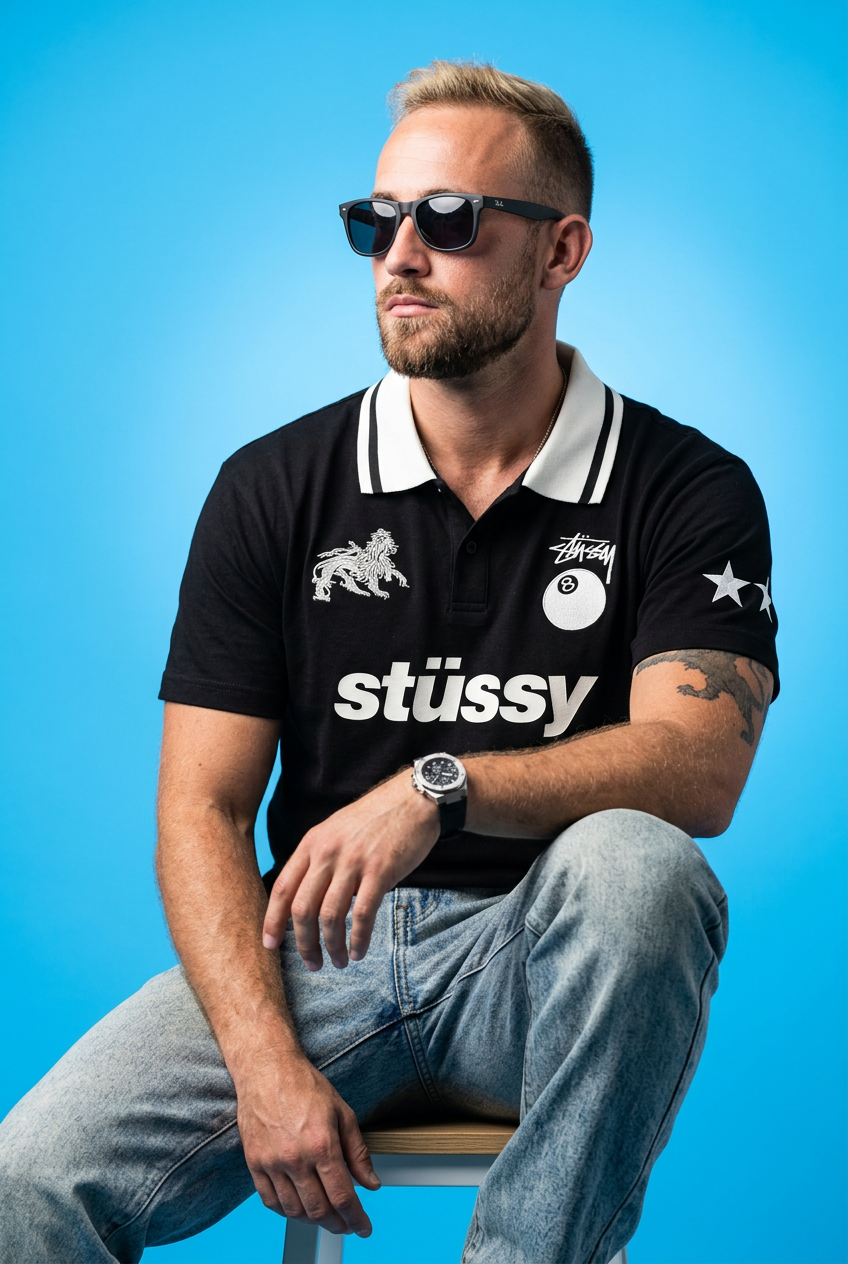
Drop your apparel design in to get a complete five-shot streetwear editorial campaign. It renders your clothing across a cohesive mix of high-fashion poses, from low-angle hero shots and mid-stride action to gritty macro close-ups.
Regenerate using your own assets.
Step 4: Scale your lookbook from one shot to a full collection
Once your Brandkit and workflow are locked in, scaling your production is simple. You're no longer generating from scratch; you're directing variations within your established brand world. Your role shifts from technician to creative director.
You can now instruct the system to create the necessary assets for a full campaign or e-commerce listing:
- 'Generate the same shot from a 3/4 angle.'
- 'Create a full-body shot of the same model wearing this outfit.'
- 'Place this scene in a minimalist concrete skatepark at midday.'
- 'Showcase this hoodie in three alternate colorways: olive green, heather grey, and black.'
Because the core elements are constrained by your workflow, the outputs remain consistent and on-brand. You're simply guiding the composition and context. The MyUP platform handles the complex production, while you validate the results. This allows you to generate dozens of commercially viable assets in the time it would take to set up a single traditional photograph.
These workflows show how the final assets can be adapted for different marketing needs, from a dynamic ad to a clean poster.
Workflow code: #myup-ywpr-rqz6
Professional Sportswear Ad

Suspends your apparel right in the center of a high-energy promo shot, held up by hands around the frame. It gives your shirts or jerseys a gritty, collaborative streetwear editorial look that feels alive and physical.
Regenerate using your own assets.
Workflow code: #myup-wtgs-4huq
Fashion Poster
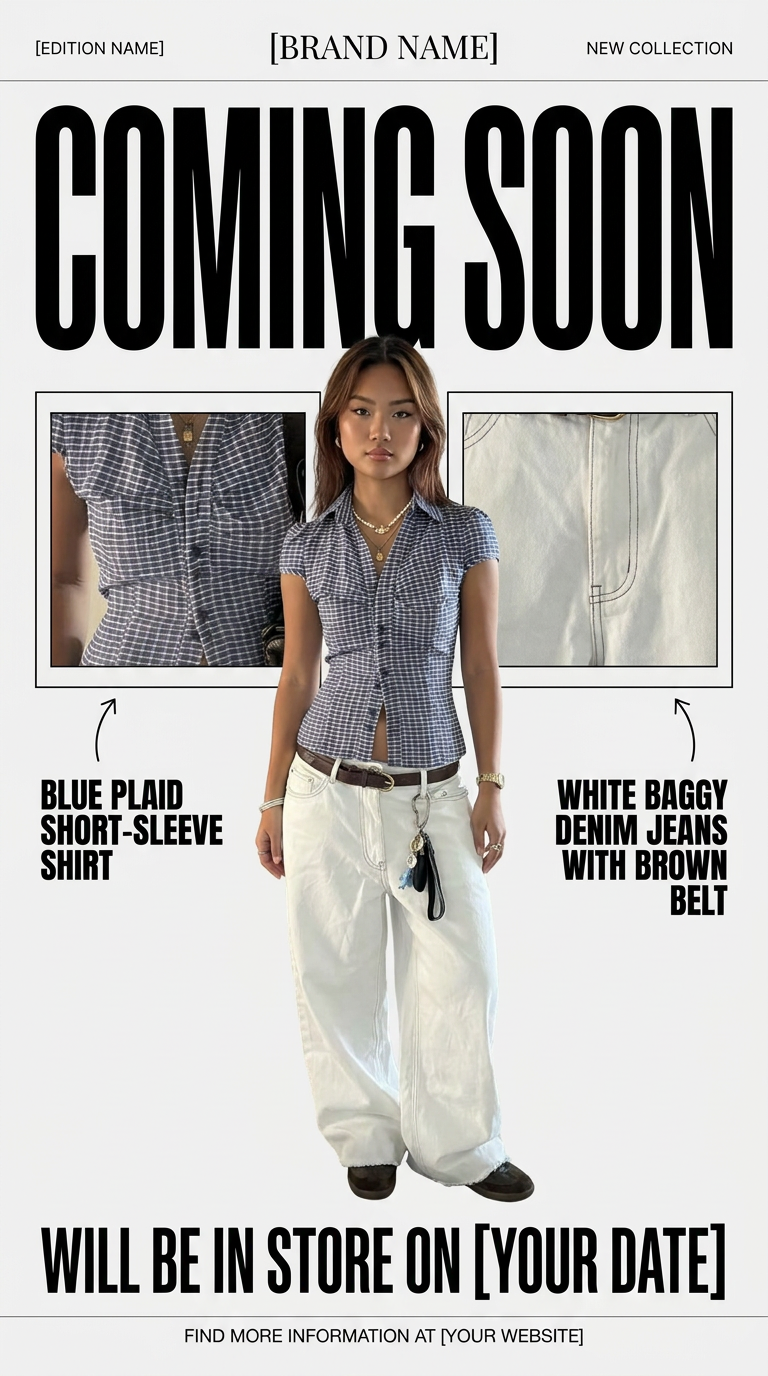
Turn your product shots into clean, high-end teaser posters. It frames your images in a minimalist off-white layout with editorial header text, giving your upcoming launches the look of a luxury fashion drop.
Regenerate using your own assets.
Your role is creative director, not AI technician
Achieving AI fashion photography that sells isn't about outsmarting the AI with a complex prompt. It's about building a system where the AI works for your brand by default. By defining your photoshoot DNA in a Brandkit, mastering the details of texture and emotion, and using repeatable workflows for consistency, you move beyond generating single images and start producing entire campaigns.
The goal of a platform like MyUP is to handle the tedious production so you can focus on creative direction. You approve the shots, you guide the narrative, you make the final call. The AI executes. This brand-first workflow is what turns the potential of AI image generation into a real commercial asset that drives sales.
