This week, the world of AI image generation was rocked by two major announcements. On July 21, Stability AI launched 'Stable Storyboard', followed a day later by Adobe Firefly's 'Generative Match'. Both promise to solve the single biggest problem in AI storytelling: character consistency. And they are a huge step forward. But if you've tried to create a narrative that lasts longer than a single panel, you know the truth: a feature is not a production system.
Generating one great image is easy. Telling a story is hard. True consistency isn't just about your character's face looking the same. It's about their clothes, the props they hold, the color grade of the world they inhabit, and the style of the lettering in their speech bubbles. If any of these elements drift, the story falls apart. Viral social media threads show creators juggling three or four different apps—Midjourney, a face-swapper, Canva, Photoshop—in a painstaking process to maintain control. There is a better way.
This tutorial details the professional workflow for creating AI comic strips. It’s not about finding the perfect prompt; it's about building a system in MyUP.ai that ensures consistency from the first character sketch to the final, finished page.
Step 1: Create your character's 'single source of truth'
Before you generate a single panel, you need to define your character. In professional animation and comics, this is called a character turnaround sheet or model sheet. It’s a definitive reference that shows the character from multiple angles (front, side, three-quarter) with consistent features, clothing, and colors. This isn't just a nice-to-have; it's the anchor for your entire project.
The amateur method is to just use a good panel as your reference. The problem? That first image might have lighting or a pose that obscures key details, confusing the AI in later steps. A professional builds the master reference first.
In MyUP.ai, you can create a high-quality character sheet and save it directly into your Brandkit. The Brandkit becomes your project's 'story bible,' a central hub for all visual assets. You generate the key art for your character once, establishing their official look, colors, and style. The AI can then refer to this 'single source of truth' for every subsequent generation.
To create a striking, high-quality reference image for your character, you can use a workflow designed for polished portraits. The goal is to get a clean, well-lit image that clearly defines your character's core features.
Workflow code: #myup-yk1h-uqy8
High-End Editorial Fashion Magazine Cover

Drop in any portrait and turn it into a high-end editorial magazine cover. It frames your subject beautifully with relaxed, high-fashion posing and soft styling for a polished print aesthetic.
Regenerate using your own assets.
Step 2: Generate consistent panels with your Character Brandkit
With your character reference sheet saved in your MyUP Brandkit, you can now start producing panels. This is where the system-based approach pays off. Instead of relying on a complex text prompt and hoping for the best, you use the Brandkit asset as a powerful visual reference for every new image.
This workflow transforms the creative process. MyUP executes the production; you validate the results. For each panel, you provide a simple prompt describing the action and composition, and MyUP uses your Brandkit's character sheet to ensure the person in that panel is your character. No more drifting faces, changing eye colors, or mysteriously different hairstyles.
This method is fundamentally more reliable than prompt-only techniques because it anchors the AI's output to a concrete visual example. The user approves and adjusts the high-level narrative beats, while MyUP handles the painstaking production of keeping the visuals locked down. You can start generating individual panels using a simple workflow like this one.
Workflow code: #myup-3sro-edbt
Brand Clothes Post

Turn any outfit photo into a high-end fashion promo poster. It centers your subject in a full-body shot against a dark, dramatic studio backdrop, perfectly cropped for social feeds. It gives your apparel a moody, editorial look instantly.
Regenerate using your own assets.
Step 3: Lock down the entire world, not just the face
A common frustration, even when character faces are consistent, is object permanence. A Reddit thread recently went viral asking, 'How do I get my character to hold the SAME sword twice?' This highlights a critical flaw in feature-based solutions: they often focus only on the character, ignoring their world.
A story needs more than a consistent hero. It needs consistent props, locations, and costumes. If your hero's 'ancient magical sword' looks different in every panel, the illusion is broken. MyUP's Brandkit solves this by allowing you to store more than just your main character. You can create reference images for key props, recurring background elements, or specific outfits and add them to your Brandkit.
By building a complete visual bible for your project, you gain control over the entire world. When you need that magical sword to reappear, you reference it from the Brandkit, ensuring it's the exact same design, hilt, and all. This is the difference between making a series of images and building a cohesive, believable world for your story.
Step 4: Assemble and finish with a one-click style workflow
You've generated a set of visually consistent panels. The final step is to bring them together onto a page with a uniform artistic style, layout, and lettering. The amateur workflow typically requires exporting all the images and re-assembling them in Canva or Photoshop, where you manually apply color grades, add speech bubbles, and arrange the layout.
This is slow, tedious, and introduces another chance for inconsistency. In MyUP, this final production step is just another workflow. You can take your generated panels and run them through a finishing workflow that applies a consistent visual treatment across the board. Want a vintage comic book look with halftone dots and a specific color palette? Or a gritty, risograph-printed zine aesthetic? A single workflow can apply that style, add your brand's font for lettering, and arrange the panels into a final page layout.
For applying a distinct visual effect, a styling workflow is perfect.
Workflow code: #myup-3xus-3l9x
Vintage Risograph Event Poster

Turn any announcement into a gritty, tactile gig poster. It layers your text with an uneven letterpress ink texture over a dusty, warm pink risograph paper background. It’s perfect for giving social posts a real analog, screenprinted vibe.
Regenerate using your own assets.
And for arranging your finished panels into a compelling page layout, you can use a mosaic or grid-based template.
Workflow code: #myup-aktp-7jq0
Food Magazine Mosaic Cover
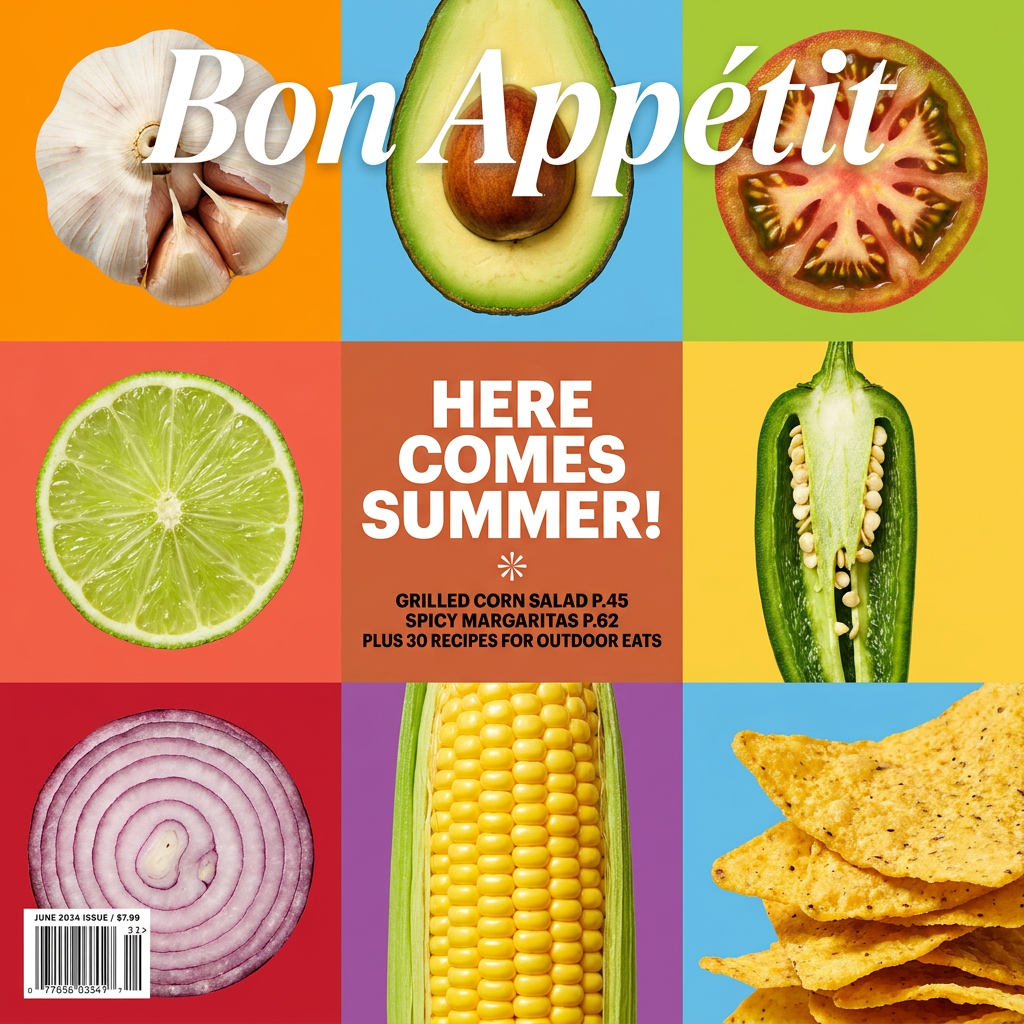
Turn your food shots into a bold, high-end editorial cover. It takes extreme close-ups of your dishes or ingredients and arranges them into a vibrant 3x3 grid that looks straight out of a premium food magazine.
Regenerate using your own assets.
This collapses the final, frustrating steps of page assembly into a single, repeatable action, all within one platform.
The difference between a tool and a production system
Features like Adobe's Generative Match and Stability's Stable Storyboard are powerful and validate the need for greater creative control. But they are still just steps in a much longer process. A storyteller needs more than a tool; they need a production system.
The chaotic, multi-app process of generating panels, fixing faces, assembling layouts, and applying styles is brittle and slow. MyUP's integrated approach provides a robust alternative. The Brandkit acts as the central story bible for all your visual assets, and workflows automate the entire chain of production. This gives you what every creator actually wants: the ability to focus on the story, confident that the execution will remain consistent, professional, and on-brand from the first panel to the last.
