
The architect’s dilemma: when AI photorealism breaks your design
You spend days perfecting a 3D model in SketchUp or Blender. Every line, every angle, every volume is deliberate. You export a basic render and feed it to an AI enhancer like Magnific, hoping for that touch of photorealistic magic to bring it to life for a client presentation. The result? A beautifully lit image with warped columns, melted window frames, and impossible geometry. As a widely shared thread on Reddit's r/archviz from just yesterday, September 4th, 2026, made painfully clear, this is the number one blocker for adopting AI in professional architectural work.
This isn't a random flaw; it's a fundamental problem with how most generative enhancement tools operate. They are built for creative exploration, not structural precision. But there is a reliable production method for achieving photorealism without sacrificing your design's integrity. It requires moving from 'enhancement' to 'intention'.
Why 'adding detail' fails: the problem with generative enhancement
The core issue lies in the phrase 'add detail'. For an AI, 'adding detail' is an act of imaginative invention, or 'hallucination'. When you ask a tool like Magnific to upscale and enhance a basic render, it analyzes the image and guesses what textures, shadows, and details *could* exist. For a fantasy landscape, this is a feature. For an architectural plan, it's a critical failure. The AI doesn't understand that the thickness of a load-bearing wall or the precise angle of a roofline is a non-negotiable constraint.
The result is a render that is aesthetically pleasing but structurally unsound. The AI might smooth a corner that was meant to be sharp, curve a beam that must be straight, or add a window where a structural element belongs. For architects, where every millimeter matters, this unpredictability makes the output unusable for anything beyond a vague mood board.
The expert's fix: manual multi-layer control in ComfyUI
In response to this problem, the most advanced AI creators are not using simple one-click enhancers. As seen in technical tutorials trending on X.com today, they are turning to complex, manual solutions within node-based platforms like ComfyUI. The key is a technique called multi-layered control.
Instead of giving the AI a single image to interpret, they feed it multiple layers of structural information derived from the original 3D model. These often include:
- Canny Edges: A black-and-white map of all the hard edges, forcing the AI to respect the object outlines.
- Depth Map: A grayscale image that encodes the distance of each object from the camera, preserving the 3D perspective and preventing objects from merging.
- Lineart: A clean wireframe that locks in the precise geometry of the building.
By combining these control layers, experts force the AI to color within the lines. It can add photorealistic materials, lighting, and atmospheric effects, but it cannot alter the fundamental structure. This method works, but it's incredibly technical, time-consuming, and requires significant expertise to build and tune.
The intention-driven method: from manual nodes to a finished creation
What if you could get the precision of a manual multi-control setup without building a single node? This is the core principle of an intention-driven production platform. Instead of fighting with unpredictable tools, you state your final creative goal and provide the necessary constraints, and the platform handles the complex technical execution.
On MyUP.ai, you don't just upload an image and press 'enhance'. You provide your base render as the structural guide and describe your final vision in plain language. MyUP's production process uses your model as a hard geometric constraint—similar to the expert's multi-layer control method—while using your description to generate the photorealistic elements. This gives you control over not just the structure, but the entire artistic direction. For instance, achieving a polished, editorial look is as simple as using a pre-built creative preset, much like how a fashion creator might use Template: #myup-yk1h-uqy8 to get a specific magazine cover style instantly.
High-End Editorial Fashion Magazine Cover

Drop in any portrait and turn it into a high-end editorial magazine cover. It frames your subject beautifully with relaxed, high-fashion posing and soft styling for a polished print aesthetic.
Regenerate using your own assets.
A practical guide: creating a distortion-free render in MyUP
Let's walk through a practical project. You have a basic, untextured model of a residential home and need to produce a client-ready, photorealistic image for a design proposal. The old way involved unpredictable results; the new way is about precise instruction.
Here is the simple, controllable production process on MyUP:
- Provide Your Structural Guide: Start a new creation on MyUP and upload your basic 3D render. This image will act as the geometric foundation.
- State Your Precise Intention: In the prompt, describe the finished creation you envision. Don't just say 'make it realistic'. Be specific. For example: "A photorealistic rendering of this modern house at golden hour. The facade is made of brushed concrete and teak wood accents, with large glass windows reflecting the sunset. The surrounding environment is a lush, green park with soft, long shadows on the grass."
- Generate the Finished Creation: MyUP interprets your instructions, applying the specified materials, lighting, and environment while strictly adhering to the geometry of your uploaded render. The result is a finished image that matches your vision without any structural distortion.
This control also extends to composition. To achieve a specific perspective, like a dramatic high-angle shot that emphasizes the building's relationship with its site, you can use a creative preset like Template: #myup-lkxt-mwbw as a starting point for your creation.
Hyperrealistic High Angle Fashion Editorial
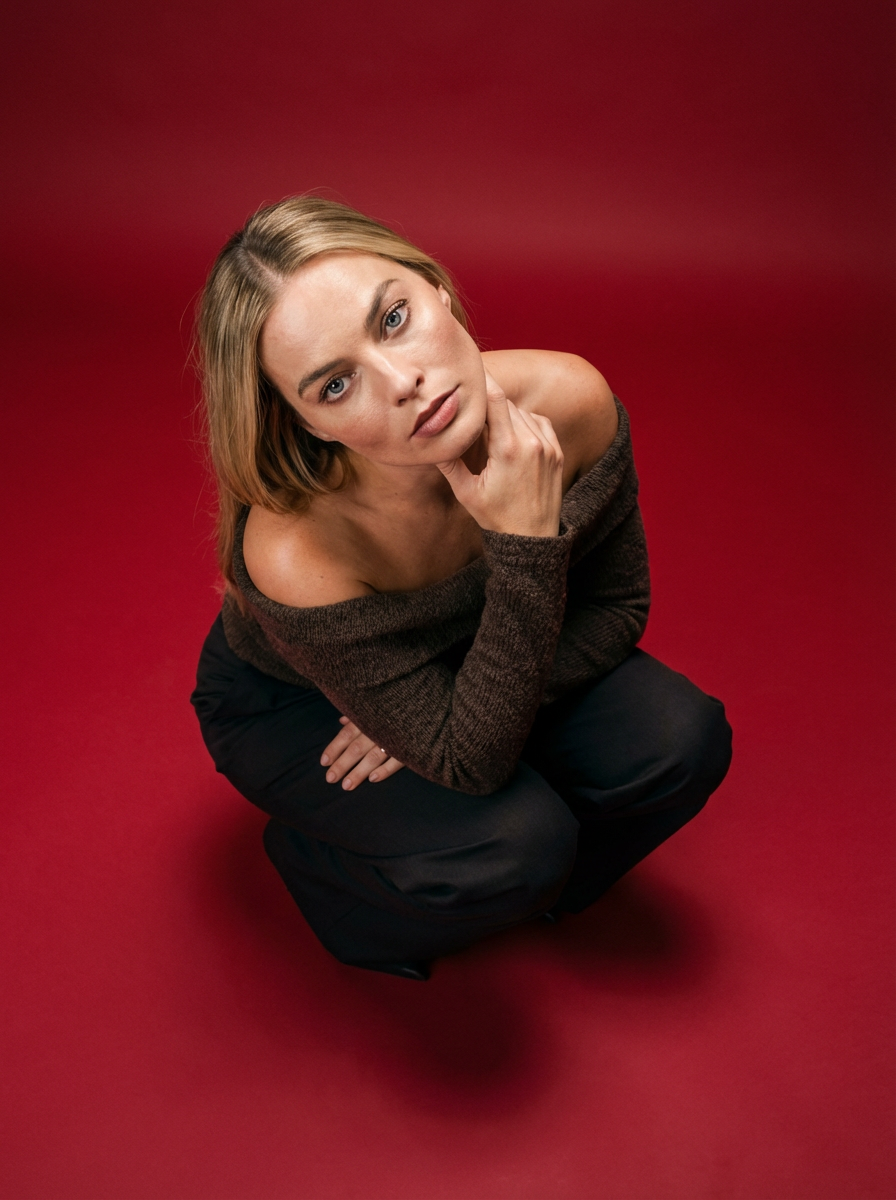
Frame your subject in a grounded, high-angle editorial style. This setup forces a compact, kneeling pose that brings out a raw and hyperrealistic fashion aesthetic, perfect for making any garment or accessory look sharp and intentional.
Regenerate using your own assets.
Going further: from static renders to cinematic fly-throughs
True creative production doesn't stop at static images. The same principles of structural control and intention-driven creation can be extended to produce dynamic architectural animations, a trend that has recently exploded in popularity. Creating a cinematic 'fly-through' of an unbuilt space is one of the most powerful ways to communicate a vision to a client.
Instead of just describing a single scene, you can define a camera path and a narrative sequence. MyUP can then generate a video that moves through your space, maintaining architectural consistency frame by frame. This moves beyond simple image generation into full-scale creative production. The ability to handle complex scenes with narrative movement is a core capability. For an idea of what's possible, look at how a template like Template: #myup-e4ti-dcrw is used to build a high-tension cinematic sequence with massive scale and consistent environmental details. This is the future of architectural visualization: not just creating images, but producing complete, compelling visual stories.
Cinematic Trojan Horse Siege Short Film
Build high-tension cinematic sequences that shift from massive exterior monuments to claustrophobic interior details. It tracks subtle movements like shifting shadows and creeping fog to weave a suspenseful narrative, perfect for turning any static subject into a gripping, atmospheric story that unfolds through tight, gritty visual perspectives.
Regenerate using your own assets.
Control is the new creative freedom
For professional architects and designers, AI is only a viable tool if it is a controllable one. Random enhancement is a liability, not a feature. The future of AI-powered architectural visualization isn't about finding clever ways to fix broken renders; it's about stating your precise intention from the start and using a production platform that can execute it with absolute fidelity.
By shifting from 'enhancement' to 'intention', you regain control over your design. Stop guessing what an AI will do to your work. Instead, tell it exactly what you want and get a finished, client-ready creation that makes your vision possible. Create an account on MyUP.ai and turn your next basic model into a precise, photorealistic vision.
