
The biggest headache in AI product ads just got a name: compositional consistency
On June 27, 2026, Adobe released a feature for Firefly called 'Structure Reference'. It’s designed to solve a problem every marketer who has used AI image generation knows intimately: you prompt for a beautiful new scene for your product, and the AI delivers a masterpiece… but it moves your product to the wrong side of the frame, changes its shape, or warps its perspective. The result is unusable.
This lack of compositional consistency is the single biggest barrier to using AI for scalable product advertising. You can’t build a campaign from a dozen images if your product looks different in every single one. It breaks brand recognition and looks unprofessional.
Adobe's move validates the problem. But fixing the structure of a single image is only one piece of the puzzle. A raw, AI-generated image is not a finished ad. To get from a product photo to a campaign you can actually ship, you need more than a single feature; you need an integrated production system.
From one photo to a campaign: the full production workflow
The goal isn't just to place your product in a new background. The goal is to generate dozens of campaign-ready assets that are not only structurally consistent but also brand consistent. This means every asset has your logo, your fonts, your colors, and your call-to-action, all applied correctly, every time. This is where a dedicated platform like MyUP.ai provides the complete solution.
The workflow moves beyond simple image generation and into full campaign production. Here’s how it works in MyUP:
- Anchor: You start with a single, high-quality photo of your product. This is your unchanging source of truth.
- Generate: You use your photo as a reference to generate dozens of new scenes, backgrounds, and lifestyle contexts around it, while your product remains perfectly intact.
- Brand: You apply your MyUP Brandkit in one click. This instantly transforms the generated images into finished ads by adding your logo, headlines, and on-brand text overlays.
- Scale: You repeat the process for different channels, aspect ratios, and campaign angles, all from the same initial product photo.
This process ensures that every visual is not just a pretty picture, but a hard-working piece of marketing collateral. For e-commerce brands, getting this right is the difference between a chaotic mess of images and a cohesive, professional campaign. You can learn more about the fundamentals in our guide to fixing inconsistent AI product shots.
Step 1: Anchor your campaign with a single source of truth
The entire workflow hinges on the quality of your starting image. Your product photo is the element the AI will preserve, so it needs to be perfect. Garbage in, garbage out.
For best results, upload a clean product shot to MyUP. This typically means:
- High resolution: The sharper the source image, the better the final output.
- Clear background: A simple, neutral, or transparent background (like a .PNG) helps the AI isolate the product itself without confusing background elements.
- Good lighting: Ensure your product is well-lit, with clear details and defined shadows. The AI will preserve this lighting in the new scenes it generates.
This image becomes the non-negotiable anchor of your campaign. MyUP treats it as a locked layer; the AI's job is to build the world *around* it, not to reinterpret it. The user—you—provides the ground truth, and MyUP handles the creative production.
Step 2: Generate dozens of new scenes and backgrounds
With your product photo uploaded in MyUP, you can now start the AI product placement process. This is where you instruct the AI on what kind of environments to create. Your prompt doesn't need to describe the product; it only needs to describe the new scene.
For a skincare product, you could prompt for scenes like:
- "On a white marble bathroom counter, next to a lush green plant and soft morning light streaming from a window."
- "Resting on a bed of smooth, wet river stones by a misty waterfall."
- "A minimalist studio shot with a single, dramatic shadow on a beige background."
MyUP will generate these scenes while keeping your original product photo perfectly placed within them. This allows you to create visuals for different seasons, target audiences, or marketing channels in minutes, rather than weeks of expensive photoshoots. To get started with a clean, versatile base, the studio shot is always a great option.
Workflow code: #myup-u4lt-o0ho
Studio Product Ad

Drop in a single product photo to instantly build a cohesive visual identity. It automatically samples your item's dominant colors to generate a beautifully matched mosaic moodboard, giving your brand an instant, polished aesthetic.
Regenerate using your own assets.
Step 3: Apply your Brandkit to turn images into ads
A beautiful image of your product on a marble counter is a great start, but it's not an ad. It's missing your brand identity. This is the step where most point-solution tools fall short and where the MyUP workflow becomes essential.
Once you've generated a scene you like, you apply your Brandkit. MyUP allows you to save your brand’s visual identity—logo, color palette, and fonts—once. From then on, you can apply it to any creation instantly. The system automatically adds your logo in a designated corner, places your headline in the correct brand font, and adds a call-to-action with the right color button. The user validates the final placement, but MyUP handles the tedious production work.
This turns your raw AI generation into a finished, on-brand social media post, banner ad, or product hero image. For a polished and high-end look, a minimalist template often works best.
Workflow code: #myup-fy77-jljs
Minimalist Elegant Product Advertising Poster

Turn any product shot into a high-end editorial ad. It places your item against a soft cream background with airy spacing and adds elegant, small serif typography at the top. Great for wellness or luxury brands wanting a calm, minimal aesthetic.
Regenerate using your own assets.
This step is crucial for creating photorealistic lifestyle photos that feel authentic to your brand, not just a generic AI creation.
Step 4: Tailor the workflow for specific product types
The beauty of this workflow is its adaptability. The core process remains the same, but the prompts and templates you use can be tailored to the specific product you're marketing. Different products require different moods, textures, and compositions.
For example:
- Jewelry: Requires scenes with dramatic lighting, luxurious textures like velvet or silk, and close-up shots that emphasize sparkle and detail. A dedicated workflow can ensure the focus remains on the intricate details of the piece.
Workflow code: #myup-qtty-nngw
Jewerly Product Ad
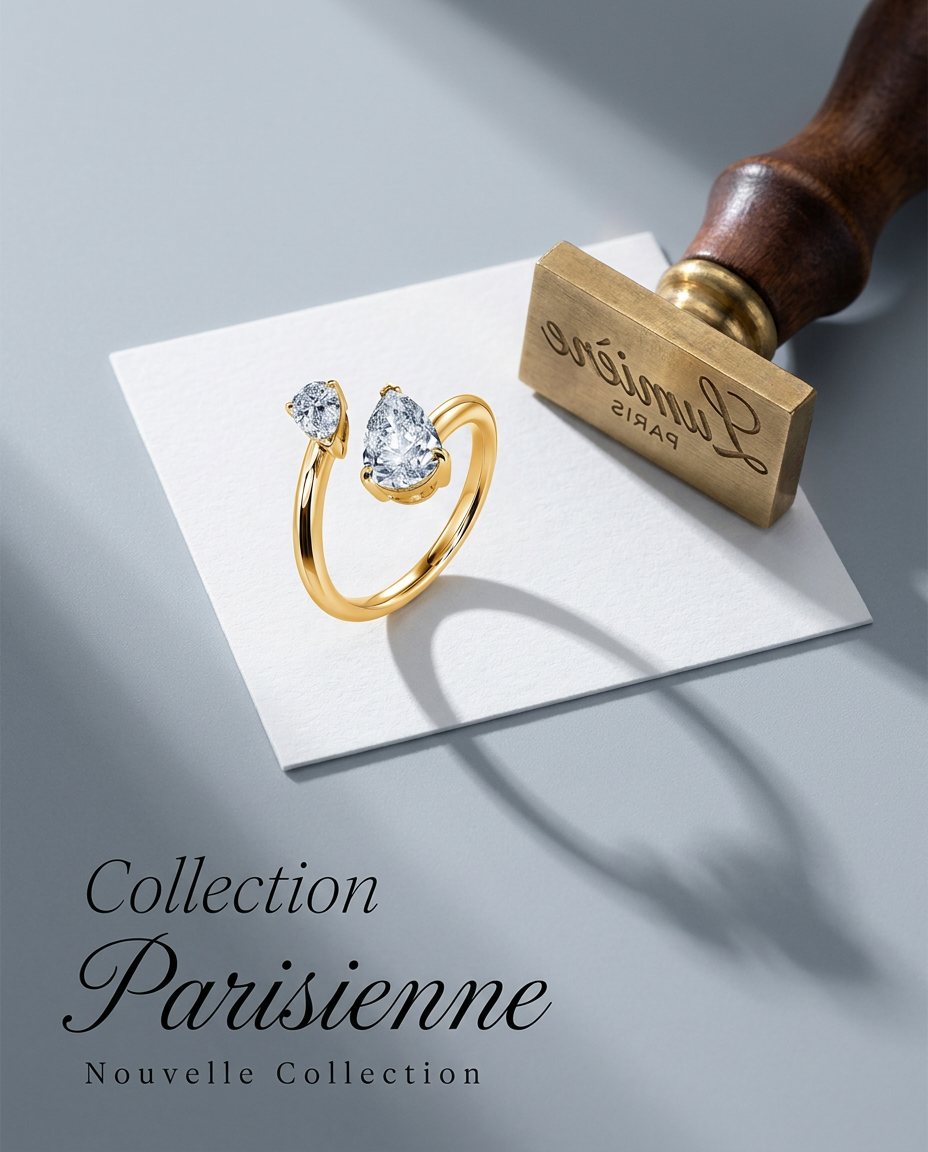
Turn any product into a high-end editorial shot. It drops your item into a clean, flat-lay setup with soft directional light and elegant long shadows against a cool matte gray background.
Regenerate using your own assets.
- Beverages: Often needs dynamic scenes with condensation, splashes, fresh fruit garnishes, and vibrant, energetic backgrounds that evoke a feeling of refreshment or celebration.
Workflow code: #myup-cqnu-i50m
Drink Product Ad
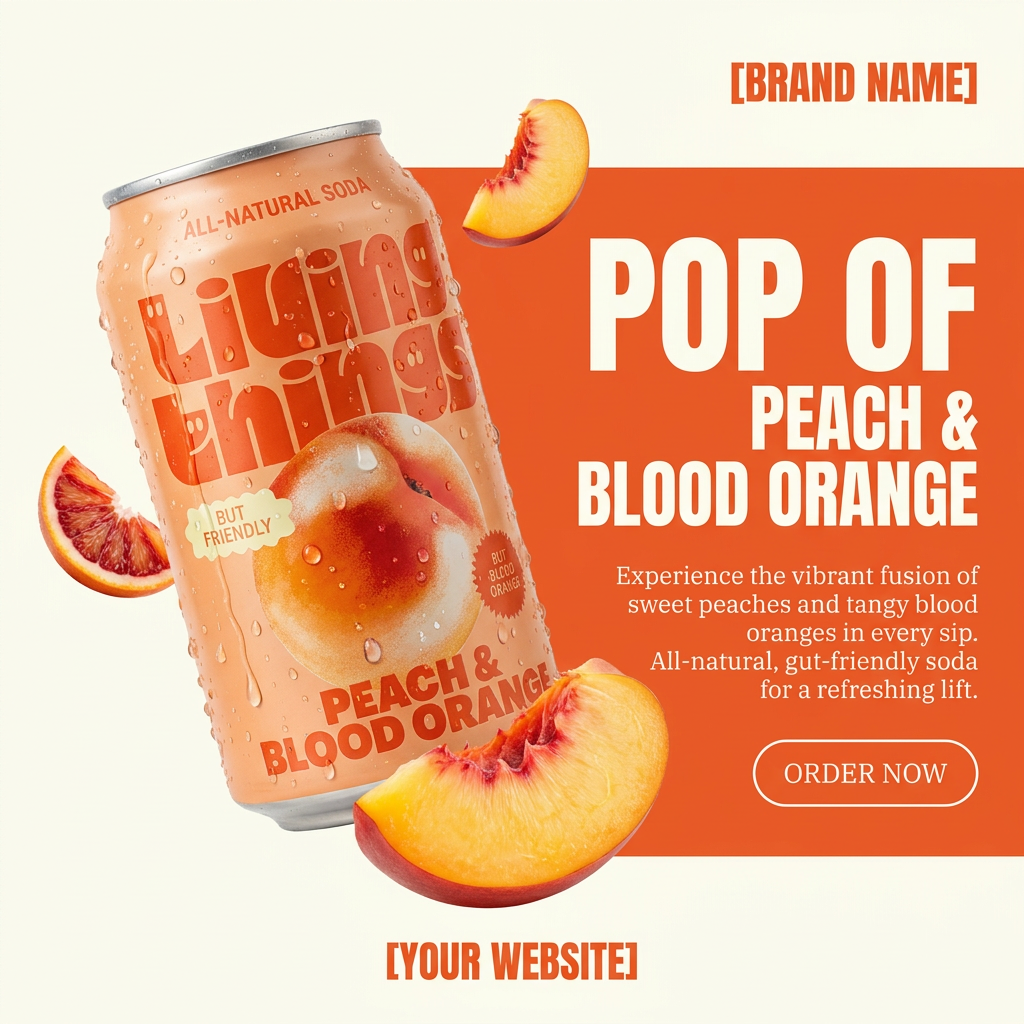
Turn any product photo into a bold, modern ad poster. It automatically frames your item against a split-color background, pairing a clean cream tone with a solid block of your product's dominant color. Super clean, minimal, and ready for social feeds.
Regenerate using your own assets.
By using specific templates and adjusting your scene prompts in MyUP, you can create campaigns that are perfectly suited to your product category, all while maintaining absolute consistency of the product itself.
A feature is a good start. A system is how you ship.
Adobe's Structure Reference is an important development that acknowledges a critical need in the market: control and consistency. But for marketers and brands, generating a structurally consistent image is just the first step. The real job is to produce a high volume of on-brand, campaign-ready assets.
That requires an end-to-end system. It requires a workflow that takes you from a single product photo to a complete set of finished ads, with your brand identity baked in. Point features are interesting, but integrated platforms are what allow you to execute at the speed and scale your business demands. Your product photo isn't just a reference for structure; it's the anchor for an entire campaign that MyUP.ai can help you build in minutes.
