
This week, the AI image generation world got a clear signal from one of its biggest players. On July 20, 2026, Adobe announced ‘Structure Reference’ for its Firefly model, a feature designed to give creators more control over composition. This news, coupled with reports of its ‘Project Indigo’ camera app focusing on a ‘natural look,’ confirms what every professional creator already knows: most AI-generated photos still feel subtly, frustratingly fake.
You know the look. The skin is a little too waxy, the specular highlights on a product are just slightly wrong, or the depth of field feels unnatural. It’s the AI uncanny valley, and it’s the biggest barrier between generating a novelty image and producing a professional-grade asset you can actually use in a campaign. While the industry giants are now racing to build features that address this, the solution isn't another filter or setting. It's a different approach entirely—a repeatable workflow.
The AI uncanny valley: Why most AI photos still feel fake
The problem with AI photorealism isn't a lack of detail; it's a lack of authenticity. The models are trained on billions of images, but they struggle to replicate the subtle physics of light, texture, and composition that our brains instantly recognize as real. Common giveaways include:
- Synthetic Textures: Surfaces like wood, fabric, or food often have a plastic-like sheen, missing the micro-details of real-world materials.
- Incorrect Lighting: Shadows might fall in the wrong direction, or reflections won't accurately match the environment, making the subject look like a sticker on a background.
- Compositional Clutter: Without specific guidance, AI models tend to create busy, generic scenes that lack the intentional focus of professional photography.
- The Infamous Details: And of course, there are the well-known struggles with things like realistic hands or the subtle expressions that convey genuine emotion.
Adobe’s focus on structure and a ‘natural look’ is a direct admission that solving these problems is the next frontier. But adding a single control feature is like giving a photographer a better lens without teaching them how to light a scene. True realism comes from controlling the entire system, not just one part of it.
Realism isn't a filter, it's a workflow
Getting a ‘natural look’ from AI isn’t about finding the magic prompt or applying the perfect filter. That approach gives you a single, lucky shot in someone else’s style. A professional workflow, on the other hand, gives you your brand's unique version of 'real'—consistently and at scale.
This is the core philosophy behind MyUP.ai. We believe that professional-grade AI content requires a system that combines creative direction with automated execution. The user validates and approves; MyUP handles the production. This system deconstructs 'realism' into its core components and builds a repeatable process around them. Here’s how it works.
Step 1: Define your brand's 'real' with a Brandkit
Before you generate a single image, you have to define what ‘realistic’ means for your brand. Is it the gritty, high-contrast look of a streetwear label, or the soft, airy, natural-light aesthetic of a wellness brand? These are two very different versions of reality.
A generic AI tool doesn't know the difference. In MyUP, the first step is creating a Brandkit. By providing your website URL, MyUP automatically extracts your brand's colors, fonts, and logo. More importantly, you can add style guidance that defines your visual identity—describing your photographic style, lighting preferences, and overall mood. This Brandkit becomes the foundation for every asset you create, ensuring the AI’s interpretation of ‘real’ is always aligned with your specific brand aesthetic.
Step 2: Control the scene with a structured workflow
Once your brand's style is defined, the next challenge is composition. An e-commerce brand needs a clean, studio shot of a product on a specific background. A marketing campaign might need a lifestyle photo with a model in a particular environment. Leaving this to chance is inefficient.
This is where MyUP workflows replace manual prompting. Instead of a blank text box, a workflow asks for the specific inputs needed for a professional shot. For e-commerce brands that need clean, consistent product photos, a template like the Studio Product Ad workflow removes the guesswork. You simply provide the product name and a brief description, and the workflow handles the complex prompting required to generate a photorealistic studio image with professional lighting and a clean background.
Workflow code: #myup-u4lt-o0ho
Studio Product Ad

Drop in a single product photo to instantly build a cohesive visual identity. It automatically samples your item's dominant colors to generate a beautifully matched mosaic moodboard, giving your brand an instant, polished aesthetic.
Regenerate using your own assets.
Workflow code: #myup-aon6-zvop
Studio Product Ad
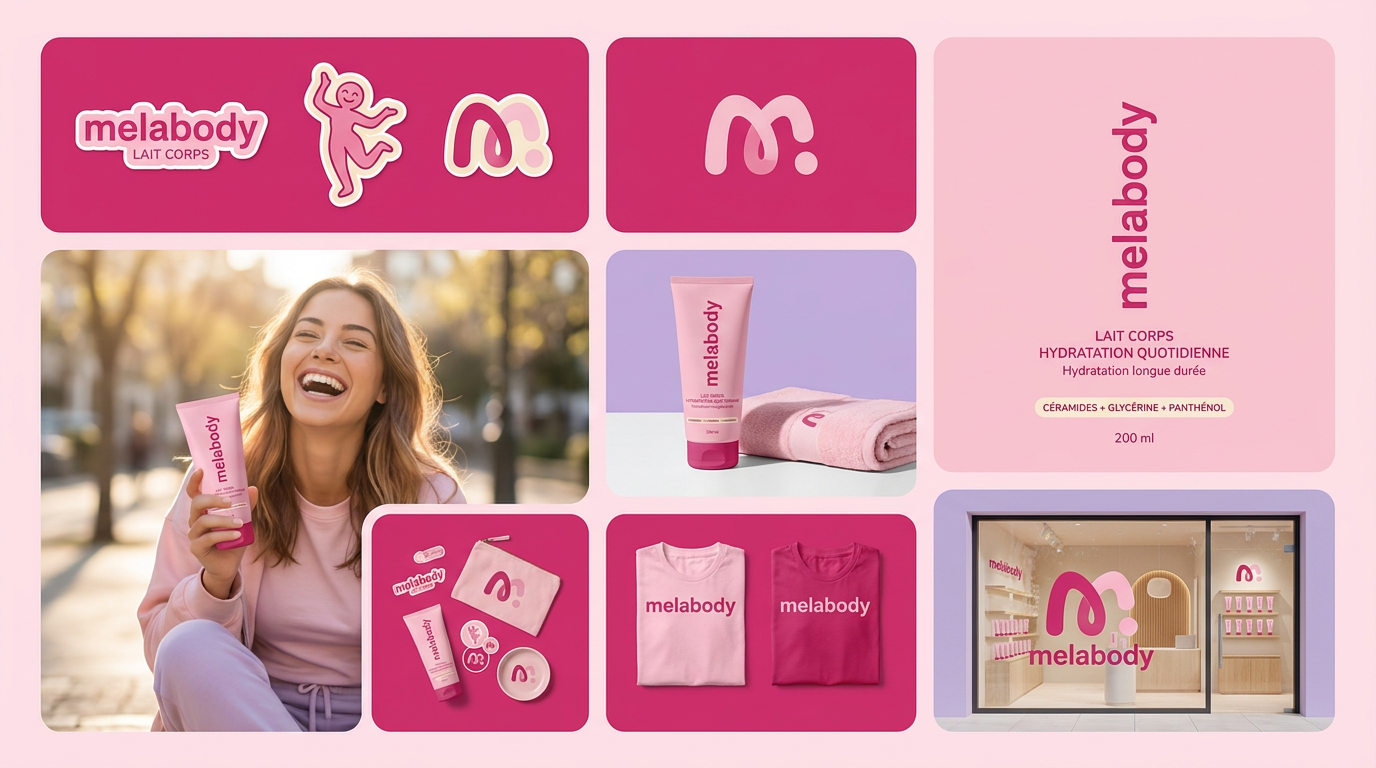
Turn any product photo into a cohesive brand moodboard. It automatically extracts the dominant color from your image to style the background, framing everything in a clean mosaic layout that perfectly matches your aesthetic.
Regenerate using your own assets.
Step 3: Master the details that scream 'AI'
Now we tackle the subtle flaws. Waxy skin, plastic-looking food, and strange textures are often the result of using a general-purpose model without specific constraints. You can try to fight this with complex negative prompts, but that’s a time-consuming, trial-and-error process.
MyUP workflows are designed to suppress these artifacts automatically. We use specific models, like Stable Diffusion Ultra, that excel at photorealism and build in negative prompts to avoid common issues. For example, if you're creating an ad for a food product, you need the texture to look delicious, not synthetic. A workflow built for this task will prioritize natural textures, accurate colors, and appetizing lighting, ensuring the final image is mouth-watering, not artificial.
For an example of a workflow designed for perfect texture and lighting, try the Bold Portrait Food Advertising Photo template.
Workflow code: #myup-xjsb-hirr
Bold Portrait Food Advertising Photo

Get those high-impact, tight action shots of people actually enjoying your food brand. It drops your product right into a messy, realistic close-up bite shot that feels like a premium lifestyle campaign instead of a boring studio packshot.
Regenerate using your own assets.
Workflow code: #myup-wo7y-ebmc
Food Ad
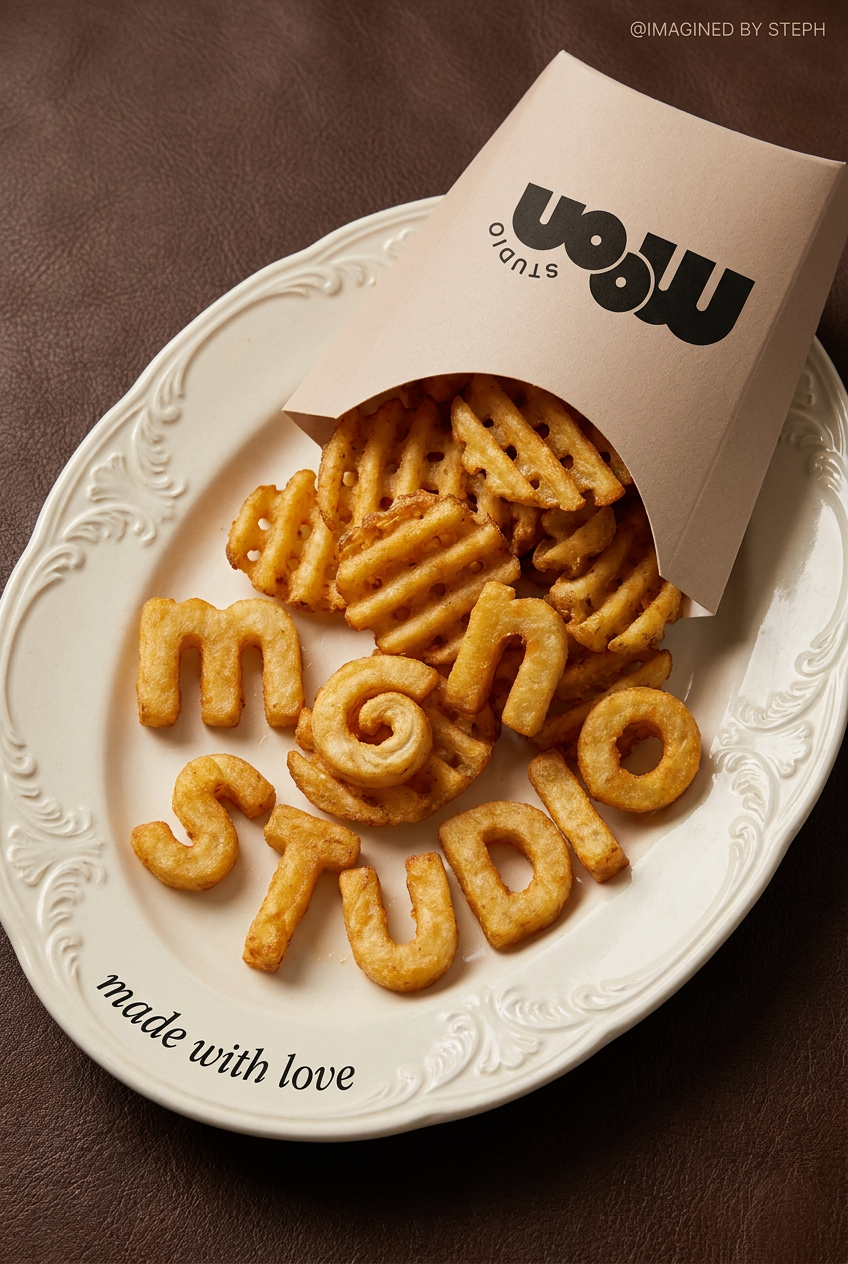
Transform simple food items into high-fashion editorial campaigns. This style uses a dynamic diagonal layout and a slightly tilted overhead angle to give your products incredible depth and texture, making them look like luxury design pieces.
Regenerate using your own assets.
Step 4: Scale your realism from one photo to a full campaign
The real value of a workflow isn't generating one perfect image; it's generating dozens of on-brand variations for a full campaign. With a traditional AI generator, creating a second, third, or tenth image that perfectly matches the style and composition of the first is nearly impossible. Each generation is a new roll of the dice.
Because a MyUP workflow is a repeatable process tied to your Brandkit, you can run it multiple times to generate a suite of assets that are stylistically consistent. This is how you move from one-off image creation to full-scale content production. Need a series of ads featuring athletes wearing your latest sportswear? A dedicated workflow ensures every image shares the same dynamic, high-energy, and realistic visual language.
Workflow code: #myup-ywpr-rqz6
Professional Sportswear Ad

Suspends your apparel right in the center of a high-energy promo shot, held up by hands around the frame. It gives your shirts or jerseys a gritty, collaborative streetwear editorial look that feels alive and physical.
Regenerate using your own assets.
The verdict: Stop prompting, start producing
Adobe’s focus on realism validates a critical need in the market. But features like ‘Structure Reference’ are just one piece of the puzzle. For professionals, the goal isn't just to create a single realistic image—it's to produce a consistent volume of on-brand, believable content that drives business results.
This requires a shift in thinking: from prompting to production. Instead of wrestling with a blank text box, you need a system that translates your brand strategy into visual assets, reliably and at scale. While industry giants are adding features, a dedicated platform like MyUP.ai already provides this end-to-end workflow. If you're ready to move beyond experimentation and start producing professional, realistic content today, it's time to adopt a workflow.
