You’ve seen them on your social feeds: stunning, hyper-realistic images of juicy burgers and decadent desserts, all generated by AI. Inspired, you try to create one for your own restaurant or food brand. The result? Something flat, plastic, and unappetizing. It’s a common frustration, and it’s why so many creators are giving up on AI for serious commercial work.
The problem isn't the AI. It's the process. A simple prompt like 'photo of a pizza' will always give you a generic, lifeless image. To get results that make people hungry, you need to stop prompting like a user and start directing like a food stylist. This guide breaks down the exact workflow—from controlling light and composition to applying your brand—to create professional food ads, all within MyUP.
Workflow code: #myup-wo7y-ebmc
Food Ad
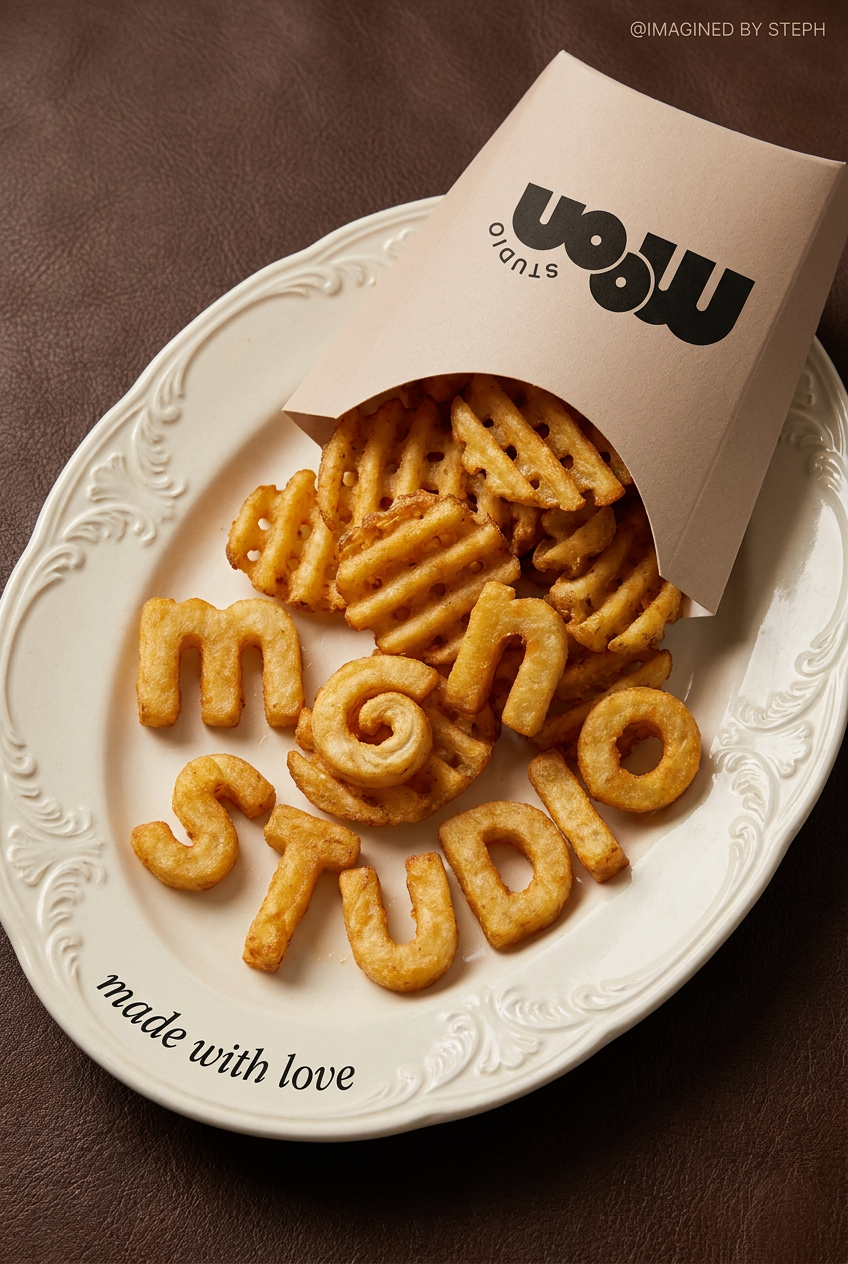
Transform simple food items into high-fashion editorial campaigns. This style uses a dynamic diagonal layout and a slightly tilted overhead angle to give your products incredible depth and texture, making them look like luxury design pieces.
Regenerate using your own assets.
Step 1: Deconstruct the shot like a food photographer
Before you write a single word of a prompt, you need to know what makes a food photo work. Professional food photographers don't just point and shoot; they meticulously build a scene. The secret to great AI food photography is to deconstruct these scenes into elements the AI can understand.
Think about these four key components:
- Lighting: This is the most critical element for making food look appetizing. Is it bright, airy, and natural, like a brunch cafe? Or is it dark and moody with a single, dramatic light source (a 'key light')? Warm, soft side-lighting often works best, as it creates gentle shadows that reveal texture and shape.
- Composition & Angle: Are you shooting from above (a 'flat lay') or from a 45-degree angle to show the height of a stack of pancakes? Is it a tight, macro shot focusing on melting cheese, or a wider shot that includes the whole table setting? Using terms like 'shallow depth of field' tells the AI to blur the background, making the dish pop.
- Surface & Background: The surface your food sits on sets the mood. Is it a rustic, dark wood table? A clean, white marble countertop? A simple, colored backdrop? Be specific. 'On a plate' is weak. 'On a white ceramic plate on a dark slate surface' is strong.
- Propping & Plating: These are the supporting details. A sprinkle of flour on the table, a few scattered coffee beans, a sprig of fresh basil as garnish, or a linen napkin next to the plate. These elements tell a story and make the scene feel real and lived-in.
Step 2: Build your 'scene prompt' for a mouth-watering image
Now, you translate those elements into a detailed prompt. The goal is to build a complete scene, not just name a food item. Let's compare a basic prompt with a professional 'scene prompt'.
Basic Prompt: 'Professional photo of a cheeseburger and fries.'
Professional Scene Prompt: 'Editorial food photography of a gourmet cheeseburger with melted cheddar cheese, on a rustic wooden board next to a small metal basket of crispy fries. Shot at a 45-degree angle with warm side lighting creating soft shadows. The background is a dark, moody restaurant interior, blurred with a shallow depth of field.'
See the difference? The second prompt gives the AI specific instructions for lighting, angle, surface, and propping. It leaves nothing to chance. This is how you move from generating a stock photo to creating a signature look.
On MyUP, you can build these detailed prompts directly into a reusable workflow. This saves you from re-typing complex instructions every time. You just define the scene once, then swap out the main dish to generate a whole menu's worth of consistent visuals. To get started with a powerful base image, this workflow is the perfect starting point.
Workflow code: #myup-xjsb-hirr
Bold Portrait Food Advertising Photo

Get those high-impact, tight action shots of people actually enjoying your food brand. It drops your product right into a messy, realistic close-up bite shot that feels like a premium lifestyle campaign instead of a boring studio packshot.
Regenerate using your own assets.
Step 3: Turn your perfect photo into a finished ad with a Brandkit
Generating a beautiful image is only half the battle. An image isn't an ad. An ad needs a headline, a price, a call to action, and your logo. This is where nearly all image generators fail spectacularly. They can't handle typography. Prompts for 'add text saying 50% OFF' result in warped, unreadable nonsense.
Trying to fix this in a separate design tool breaks your workflow, costing time and making consistency a nightmare. The solution is to separate image generation from brand application. In MyUP, you first generate the perfect image using your scene prompt, then let your MyUP Brandkit handle the rest.
A Brandkit is your visual identity, saved in MyUP: your exact logo, brand fonts, and color palette, built once from your website URL. Once the AI generates your delicious food photo, the workflow automatically overlays your promotional text using your actual fonts, places your logo perfectly, and ensures every color is on-brand. The user—you—simply validates the result. MyUP handles the production.
This two-step process is the key to creating commercially viable ads at scale. You get the creative control of a food stylist and the brand precision of a designer, all in one automated flow. These workflows turn your generated images into finished posters and promotional assets instantly.
Workflow code: #myup-tbky-nciq
Food Brand Poster

Instantly turn any food or drink product packaging into a bold, vibrant retro poster. The system automatically reads your bottle or box to grab its exact colors and ingredients, then crafts a perfectly coordinated vintage background around it.
Regenerate using your own assets.
Workflow code: #myup-egd6-d8uv
Modern Minimalist Food Promotional Poster
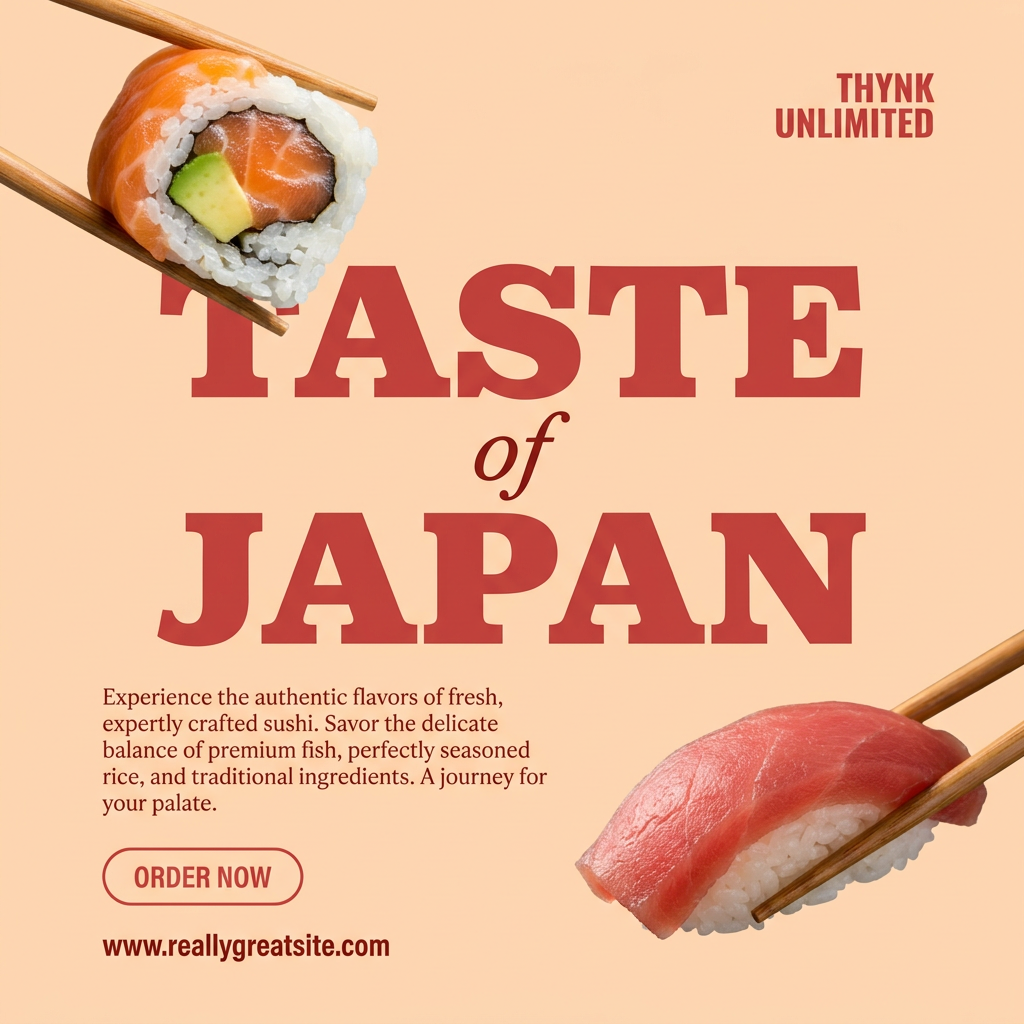
Turn your food photos into clean, modern social posters. It automatically grabs the lightest color tint from your uploaded dish to build a perfectly matched, soft background that keeps your feed looking cohesive and high-end.
Regenerate using your own assets.
Step 4: Create a consistent campaign, not just one-off images
A single great ad is good. A visually consistent campaign is what builds a memorable brand. Your ads for a new burger, a seasonal salad, and a dessert special should all feel like they come from the same place. This is impossible when you're just writing one-off prompts and hoping for the best.
In MyUP, you achieve consistency by design. Your 'scene prompt' from Step 2 can be saved as a custom workflow. This becomes your brand's unique photography style. Want to shoot a new dish? Just run the workflow and change the food item. The lighting, angle, and mood will remain consistent.
The Brandkit provides the second layer of consistency. Every ad created, regardless of the underlying image, will use the same logo placement, typography, and color rules. This combination of a saved visual style (the workflow) and a saved brand identity (the Brandkit) allows you to produce an entire campaign of diverse-yet-cohesive ads in a fraction of the time it would take with traditional methods.
You can even create variations for different campaign styles, like this retro-themed poster, while still locking in your core brand elements.
Workflow code: #myup-1hgd-9oz5
Retro Style Food Advertising Poster

Turn any food product shot into a bold, nostalgic retro advertisement. It drops your item onto a warm cream background and automatically frames it with a color-matched header badge for that classic mid-century print ad look.
Regenerate using your own assets.
The one-platform workflow for food ads that sell
The gap between unappetizing AI images and mouth-watering food ads isn't about finding a 'magic' prompt. It's about adopting a professional workflow. By thinking like a food stylist to direct the scene and using a Brandkit to apply your identity, you create a system for producing high-quality, on-brand marketing assets at scale.
This is the MyUP point of view: a great image is the start, but a finished, on-brand asset is the goal. Stop wrestling with text in image generators and patching together different tools. Create a MyUP account, load your Brandkit, and start using the workflows from this guide to generate food ads that actually look delicious and drive sales.
